<?xml version="1.0" encoding="utf-8"?>
<feed xmlns="http://www.w3.org/2005/Atom">
  <title>梦溪笔谈</title>
  
  
  <link href="https://shenst.cn/atom.xml" rel="self"/>
  
  <link href="https://shenst.cn/"/>
  <updated>2026-09-08T09:27:17.512Z</updated>
  <id>https://shenst.cn/</id>
  
  <author>
    <name>可乐就是力量</name>
    
  </author>
  
  <generator uri="https://hexo.io/">Hexo</generator>
  
  <entry>
    <title>Linux 常用命令与基础操作</title>
    <link href="https://shenst.cn/posts/3c098e9e.html"/>
    <id>https://shenst.cn/posts/3c098e9e.html</id>
    <published>2023-04-07T15:56:41.000Z</published>
    <updated>2026-09-08T09:27:17.512Z</updated>
    
    <content type="html"><![CDATA[<blockquote><p><strong>结论：</strong> 本文是一份面向实际操作的 Linux 命令速查表，命令按任务场景组织。<br /><strong>内容状态：</strong> 示例来自早期学习环境；涉及系统服务、权限和网络的命令应先在测试环境验证。</p></blockquote><h2 id="linux-基本命令与测试"><a class="markdownIt-Anchor" href="#linux-基本命令与测试"></a> Linux 基本命令与测试</h2><p>本文当前覆盖文件与目录的基础操作。防火墙、NFS 和网络排错将在独立文章中整理，未发布前不保留失效入口。</p><h3 id="创建文件夹"><a class="markdownIt-Anchor" href="#创建文件夹"></a> 创建文件夹</h3><p>mkdir</p><figure class="highlight arduino"><table><tr><td class="gutter"><pre><span class="line">1</span><br><span class="line">2</span><br></pre></td><td class="code"><pre><span class="line">ARDUINO</span><br><span class="line">mkdir farmsec</span><br></pre></td></tr></table></figure><p>建多个文件夹</p><figure class="highlight css"><table><tr><td class="gutter"><pre><span class="line">1</span><br><span class="line">2</span><br></pre></td><td class="code"><pre><span class="line">CSS</span><br><span class="line">mkdir <span class="selector-tag">A</span>文件夹 <span class="selector-tag">B</span>文件夹</span><br></pre></td></tr></table></figure><p>建立文件路径</p><figure class="highlight bash"><table><tr><td class="gutter"><pre><span class="line">1</span><br><span class="line">2</span><br></pre></td><td class="code"><pre><span class="line">AWK</span><br><span class="line"><span class="built_in">mkdir</span> -p farmsec/farm/sec</span><br></pre></td></tr></table></figure><p>创建隐藏目录</p><figure class="highlight bash"><table><tr><td class="gutter"><pre><span class="line">1</span><br><span class="line">2</span><br></pre></td><td class="code"><pre><span class="line">BASH</span><br><span class="line"><span class="built_in">mkdir</span> .study/xxxx</span><br></pre></td></tr></table></figure><h3 id="查看文件的一些信息"><a class="markdownIt-Anchor" href="#查看文件的一些信息"></a> 查看文件的一些信息</h3><p>列出当前路径下文件名称</p><figure class="highlight bash"><table><tr><td class="gutter"><pre><span class="line">1</span><br><span class="line">2</span><br></pre></td><td class="code"><pre><span class="line">BASH</span><br><span class="line"><span class="built_in">ls</span></span><br></pre></td></tr></table></figure><p>列出其他目录下文件名称</p><figure class="highlight bash"><table><tr><td class="gutter"><pre><span class="line">1</span><br><span class="line">2</span><br></pre></td><td class="code"><pre><span class="line">AWK</span><br><span class="line"><span class="built_in">ls</span> farmsec/farm/sec</span><br></pre></td></tr></table></figure><p>显示所有文件，包括隐藏文件</p><figure class="highlight bash"><table><tr><td class="gutter"><pre><span class="line">1</span><br><span class="line">2</span><br></pre></td><td class="code"><pre><span class="line">BASH</span><br><span class="line"><span class="built_in">ls</span> -a</span><br></pre></td></tr></table></figure><p>隐藏文件：以“.”开头的文件名就是隐藏文件</p><p>显示文件权限、拥有者、创建日期 l:list</p><figure class="highlight bash"><table><tr><td class="gutter"><pre><span class="line">1</span><br><span class="line">2</span><br></pre></td><td class="code"><pre><span class="line">BASH</span><br><span class="line"><span class="built_in">ls</span> -l</span><br></pre></td></tr></table></figure><p>以容易理解的方式列出文件大小</p><figure class="highlight vim"><table><tr><td class="gutter"><pre><span class="line">1</span><br><span class="line">2</span><br></pre></td><td class="code"><pre><span class="line">VIM</span><br><span class="line"><span class="keyword">ls</span> -<span class="keyword">lh</span></span><br></pre></td></tr></table></figure><h3 id="目录的查看及切换"><a class="markdownIt-Anchor" href="#目录的查看及切换"></a> 目录的查看及切换</h3><p>显示当前路径的绝对路径</p><figure class="highlight bash"><table><tr><td class="gutter"><pre><span class="line">1</span><br><span class="line">2</span><br></pre></td><td class="code"><pre><span class="line">BASH</span><br><span class="line"><span class="built_in">pwd</span></span><br></pre></td></tr></table></figure><p>切换目录</p><figure class="highlight bash"><table><tr><td class="gutter"><pre><span class="line">1</span><br><span class="line">2</span><br></pre></td><td class="code"><pre><span class="line">BASH</span><br><span class="line"><span class="built_in">cd</span> xxxx/</span><br></pre></td></tr></table></figure><p>回到家目录</p><figure class="highlight bash"><table><tr><td class="gutter"><pre><span class="line">1</span><br><span class="line">2</span><br></pre></td><td class="code"><pre><span class="line">BASH</span><br><span class="line"><span class="built_in">cd</span>  ~</span><br></pre></td></tr></table></figure><p>返回上一级</p><figure class="highlight gams"><table><tr><td class="gutter"><pre><span class="line">1</span><br><span class="line">2</span><br></pre></td><td class="code"><pre><span class="line">GAMS</span><br><span class="line"><span class="function"><span class="title">cd</span></span> ..</span><br></pre></td></tr></table></figure><p>返回刚才的目录</p><figure class="highlight bash"><table><tr><td class="gutter"><pre><span class="line">1</span><br><span class="line">2</span><br></pre></td><td class="code"><pre><span class="line">BASH</span><br><span class="line"><span class="built_in">cd</span> -</span><br></pre></td></tr></table></figure><p>进入根目录</p><figure class="highlight bash"><table><tr><td class="gutter"><pre><span class="line">1</span><br><span class="line">2</span><br></pre></td><td class="code"><pre><span class="line">BASH</span><br><span class="line"><span class="built_in">cd</span> /</span><br></pre></td></tr></table></figure><p>绝对路径：从根目录开始到目前路径</p><p>相对路径：不从根目录开始</p><p>ps：./执行可执行文件，不加./就会去/bin目录找这个命令，加了之后就会在当前路径下找</p><h3 id="文件的创建及移动"><a class="markdownIt-Anchor" href="#文件的创建及移动"></a> 文件的创建及移动</h3><p>创建新文件</p><figure class="highlight bash"><table><tr><td class="gutter"><pre><span class="line">1</span><br><span class="line">2</span><br></pre></td><td class="code"><pre><span class="line">BASH</span><br><span class="line"><span class="built_in">touch</span> farmsec</span><br></pre></td></tr></table></figure><p>复制文件或目录cp</p><p>复制passwd到当前目录及opt/</p><figure class="highlight bash"><table><tr><td class="gutter"><pre><span class="line">1</span><br><span class="line">2</span><br><span class="line">3</span><br><span class="line">4</span><br></pre></td><td class="code"><pre><span class="line">AWK</span><br><span class="line"><span class="built_in">cp</span> /etc/passwd .</span><br><span class="line"></span><br><span class="line"><span class="built_in">cp</span> /etc/passwd /opt/</span><br></pre></td></tr></table></figure><p>复制目录到其他目录</p><figure class="highlight avrasm"><table><tr><td class="gutter"><pre><span class="line">1</span><br><span class="line">2</span><br></pre></td><td class="code"><pre><span class="line">AWK</span><br><span class="line"><span class="keyword">cp</span> -r /farmsec/farm/<span class="keyword">sec</span> srx/</span><br></pre></td></tr></table></figure><p>连带修改时间和访问权限一同复制</p><figure class="highlight avrasm"><table><tr><td class="gutter"><pre><span class="line">1</span><br><span class="line">2</span><br></pre></td><td class="code"><pre><span class="line">AVRASM</span><br><span class="line"><span class="keyword">cp</span> -p</span><br></pre></td></tr></table></figure><p>mv 剪切</p><p>将文件移走</p><figure class="highlight bash"><table><tr><td class="gutter"><pre><span class="line">1</span><br><span class="line">2</span><br></pre></td><td class="code"><pre><span class="line">AWK</span><br><span class="line"><span class="built_in">mv</span> /root/fsec/ .</span><br></pre></td></tr></table></figure><p>重命名</p><figure class="highlight bash"><table><tr><td class="gutter"><pre><span class="line">1</span><br><span class="line">2</span><br></pre></td><td class="code"><pre><span class="line">BASH</span><br><span class="line"><span class="built_in">mv</span> fsec fsec1</span><br></pre></td></tr></table></figure><p>直接覆盖旧的同名文件</p><figure class="highlight powershell"><table><tr><td class="gutter"><pre><span class="line">1</span><br><span class="line">2</span><br></pre></td><td class="code"><pre><span class="line">POWERSHELL</span><br><span class="line"><span class="built_in">mv</span> <span class="operator">-f</span> fsec fsec</span><br></pre></td></tr></table></figure><p>不覆盖任何文件</p><figure class="highlight bash"><table><tr><td class="gutter"><pre><span class="line">1</span><br><span class="line">2</span><br></pre></td><td class="code"><pre><span class="line">BASH</span><br><span class="line"><span class="built_in">mv</span> -n fsec fsec</span><br></pre></td></tr></table></figure><p>rm 删除</p><p>删除前逐一询问</p><figure class="highlight bash"><table><tr><td class="gutter"><pre><span class="line">1</span><br><span class="line">2</span><br></pre></td><td class="code"><pre><span class="line">BASH</span><br><span class="line"><span class="built_in">rm</span> -i</span><br></pre></td></tr></table></figure><p>即使文件属性为只读也删除，无需一一确认</p><figure class="highlight powershell"><table><tr><td class="gutter"><pre><span class="line">1</span><br><span class="line">2</span><br></pre></td><td class="code"><pre><span class="line">POWERSHELL</span><br><span class="line"><span class="built_in">rm</span> <span class="operator">-f</span></span><br></pre></td></tr></table></figure><p>连带目录及下级目录都删除</p><figure class="highlight bash"><table><tr><td class="gutter"><pre><span class="line">1</span><br><span class="line">2</span><br></pre></td><td class="code"><pre><span class="line">BASH</span><br><span class="line"><span class="built_in">rm</span> -r</span><br></pre></td></tr></table></figure><p>ps:</p><p><em>1.短选项可以拼接，长选项不可以拼接</em></p><p><em>2.Linux命令严格区分大小写，win不严格区分大小写</em></p><p><em>3.man 使用时可作命令说明使用</em></p><p><em>4.tab键的作用</em></p><p><em>5.输入前面字母后敲两下tab键：列出所有带此关键字的命令</em></p><p><em>6.输入路径关键字敲tab键：联想后面的路径名称</em></p><h3 id="文件的编辑与查看"><a class="markdownIt-Anchor" href="#文件的编辑与查看"></a> 文件的编辑与查看</h3><p>cat命令</p><p>打开文件查看内容，文件尾展示在最后</p><figure class="highlight bash"><table><tr><td class="gutter"><pre><span class="line">1</span><br><span class="line">2</span><br></pre></td><td class="code"><pre><span class="line">BASH</span><br><span class="line"><span class="built_in">cat</span> filename</span><br></pre></td></tr></table></figure><p>代码高亮</p><figure class="highlight bash"><table><tr><td class="gutter"><pre><span class="line">1</span><br><span class="line">2</span><br></pre></td><td class="code"><pre><span class="line">BASH</span><br><span class="line"><span class="built_in">cat</span> -v filename</span><br></pre></td></tr></table></figure><p>echo 输出命令</p><p>输出1111</p><figure class="highlight apache"><table><tr><td class="gutter"><pre><span class="line">1</span><br><span class="line">2</span><br></pre></td><td class="code"><pre><span class="line"><span class="attribute">APACHE</span></span><br><span class="line"><span class="attribute">echo</span> <span class="number">1111</span></span><br></pre></td></tr></table></figure><p>重定向符：&gt; &gt;&gt; &lt; &lt;&lt;</p><p>输出至文件，清除原文件内容</p><figure class="highlight dns"><table><tr><td class="gutter"><pre><span class="line">1</span><br><span class="line">2</span><br></pre></td><td class="code"><pre><span class="line">BASH</span><br><span class="line">echo xxx &gt; <span class="keyword">a</span>.<span class="keyword">txt</span></span><br></pre></td></tr></table></figure><p>追加至文件，不清除原文件内容</p><figure class="highlight dns"><table><tr><td class="gutter"><pre><span class="line">1</span><br><span class="line">2</span><br></pre></td><td class="code"><pre><span class="line">STYLUS</span><br><span class="line">echo aaax &gt;&gt; <span class="keyword">a</span>.<span class="keyword">txt</span></span><br></pre></td></tr></table></figure><p>more 分屏查看文件</p><figure class="highlight dos"><table><tr><td class="gutter"><pre><span class="line">1</span><br><span class="line">2</span><br></pre></td><td class="code"><pre><span class="line">DOS</span><br><span class="line"><span class="built_in">more</span> filename</span><br></pre></td></tr></table></figure><p>敲回车会一点点向下阅读，大文本阅读可用</p><p>less 查看文本</p><figure class="highlight awk"><table><tr><td class="gutter"><pre><span class="line">1</span><br><span class="line">2</span><br></pre></td><td class="code"><pre><span class="line">AWK</span><br><span class="line">less <span class="regexp">/etc/</span>passwd</span><br></pre></td></tr></table></figure><p>ps：</p><p><em>输入q推出less</em></p><p>head 显示文件前10行</p><p>显示文件前3行</p><figure class="highlight bash"><table><tr><td class="gutter"><pre><span class="line">1</span><br><span class="line">2</span><br></pre></td><td class="code"><pre><span class="line">BASH</span><br><span class="line"><span class="built_in">head</span> -n 3 /etc/passwd|<span class="built_in">nl</span></span><br></pre></td></tr></table></figure><p>tail 显示文件末尾10行</p><p>显示文件尾10行</p><figure class="highlight bash"><table><tr><td class="gutter"><pre><span class="line">1</span><br><span class="line">2</span><br></pre></td><td class="code"><pre><span class="line">AWK</span><br><span class="line"><span class="built_in">tail</span> /etc/passwd</span><br></pre></td></tr></table></figure><p>显示文件尾3行</p><figure class="highlight bash"><table><tr><td class="gutter"><pre><span class="line">1</span><br><span class="line">2</span><br></pre></td><td class="code"><pre><span class="line">AWK</span><br><span class="line"><span class="built_in">tail</span> -n 3 /etc/passwd</span><br></pre></td></tr></table></figure><p>取文件20-25行</p><figure class="highlight bash"><table><tr><td class="gutter"><pre><span class="line">1</span><br><span class="line">2</span><br></pre></td><td class="code"><pre><span class="line">BASH</span><br><span class="line"><span class="built_in">cat</span> /etc/passwd|<span class="built_in">nl</span>|<span class="built_in">head</span> -n 25|<span class="built_in">tail</span> -n 6</span><br></pre></td></tr></table></figure><p>滚动提取日志</p><figure class="highlight bash"><table><tr><td class="gutter"><pre><span class="line">1</span><br><span class="line">2</span><br></pre></td><td class="code"><pre><span class="line">BASH</span><br><span class="line"><span class="built_in">tail</span> -f *.<span class="built_in">log</span></span><br></pre></td></tr></table></figure><p>| 管道符</p><p>获取前面执行命令的结果</p><p>wc 统计文件</p><p>统计行数</p><figure class="highlight 1c"><table><tr><td class="gutter"><pre><span class="line">1</span><br><span class="line">2</span><br></pre></td><td class="code"><pre><span class="line"><span class="number">1</span>C</span><br><span class="line">ll <span class="string">| wc -l</span></span><br></pre></td></tr></table></figure><p>查询封禁多少IP</p><figure class="highlight bash"><table><tr><td class="gutter"><pre><span class="line">1</span><br><span class="line">2</span><br></pre></td><td class="code"><pre><span class="line">AWK</span><br><span class="line"><span class="built_in">wc</span> -l /etc/passwd</span><br></pre></td></tr></table></figure><p>统计字节数</p><figure class="highlight bash"><table><tr><td class="gutter"><pre><span class="line">1</span><br><span class="line">2</span><br></pre></td><td class="code"><pre><span class="line">BASH</span><br><span class="line"><span class="built_in">wc</span> -c</span><br></pre></td></tr></table></figure><p>统计字符数</p><figure class="highlight bash"><table><tr><td class="gutter"><pre><span class="line">1</span><br><span class="line">2</span><br></pre></td><td class="code"><pre><span class="line">BASH</span><br><span class="line"><span class="built_in">wc</span> -m</span><br></pre></td></tr></table></figure><p>统计单词数</p><p>wc -w</p><h3 id="其他一些命令"><a class="markdownIt-Anchor" href="#其他一些命令"></a> 其他一些命令</h3><figure class="highlight bash"><table><tr><td class="gutter"><pre><span class="line">1</span><br><span class="line">2</span><br><span class="line">3</span><br><span class="line">4</span><br></pre></td><td class="code"><pre><span class="line">BASH</span><br><span class="line"><span class="built_in">du</span> -h <span class="comment">#查看当前路径下文件大小</span></span><br><span class="line"><span class="built_in">df</span> -h <span class="comment">#查看磁盘使用情况</span></span><br><span class="line">diff <span class="comment">#比较两个文件内容是否一致</span></span><br></pre></td></tr></table></figure><p>Linux文件结构</p><figure class="highlight bash"><table><tr><td class="gutter"><pre><span class="line">1</span><br><span class="line">2</span><br><span class="line">3</span><br><span class="line">4</span><br><span class="line">5</span><br><span class="line">6</span><br><span class="line">7</span><br><span class="line">8</span><br><span class="line">9</span><br><span class="line">10</span><br><span class="line">11</span><br><span class="line">12</span><br><span class="line">13</span><br><span class="line">14</span><br><span class="line">15</span><br><span class="line">16</span><br><span class="line">17</span><br><span class="line">18</span><br><span class="line">19</span><br><span class="line">20</span><br><span class="line">21</span><br></pre></td><td class="code"><pre><span class="line">BASH</span><br><span class="line"></span><br><span class="line">/bin：用户命令目录</span><br><span class="line"></span><br><span class="line">/boot：系统启动需要用到的所有文件</span><br><span class="line"></span><br><span class="line">/dev：<span class="built_in">tty</span> 终端 usb U盘 cdrom 光驱</span><br><span class="line"></span><br><span class="line">/etc：系统配置文件</span><br><span class="line"></span><br><span class="line">/root：root用户目录</span><br><span class="line"></span><br><span class="line">/lib：动态链接库</span><br><span class="line"></span><br><span class="line">/media：光盘挂载点</span><br><span class="line"></span><br><span class="line">/mnt：外部挂载点</span><br><span class="line"></span><br><span class="line">/opt：安装的默认路径</span><br><span class="line"></span><br><span class="line">/tmp：临时目录，充当垃圾站的角色，木马很容易上传到这个目录下</span><br></pre></td></tr></table></figure><p>vi编辑器</p><figure class="highlight css"><table><tr><td class="gutter"><pre><span class="line">1</span><br><span class="line">2</span><br><span class="line">3</span><br><span class="line">4</span><br><span class="line">5</span><br><span class="line">6</span><br><span class="line">7</span><br><span class="line">8</span><br><span class="line">9</span><br><span class="line">10</span><br><span class="line">11</span><br><span class="line">12</span><br><span class="line">13</span><br><span class="line">14</span><br><span class="line">15</span><br><span class="line">16</span><br><span class="line">17</span><br><span class="line">18</span><br><span class="line">19</span><br><span class="line">20</span><br><span class="line">21</span><br></pre></td><td class="code"><pre><span class="line">BASH</span><br><span class="line"></span><br><span class="line">/xxx：搜索xxx</span><br><span class="line"></span><br><span class="line">gg：回到第一行</span><br><span class="line"></span><br><span class="line">数字+回车：光标向下跳几行</span><br><span class="line"></span><br><span class="line">shift+<span class="selector-tag">g</span>：最后一行</span><br><span class="line"></span><br><span class="line"><span class="selector-tag">dd</span>：删除一行</span><br><span class="line"></span><br><span class="line">d2j：删除当前行和下两行</span><br><span class="line"></span><br><span class="line">yy：复制一行</span><br><span class="line"></span><br><span class="line">y2y：复制两行</span><br><span class="line"></span><br><span class="line"><span class="selector-tag">p</span>：粘贴到光标之后</span><br><span class="line"></span><br><span class="line"><span class="selector-tag">P</span>:粘贴到光标之后</span><br></pre></td></tr></table></figure><hr /><p><strong>好用的Linux命令在线查询手册</strong></p><p><a href="https://tuchuang.voooe.cn/images/2023/03/05/542a5c78d43f8884136e40272d0a58f4.webp"><img src="https://mengxi-1317088086.cos.ap-beijing.myqcloud.com/img/542a5c78d43f8884136e40272d0a58f4.webp" alt="Linux 命令操作示例 01" /></a></p><p>Linux命令大全（手册）</p><p><a href="https://www.linuxcool.com/">https://www.linuxcool.com/</a></p>]]></content>
    
    
    <summary type="html">按文件、目录、编辑和信息查看等场景整理 Linux 基础命令。</summary>


    <category term="Linux" scheme="https://shenst.cn/categories/Linux/"/>
    
    
    <category term="Linux" scheme="https://shenst.cn/tags/Linux/"/>
    
    <category term="命令行" scheme="https://shenst.cn/tags/%E5%91%BD%E4%BB%A4%E8%A1%8C/"/>
    
  </entry>
  
  <entry>
    <title>Ubuntu 20.04 虚拟机安装指南（历史版）</title>
    <link href="https://shenst.cn/posts/255122242.html"/>
    <id>https://shenst.cn/posts/255122242.html</id>
    <published>2023-04-03T10:19:03.000Z</published>
    <updated>2023-04-03T14:00:00.000Z</updated>
    
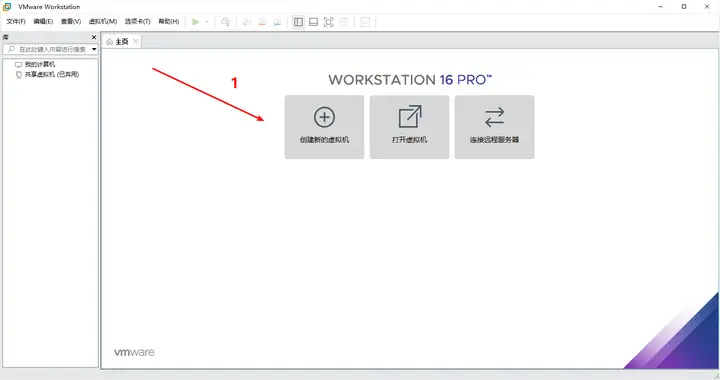
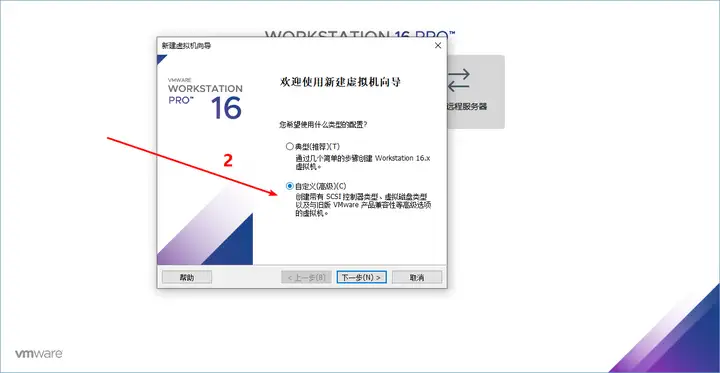
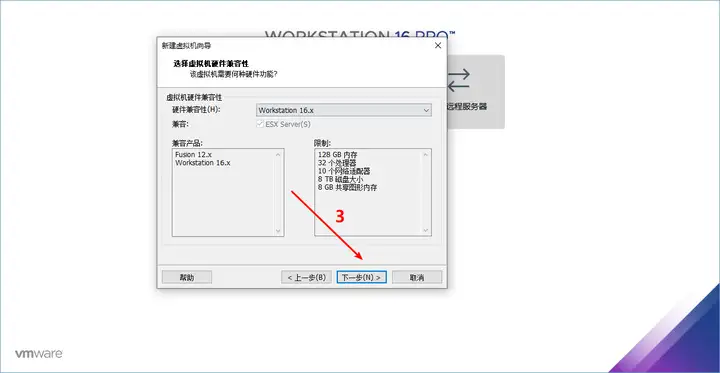
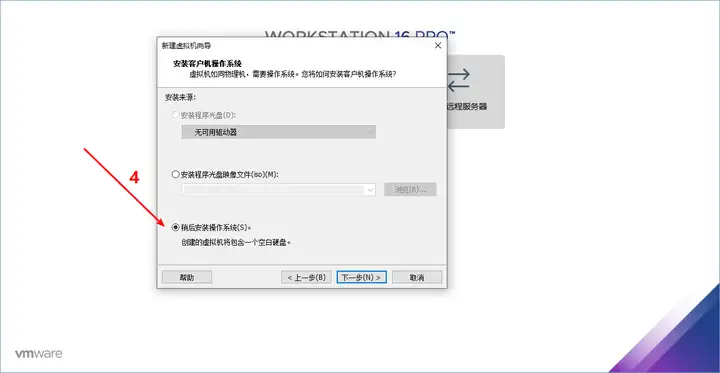
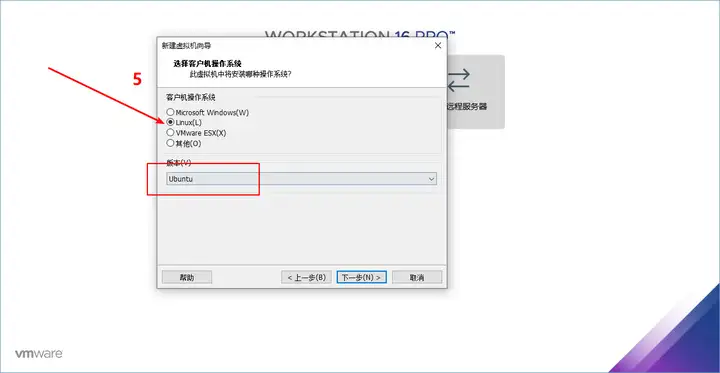
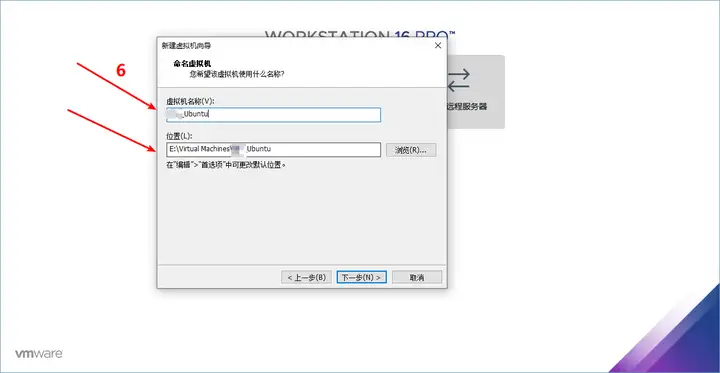
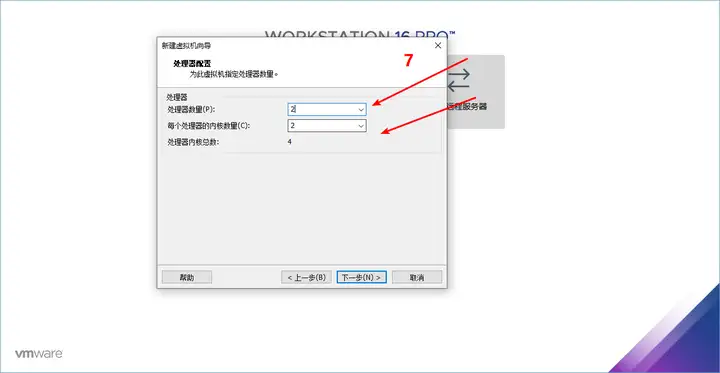
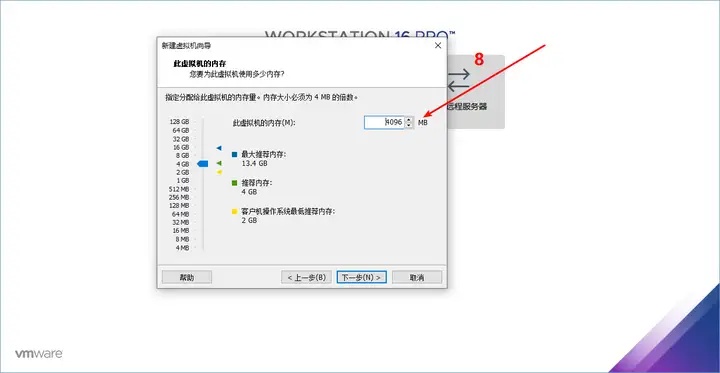
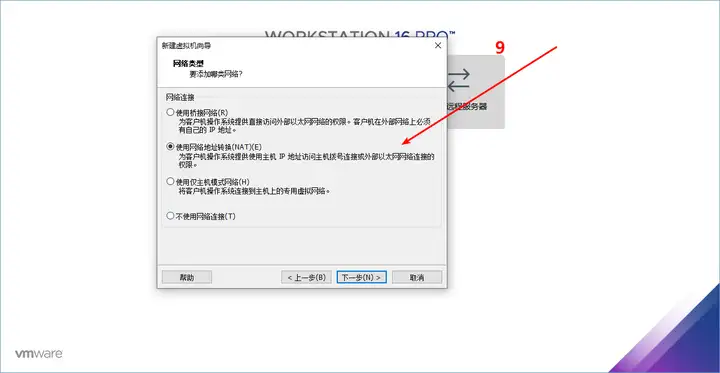
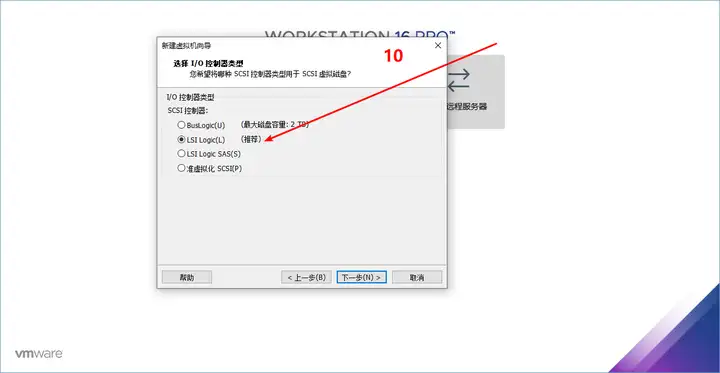
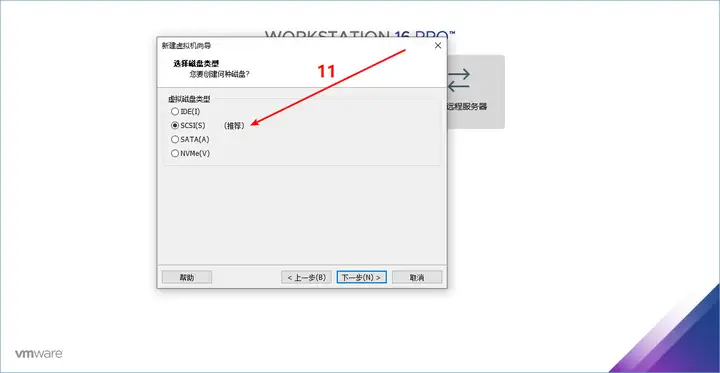
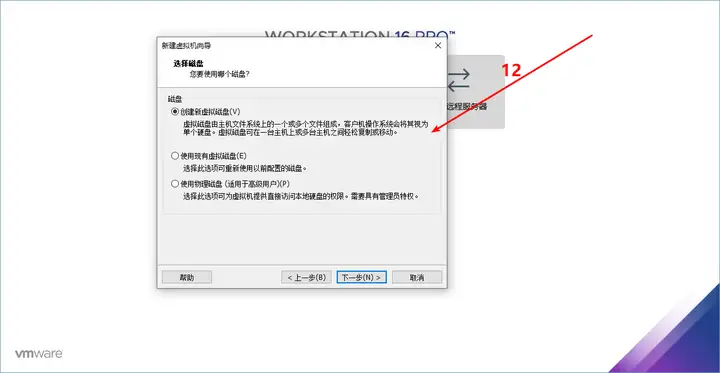
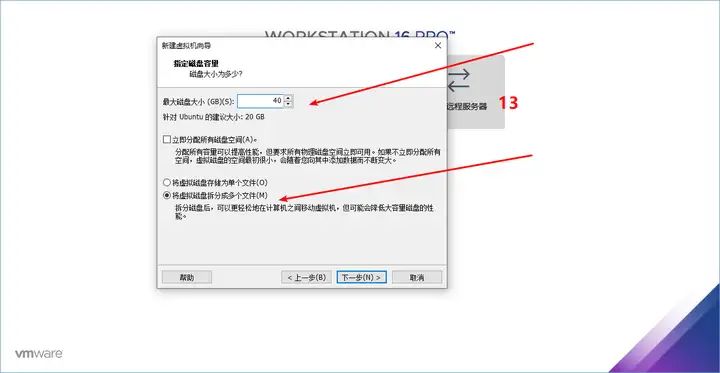
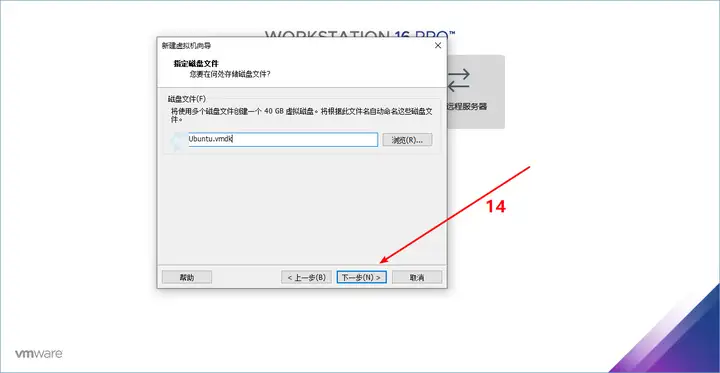
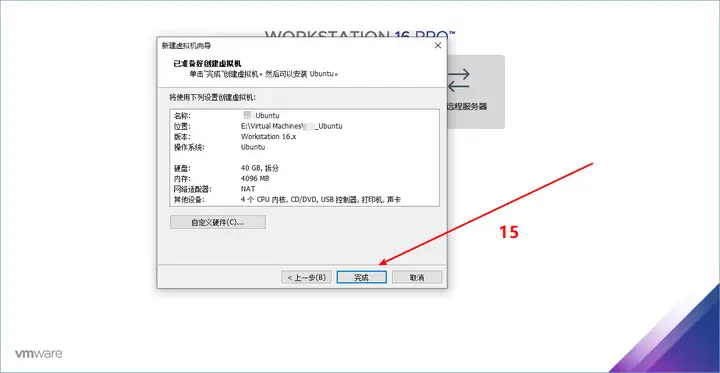
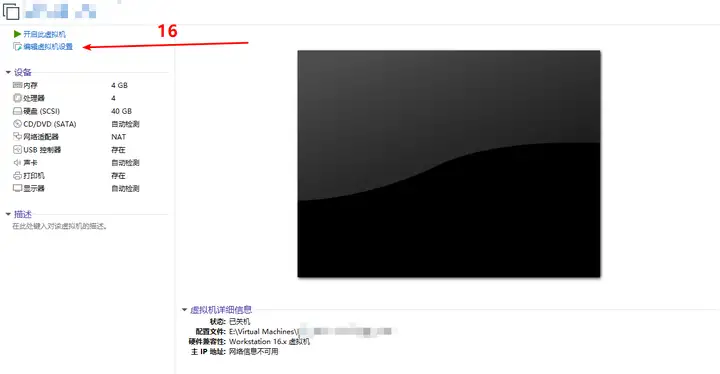
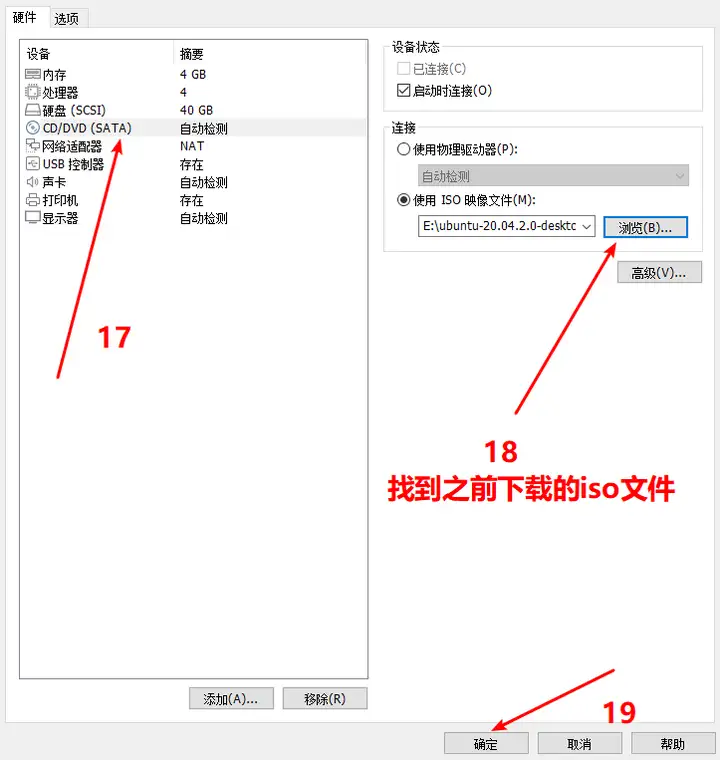
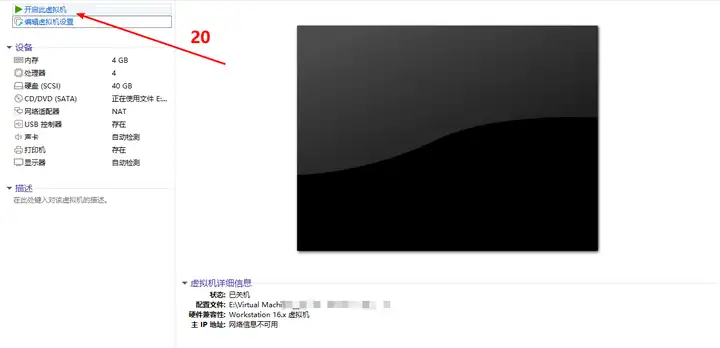
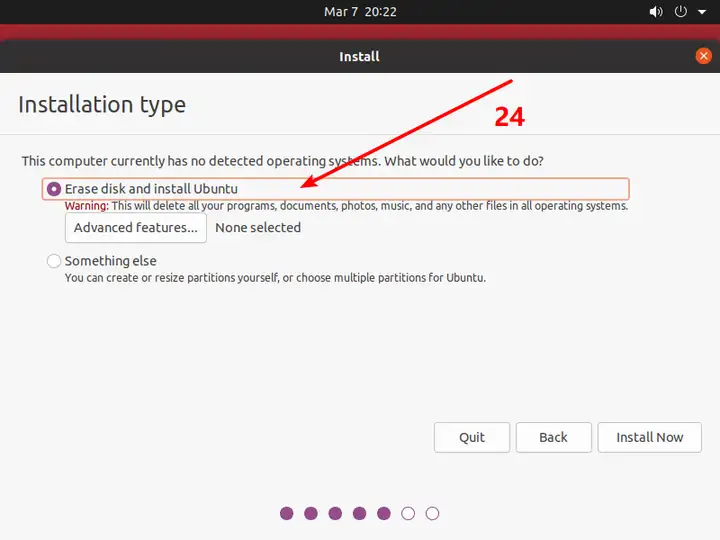
    <content type="html"><![CDATA[<blockquote><p><strong>结论：</strong> 本文适合需要复现 Ubuntu 20.04 虚拟机环境的读者，不应作为新项目的默认版本建议。<br /><strong>内容状态：</strong> 历史安装记录；下载地址、虚拟机版本和安全更新状态需要在执行前重新确认。</p></blockquote><h2 id="总的来说安装-ubuntu-包含以下三个步骤"><a class="markdownIt-Anchor" href="#总的来说安装-ubuntu-包含以下三个步骤"></a> <strong>总的来说，安装 Ubuntu 包含以下三个步骤：</strong></h2><p><strong>一、安装虚拟机</strong></p><p><strong>二、Ubuntu镜像下载</strong></p><p><strong>三、虚拟机配置</strong></p><hr /><p><strong>一、安装虚拟机</strong></p><p>选择安装VMware Workstation，登录其官网下载安装包，链接如下：</p><p><a href="https://link.zhihu.com/?target=https%3A//www.vmware.com/cn/products/workstation-pro/workstation-pro-evaluation.html">下载 VMware Workstation Prowww.vmware.com/cn/products/workstation-pro/workstation-pro-evaluation.html<img src="https://pic4.zhimg.com/v2-9102e4f3b44fe7f2f8b025c44682b0a3_ipico.jpg" alt="Ubuntu 虚拟机安装步骤 01" /></a></p><p><img src="https://mengxi-1317088086.cos.ap-beijing.myqcloud.com/img/v2-f34e437295e2460b1de210e6781ed2bb_720w.webp" alt="Ubuntu 虚拟机安装步骤 02" /></p><p>下载后运行安装向导，一直Next即可。最后的许可证可以在网上找到。</p><p><strong>二、Ubuntu镜像下载</strong></p><p>Linux 有多个发行版，本文选择桌面环境较为友好的 Ubuntu。进入 Ubuntu 镜像下载页面，选择 20.04 系列镜像：</p><p><a href="https://link.zhihu.com/?target=https%3A//mirrors.tuna.tsinghua.edu.cn/">Tsinghua Open Source Mirrormirrors.tuna.tsinghua.edu.cn/<img src="https://mengxi-1317088086.cos.ap-beijing.myqcloud.com/img/v2-22b1ca2db10aa9b49fd1e815a45ab431_180x120.jpg" alt="Ubuntu 虚拟机安装步骤 03" /></a></p><p><img src="https://mengxi-1317088086.cos.ap-beijing.myqcloud.com/img/v2-13b2b7ceaad77cf4c27bcfb9e491ceda_720w.webp" alt="Ubuntu 虚拟机安装步骤 04" /></p><p><img src="https://mengxi-1317088086.cos.ap-beijing.myqcloud.com/img/v2-c65bf74b340d9b2d09dc11d92b8a61ae_720w.webp" alt="Ubuntu 虚拟机安装步骤 05" /></p><p><strong>三、虚拟机配置</strong></p><p>step1：打开第一步所下载的VMware Workstation。在主界面中，选择【创建新的虚拟机】。</p><p><img src="https://pic1.zhimg.com/80/v2-664841d9a67ca9454e00d5c3d6a1fee0_720w.webp" alt="Ubuntu 虚拟机安装步骤 06" /></p><p>step2：如图，会自动弹出【新建虚拟向导】，选择【自定义（高级）】后，点击【下一步】。</p><p><img src="https://pic2.zhimg.com/80/v2-fafffe673b9d0063101fa3e68ad7e111_720w.webp" alt="Ubuntu 虚拟机安装步骤 07" /></p><p>step3：这一步选择默认值即可，点击【下一步】。</p><p><img src="https://pic2.zhimg.com/80/v2-c8b1fe0af892908ac59f055481d1dd95_720w.webp" alt="Ubuntu 虚拟机安装步骤 08" /></p><p>step4：选择【稍后安装操作系统】，点击【下一步】</p><p><img src="https://pic4.zhimg.com/80/v2-c0add466c9a042e5c301fc0dae95628f_720w.webp" alt="Ubuntu 虚拟机安装步骤 09" /></p><p>step5：选择【Linux】，其下方版本将默认更改为【Ubuntu】。</p><p><img src="https://pic3.zhimg.com/80/v2-686c9353ab253e8e27ae8e57c0658e8e_720w.webp" alt="Ubuntu 虚拟机安装步骤 10" /></p><p>step6：填写【虚拟机名称】及【位置】，点击【下一步】。【虚拟机名称】即虚拟机的名字。【位置】可以选择容量较大的硬盘位置。</p><p><img src="https://pic1.zhimg.com/80/v2-a66c27c64cf5a61ad416590647fa045c_720w.webp" alt="Ubuntu 虚拟机安装步骤 11" /></p><p>step7：【处理器数量】与【每个处理器的内核数量】选择2后，点击【下一步】。</p><p><img src="https://pic1.zhimg.com/80/v2-7761d36e4159f758107bbb4281a55a48_720w.webp" alt="Ubuntu 虚拟机安装步骤 12" /></p><p>step8：选择【此虚拟机的内存】，此值应依据电脑本身情况酌情调整。常用值为1G（1024MB）、2G（2048MB）、4G（4096MB）等等。在这里选择4G。</p><p><img src="https://pic2.zhimg.com/80/v2-b1451057fe66bd28428d8318e525a5d9_720w.webp" alt="Ubuntu 虚拟机安装步骤 13" /></p><p>step9：选择【使用网络地址转换】，点击【下一步】。</p><p><img src="https://pic3.zhimg.com/80/v2-d306494b310a289e5ab6261d5e65ab1a_720w.webp" alt="Ubuntu 虚拟机安装步骤 14" /></p><p>step10：选择推荐的【LSI Logic】即可，点击【下一步】。</p><p><img src="https://pic2.zhimg.com/80/v2-a9a667530f95480874aa804466dbc8e5_720w.webp" alt="Ubuntu 虚拟机安装步骤 15" /></p><p>step11：选择推荐的【SCSI】即可，点击【下一步】。</p><p><img src="https://pic4.zhimg.com/80/v2-dd12fedbeb60eb92cbb7405fc7d9d8a7_720w.webp" alt="Ubuntu 虚拟机安装步骤 16" /></p><p>step12：选择【创建新虚拟磁盘】，点击【下一步】。</p><p><img src="https://pic4.zhimg.com/80/v2-0245d744806f157502698e2a2d9485f3_720w.webp" alt="Ubuntu 虚拟机安装步骤 17" /></p><p>step13：设置【最大磁盘大小】为40，并选择【将虚拟磁盘拆分成多个文件】后，点击【下一步】。最大磁盘大小默认为20GB，磁盘剩余空间较大的话该数值可以往上加。</p><p><img src="https://pic3.zhimg.com/80/v2-97e1a58eb7220e3b5ad93a5c852c08c6_720w.webp" alt="Ubuntu 虚拟机安装步骤 18" /></p><p>step14：点击【下一步】。</p><p><img src="https://pic1.zhimg.com/80/v2-6901e8ce40884bd6f47f444bea3366e8_720w.webp" alt="Ubuntu 虚拟机安装步骤 19" /></p><p>step15：点击【完成】。</p><p><img src="https://pic3.zhimg.com/80/v2-3203cd7c895747c2b95b6897d8fcb97a_720w.webp" alt="Ubuntu 虚拟机安装步骤 20" /></p><p>step16：回到VMware Station界面，单机界面左侧【编辑虚拟机位置】。</p><p><img src="https://pic4.zhimg.com/80/v2-2013d82e34cca6f5f2a796e2e9f8fd0b_720w.webp" alt="Ubuntu 虚拟机安装步骤 21" /></p><p>step17-19：点击左侧的CD/DVD选项卡，右侧点击【使用ISO映像文件】，找到第二步在你清镜像中下载的Ubuntu镜像即可，点击【下一步】。</p><p><img src="https://pic2.zhimg.com/80/v2-29903e1d66f603693f72e78ce63e84a1_720w.webp" alt="Ubuntu 虚拟机安装步骤 22" /></p><p>step20：回到VMware Station界面，点击【开启此虚拟机】。</p><p><img src="https://pic4.zhimg.com/80/v2-efc3fe136856e9fd2f8cf1f4d1ea25c7_720w.webp" alt="Ubuntu 虚拟机安装步骤 23" /></p><p>【注】：此时若出现【此主机支持Intel VT-x，但Intel VT-x处于禁用状态】的提示。请进入BIOS，将【Intel Virtual Technology】设为【Enabled】即可，具体方法可百度。</p><p><img src="https://mengxi-1317088086.cos.ap-beijing.myqcloud.com/img/v2-dff8c7ccde2c3e4829a7de5f248d0d79_720w.webp" alt="Ubuntu 虚拟机安装步骤 24" /></p><p>step21：此时可以看到虚拟机画面，点击右侧【Install Ubuntu】。</p><p><img src="https://mengxi-1317088086.cos.ap-beijing.myqcloud.com/img/v2-0e15ec1bccfa34cd13808dd5f2269a3f_720w.webp" alt="Ubuntu 虚拟机安装步骤 25" /></p><p>step22：此时我们使用美国键盘布局【English（US）】，点击【Continue】。</p><p><img src="https://mengxi-1317088086.cos.ap-beijing.myqcloud.com/img/v2-28ec99ddcafe65f41492647b20790591_720w.webp" alt="Ubuntu 虚拟机安装步骤 26" /></p><p>step23：点击【Minimal installation】，点击【Continue】。由于Ubuntu虚拟机大多做学习研发使用，所以选择最小化安装。若是有用Ubuntu网上冲浪和打游戏的需求，请选择【Normal installation】。</p><p><img src="https://mengxi-1317088086.cos.ap-beijing.myqcloud.com/img/v2-c483f78a2ce6b6d83fea6bdbfdf57d75_720w.webp" alt="Ubuntu 虚拟机安装步骤 27" /></p><p>step24：选择【Erase disk and install Ubuntu】，点击【Install Now】。</p><p><img src="https://pic3.zhimg.com/80/v2-01f9b78c75fd3b2965769e099b9a1a0e_720w.webp" alt="Ubuntu 虚拟机安装步骤 28" /></p><p>step25：点击【Continue】确认。</p><p><img src="https://mengxi-1317088086.cos.ap-beijing.myqcloud.com/img/v2-316bd86afe2568e6468670ab8a924ccc_720w.webp" alt="Ubuntu 虚拟机安装步骤 29" /></p><p>step26：点击地图上【中国】的位置，会默认出现Shanghai，点击【Continue】。</p><p><img src="https://mengxi-1317088086.cos.ap-beijing.myqcloud.com/img/v2-789159b1e838b30f25e9418d29b338be_720w.webp" alt="Ubuntu 虚拟机安装步骤 30" /></p><p>step27：输入【Your name】【Your computer’s name】【Pick a username】【Choose a password】【Confirm your password】后，点击【Continue】。这里建议密码设置的简单一些，因为Ubuntu后续很多操作需要验证密码，设置复杂的密码后期会比较麻烦。</p><p><img src="https://mengxi-1317088086.cos.ap-beijing.myqcloud.com/img/v2-77abbe1480e9ca807b245f9b1321ada3_720w.webp" alt="Ubuntu 虚拟机安装步骤 31" /></p><p>等待安装。</p><p><img src="https://mengxi-1317088086.cos.ap-beijing.myqcloud.com/img/v2-015911a10c67cf581c6db267e89dcc05_720w.webp" alt="Ubuntu 虚拟机安装步骤 32" /></p><p>点击【Restart Now】重新启动。</p><p><img src="https://mengxi-1317088086.cos.ap-beijing.myqcloud.com/img/v2-2e5b71ea445f4e1fa71620fe672eb3dd_720w.webp" alt="Ubuntu 虚拟机安装步骤 33" /></p><p>重新启动后，可以看到Ubuntu已经安装完成，点击出现的【用户名】。</p><p><img src="https://pic4.zhimg.com/80/v2-755e6a48a3f625feccfadea2f59e97af_720w.webp" alt="Ubuntu 虚拟机安装步骤 34" /></p><p>输入密码即可以进入Ubuntu啦！</p><p><img src="https://pic1.zhimg.com/80/v2-b0defe34ef9465880c984396853d7e80_720w.webp" alt="Ubuntu 虚拟机安装步骤 35" /></p>]]></content>
    
    
    <summary type="html">记录在虚拟机中安装 Ubuntu 20.04 的完整图形化流程。</summary>


    <category term="Linux" scheme="https://shenst.cn/categories/Linux/"/>
    
    
    <category term="Ubuntu" scheme="https://shenst.cn/tags/Ubuntu/"/>
    
    <category term="虚拟机" scheme="https://shenst.cn/tags/%E8%99%9A%E6%8B%9F%E6%9C%BA/"/>
    
  </entry>
  
  <entry>
    <title>PicGo 图床搭建与云存储配置</title>
    <link href="https://shenst.cn/posts/265696892.html"/>
    <id>https://shenst.cn/posts/265696892.html</id>
    <published>2023-03-17T04:18:14.000Z</published>
    <updated>2026-09-08T09:27:17.510Z</updated>
    
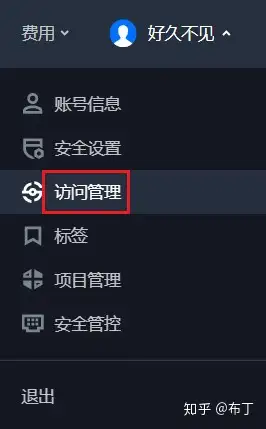
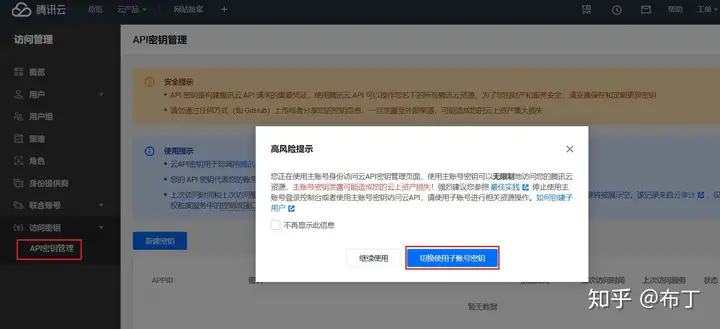
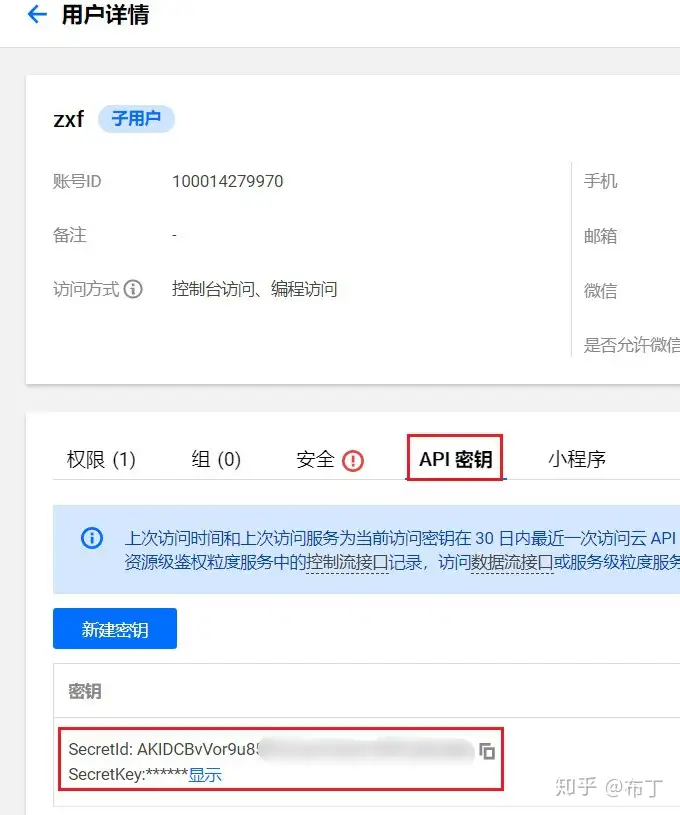
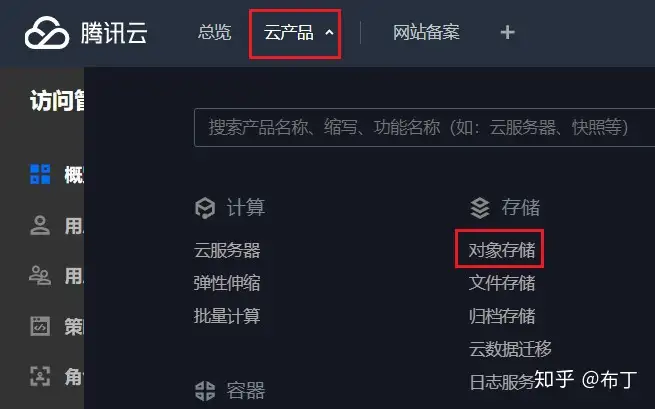
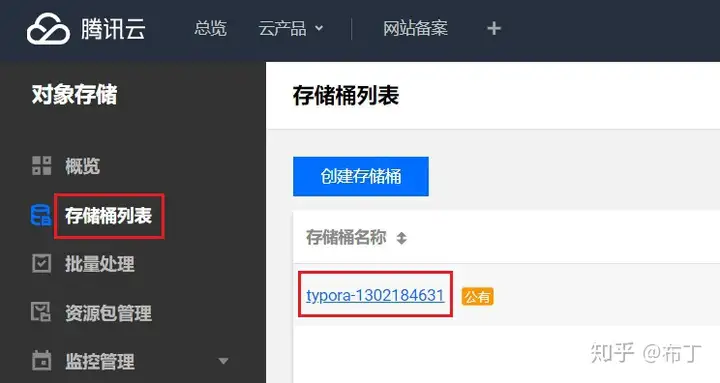
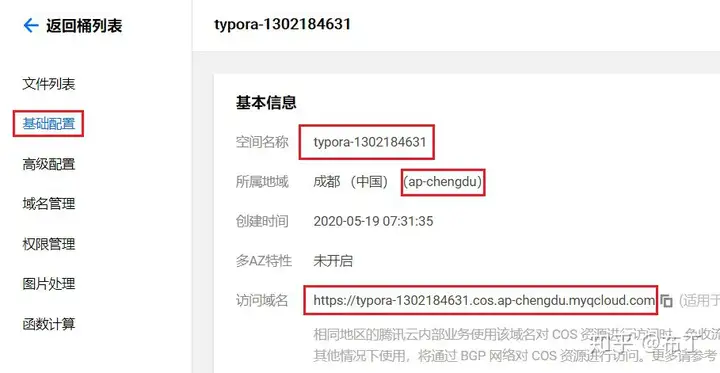
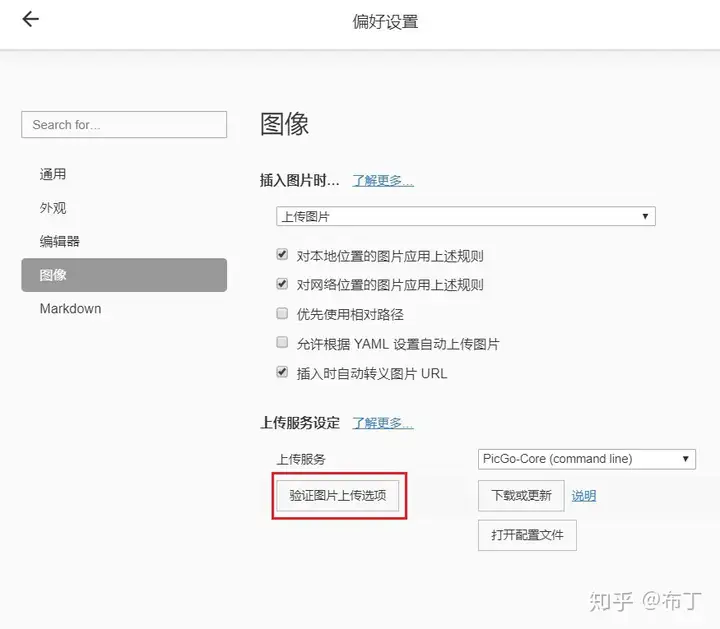
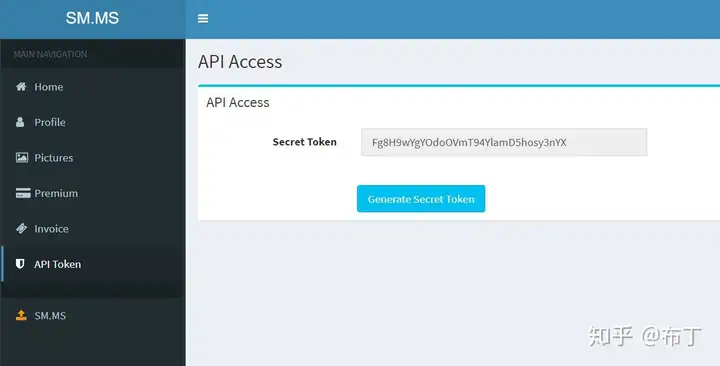
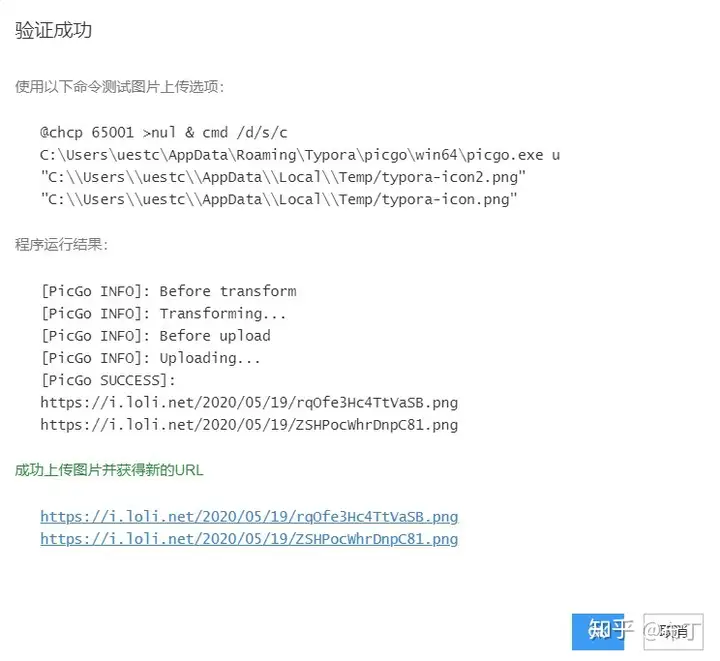
    <content type="html"><![CDATA[<blockquote><p><strong>结论：</strong> 当前博客优先采用腾讯 COS + PicGo；其他服务保留为方案对比，不建议同时维护多套上传链路。<br /><strong>安全要求：</strong> 文中的 AccessKey、SecretKey 和 Token 只能使用占位符，真实密钥不得写入文章、截图或 Git 历史。</p></blockquote><h2 id="一-图床"><a class="markdownIt-Anchor" href="#一-图床"></a> 一、图床</h2><h3 id="1-图床是什么"><a class="markdownIt-Anchor" href="#1-图床是什么"></a> 1、图床是什么</h3><p><strong>中文名:</strong> 图床</p><p><strong>功能:</strong> 专门储存图片的空间</p><p><strong>国内图床:</strong> 单线空间，多线空间，cdn加速</p><p><strong>图床种类:</strong> 国内和国外，有空间距离的因素</p><p><strong>外文名:</strong> Image Hosting Service</p><p><strong>类型：</strong> 云存储、PaaS、自建型、社交型</p><h3 id="2-为什么要搭建图床"><a class="markdownIt-Anchor" href="#2-为什么要搭建图床"></a> 2、为什么要搭建图床</h3><h4 id="不能把图片直接放在服务器里面吗"><a class="markdownIt-Anchor" href="#不能把图片直接放在服务器里面吗"></a> (不能把图片直接放在服务器里面吗)</h4><p>由于服务器的空间有限，而cos提供的图片存储空间大，可以存储更多的图片，而且cos可以提供更快速、稳定的服务，这样可以更好地满足用户的需求。</p><p>cos概念指的是存储对象服务，是针对对象存储的抽象层，能提供安全的、可扩展的、高可用的对象存储服务，可以支持海量的数据存储。</p><p>服务器是一台提供网络服务的计算机，可以承载网站、应用程序等服务，也可以为客户端提供数据访问、文件服务等功能。</p><h2 id="二-选择合适的图床服务"><a class="markdownIt-Anchor" href="#二-选择合适的图床服务"></a> 二. 选择合适的图床服务</h2><ol><li>云存储型图床：像七牛云、阿里云OSS、腾讯云等都是云存储型图床，可以将图片直接上传至云端，可靠性高，容量大，易于管理。</li><li>PaaS型图床：如imgur、<a href="http://sm.ms">sm.ms</a>、postimages等，这些图床大多是免费的，但容量有限，有些可能会限制上传速度和图片大小，适合个人或小型网站使用。</li><li>自建型图床：自建型图床需要自己购买服务器、域名等，相对来说比较麻烦，但是可以满足自己的个性化需求，而且不受限于容量和速度等问题。</li><li>社交型图床：如微博、QQ空间、豆瓣等，这些社交平台都提供了图片上传功能，可以将图片分享给好友或发布到社交平台上。</li></ol><h2 id="三-注册账号并获取api密钥"><a class="markdownIt-Anchor" href="#三-注册账号并获取api密钥"></a> 三. 注册账号并获取API密钥</h2><p>1 、配置：服务器设置(1.阿里云;2.腾讯云;3.smms;4.其他)</p><h3 id="1-配置阿里云"><a class="markdownIt-Anchor" href="#1-配置阿里云"></a> 1. 配置阿里云</h3><p>阿里云安全稳定，是国内首屈一指的云服务供应商。阿里云配置较复杂，如果不喜欢复杂操作，可直接跳过阿里云配置这部分，smms配置最为简单且免费，其中，阿里云、腾讯云服务器需收费，阿里云40G存储空间半年仅需4.98元，外网下载\读取流量0.12 元/GB/月，腾讯也差不多也这个价，海星吧！</p><h4 id="11-注册阿里云账号"><a class="markdownIt-Anchor" href="#11-注册阿里云账号"></a> 1.1. 注册阿里云账号</h4><p><a href="https://link.zhihu.com/?target=https%3A//www.aliyun.com/">阿里云</a>链接如下：</p><figure class="highlight plaintext"><table><tr><td class="gutter"><pre><span class="line">1</span><br></pre></td><td class="code"><pre><span class="line">https://www.aliyun.com/</span><br></pre></td></tr></table></figure><p>支付宝绑定注册即可，注册后完成实名认证，新人可获得一项云服务免费体验一个月。</p><h4 id="12-开通对象存储oss服务并创建bucket"><a class="markdownIt-Anchor" href="#12-开通对象存储oss服务并创建bucket"></a> 1.2. 开通对象存储OSS服务并创建bucket</h4><p>注册成功后，右上角点击进入 “<strong>控制台</strong>” ，在控制台左上角菜单栏选择 “<strong>对象存储OSS</strong>” ，并开通该服务。</p><p><img src="https://mengxi-1317088086.cos.ap-beijing.myqcloud.com/img/v2-b5e8d4390d49b78253e0d8f96142145e_720w.webp" alt="PicGo 图床配置步骤 01" /></p><p>点击左侧 “<strong>概览</strong>” ，再点击右侧 “<strong>创建bucket</strong>” ，如图：</p><p><img src="https://mengxi-1317088086.cos.ap-beijing.myqcloud.com/img/v2-576fd8887c0be117d579801e3d1e8ed8_720w.webp" alt="PicGo 图床配置步骤 02" /></p><p>按要求填写 “<strong>Bucket名称</strong>” ，“<strong>区域</strong>” 可任意选择，其他选项均可不改动，唯一需要改动的是 “<strong>读写权限</strong>” ，一定要改成 “<strong>公共读</strong>” ，复制保存一下 “<strong>Bucket名称</strong>” 和节点 “<strong>Endpoint</strong>” 信息，之后点击 “<strong>确定</strong>”。</p><p><img src="https://mengxi-1317088086.cos.ap-beijing.myqcloud.com/img/v2-4393ac373c99a52d8c40483ecc0d81ac_720w.webp" alt="PicGo 图床配置步骤 03" /></p><h4 id="13-购买存储资源包"><a class="markdownIt-Anchor" href="#13-购买存储资源包"></a> 1.3. 购买存储资源包</h4><p>点击左上角菜单，进入 “<strong>资源包管理</strong>” ，点击 ”<strong>购买资源包</strong>“ ，新人可免费领取一个月的100G标准存储包，此外半年的40G存储包也仅需4.98元！</p><p><img src="https://mengxi-1317088086.cos.ap-beijing.myqcloud.com/img/v2-0b7cdd9f0f08eaffc3bd93da76326593_720w.webp" alt="PicGo 图床配置步骤 04" /></p><p><img src="https://mengxi-1317088086.cos.ap-beijing.myqcloud.com/img/v2-2dd3b6d2d453748f9b53b01b91e0bb9e_720w.webp" alt="PicGo 图床配置步骤 05" /></p><h4 id="14-accesskey-管理"><a class="markdownIt-Anchor" href="#14-accesskey-管理"></a> 1.4. AccessKey 管理</h4><p>点击右上角头像，进入 ”<strong>AcessKey管理</strong>“ ，安全起见，点击 ”<strong>开始使用子用户AcessKey</strong>“ ：</p><p><img src="https://pic2.zhimg.com/80/v2-8e4528abb658512da525739b4af4e33d_720w.webp" alt="PicGo 图床配置步骤 06" /></p><p><img src="https://pic1.zhimg.com/80/v2-f6f9672e1aa4e0782655b424039e1470_720w.webp" alt="PicGo 图床配置步骤 07" /></p><p>创建子用户账户登录和显示名称(随便取即可)，最后勾选 ”<strong>编程访问</strong>“ ，点击 &quot;<strong>确认&quot;</strong> 。</p><p><img src="https://mengxi-1317088086.cos.ap-beijing.myqcloud.com/img/v2-59b6b790de7784cf97f0e135ca902a93_720w.webp" alt="PicGo 图床配置步骤 08" /></p><p>创建完用户后出现用户信息页面，该页面关闭后将无法再次获取相关信息，一定要保存好 “<strong>AcessKey ID</strong>” 和 ”<strong>AcessKey Secret</strong>“ ，在配置文件中会用到，可以下载CSV文件保存信息。</p><p><img src="https://mengxi-1317088086.cos.ap-beijing.myqcloud.com/img/v2-3f96bda9e310cdd116ac2275faba7f7b_720w.webp" alt="PicGo 图床配置步骤 09" /></p><p>保存好相关信息后，点击 ”<strong>添加权限</strong>“ ，为该子用户添加访问权限，在搜索栏输入 ”<strong>oss</strong>&quot; ，搜索所有关于 “<strong>对象存储oss</strong>” 的权限，一共两个，全部选中即可，右侧可看到当前已选择权限。</p><p><img src="https://mengxi-1317088086.cos.ap-beijing.myqcloud.com/img/v2-c0c27f510b977195d1476da5da3b7154_720w.webp" alt="PicGo 图床配置步骤 10" /></p><h4 id="15-创建配置文件模板"><a class="markdownIt-Anchor" href="#15-创建配置文件模板"></a> 1.5. 创建配置文件模板</h4><p>复制以下配置代码到记事本备用，其中 “<strong>xxxx</strong>” 需要替换，每个人均不一样，其他可不改动。</p><figure class="highlight text"><table><tr><td class="gutter"><pre><span class="line">1</span><br><span class="line">2</span><br><span class="line">3</span><br><span class="line">4</span><br><span class="line">5</span><br><span class="line">6</span><br><span class="line">7</span><br><span class="line">8</span><br><span class="line">9</span><br><span class="line">10</span><br><span class="line">11</span><br><span class="line">12</span><br><span class="line">13</span><br><span class="line">14</span><br><span class="line">15</span><br></pre></td><td class="code"><pre><span class="line">&#123;</span><br><span class="line">    &quot;picBed&quot;: &#123;</span><br><span class="line">        &quot;uploader&quot;: &quot;aliyun&quot;,</span><br><span class="line">        &quot;aliyun&quot;: &#123;</span><br><span class="line">        &quot;accessKeyId&quot;: &quot;xxxx&quot;,</span><br><span class="line">        &quot;accessKeySecret&quot;: &quot;xxxx&quot;,</span><br><span class="line">        &quot;bucket&quot;: &quot;xxxx&quot;,</span><br><span class="line">        &quot;area&quot;: &quot;xxxx&quot;,</span><br><span class="line">        &quot;path&quot;: &quot;img/&quot;,</span><br><span class="line">        &quot;customUrl&quot;: &quot;xxxx&quot;,</span><br><span class="line">        &quot;options&quot;: &quot;&quot;</span><br><span class="line">      &#125;</span><br><span class="line">    &#125;,</span><br><span class="line">    &quot;picgoPlugins&quot;: &#123;&#125;</span><br><span class="line">  &#125;</span><br></pre></td></tr></table></figure><p>其中，“<strong>acesskeyId</strong>&quot; 和 “<strong>acesskeySecret</strong>” 即为 “<strong>1.4. AcessKey管理</strong>” 中保存的用户信息；</p><p><img src="https://mengxi-1317088086.cos.ap-beijing.myqcloud.com/img/v2-3f96bda9e310cdd116ac2275faba7f7b_720w.webp" alt="PicGo 图床配置步骤 11" /></p><p>其中， ”<strong>bucket</strong>“ 和 “<strong>area</strong>” 即为 ”<strong>1.2. 创建bucket</strong>“ 中保存的 ”<strong>Bucket名称</strong>“ 和节点 ”<strong>Endpoint</strong>&quot; 信息，节点信息只需要取到前面的区域信息，后面的 “<strong>.<a href="https://link.zhihu.com/?target=http%3A//aliyuncs.com">http://aliyuncs.com</a></strong>” 删掉，以此处为例，“<strong>area</strong>” 对应为 “<strong>oss-cn-chengdu</strong>&quot; 。</p><p><img src="https://mengxi-1317088086.cos.ap-beijing.myqcloud.com/img/v2-886ac65673ef89f81a45de082b1af341_720w.webp" alt="PicGo 图床配置步骤 12" /></p><p>最后， “<strong>customUrl</strong>” 为外网访问链接，格式为：“<strong>http://</strong>&quot; + “<strong>Bucket名称</strong>” + ”<strong>Endpoint</strong>“ ，此处最终的 ”<strong>customUrl</strong>“ 为:</p><figure class="highlight text"><table><tr><td class="gutter"><pre><span class="line">1</span><br></pre></td><td class="code"><pre><span class="line">http://typroa-test.oss-cn-chengdu.aliyuncs.com</span><br></pre></td></tr></table></figure><p>“<strong>customUrl</strong>” 也可以从 “<strong>Bucket列表</strong>” 中直接获得，只需点击已创建的bucket将其展开就能获得外网访问链接。</p><p><img src="https://mengxi-1317088086.cos.ap-beijing.myqcloud.com/img/v2-54ffa43c70756e9c11b7171f9d1c494c_720w.webp" alt="PicGo 图床配置步骤 13" /></p><h4 id="16-typora配置文件"><a class="markdownIt-Anchor" href="#16-typora配置文件"></a> 1.6. Typora配置文件</h4><p>将之前记事本中的配置信息填好，就准备好了 ”<strong>Typora</strong>“ 中 ”<strong>PicGo-Core</strong>&quot; 的配置文件，这里给出一份配置文件参考，密钥内容隐去一部分。</p><figure class="highlight text"><table><tr><td class="gutter"><pre><span class="line">1</span><br><span class="line">2</span><br><span class="line">3</span><br><span class="line">4</span><br><span class="line">5</span><br><span class="line">6</span><br><span class="line">7</span><br><span class="line">8</span><br><span class="line">9</span><br><span class="line">10</span><br><span class="line">11</span><br><span class="line">12</span><br><span class="line">13</span><br><span class="line">14</span><br><span class="line">15</span><br></pre></td><td class="code"><pre><span class="line">&#123;</span><br><span class="line">    &quot;picBed&quot;: &#123;</span><br><span class="line">        &quot;uploader&quot;: &quot;aliyun&quot;,</span><br><span class="line">        &quot;aliyun&quot;: &#123;</span><br><span class="line">            &quot;accessKeyId&quot;: &quot;LTAI4GJx2DGB1xxxxxxxx&quot;,</span><br><span class="line">            &quot;accessKeySecret&quot;: &quot;Ep6ynvPCG6bhEQPrCBksxxxxxxx&quot;,</span><br><span class="line">            &quot;bucket&quot;: &quot;typroa-test&quot;,</span><br><span class="line">            &quot;area&quot;: &quot;oss-cn-chengdu&quot;,</span><br><span class="line">            &quot;path&quot;: &quot;img/&quot;,</span><br><span class="line">            &quot;customUrl&quot;: &quot;http://typroa-test.oss-cn-chengdu.aliyuncs.com&quot;,</span><br><span class="line">            &quot;options&quot;: &quot;&quot;</span><br><span class="line">        &#125;</span><br><span class="line">    &#125;,</span><br><span class="line">    &quot;picgoPlugins&quot;: &#123;&#125;</span><br><span class="line">  &#125;</span><br></pre></td></tr></table></figure><p>打开 “<strong>Typora</strong>&quot; 依次打开 ”<strong>文件 ----&gt; 偏好 ----&gt; 图像</strong>“ ，点击 ”<strong>打开配置文件</strong>“ ，将上面的配置代码完整复制到配置文件中，”<strong>Ctrl+S</strong>&quot; 保存后关闭配置文件。</p><p><img src="https://mengxi-1317088086.cos.ap-beijing.myqcloud.com/img/v2-63e1a4ed28df1d2bfd96b021dae1eb3a_720w.webp" alt="PicGo 图床配置步骤 14" /></p><h4 id="17-大功告成"><a class="markdownIt-Anchor" href="#17-大功告成"></a> 1.7. 大功告成！</h4><p>最后，在 “<strong>打开配置文件</strong>”左侧 有个 “<strong>上传服务</strong>” ，点击 “<strong>验证图片上传选项</strong>” ，提示 “<strong>验证成功</strong>” ，则大功告成！</p><p><img src="https://mengxi-1317088086.cos.ap-beijing.myqcloud.com/img/v2-6ad8dbb2c9c224cd1576d128fc534886_720w.webp" alt="PicGo 图床配置步骤 15" /></p><hr /><h3 id="2-配置腾讯云"><a class="markdownIt-Anchor" href="#2-配置腾讯云"></a> 2. 配置腾讯云</h3><p>腾讯云配置与阿里云大同小异，基本流程都差不多。</p><h4 id="21-注册腾讯云账号"><a class="markdownIt-Anchor" href="#21-注册腾讯云账号"></a> 2.1. 注册腾讯云账号</h4><p><a href="https://link.zhihu.com/?target=https%3A//cloud.tencent.com/">腾讯云</a>链接如下：</p><figure class="highlight text"><table><tr><td class="gutter"><pre><span class="line">1</span><br></pre></td><td class="code"><pre><span class="line">https://cloud.tencent.com/</span><br></pre></td></tr></table></figure><p>用微信或QQ均可登录，注册后首先完成实名认证。</p><h4 id="22-开通对象存储cos并创建存储桶"><a class="markdownIt-Anchor" href="#22-开通对象存储cos并创建存储桶"></a> 2.2. 开通对象存储COS并创建存储桶</h4><p>点击 “<strong>云产品</strong>” ，在下拉菜单中找到 “<strong>对象存储</strong>” ，点击后开通该服务；</p><p><img src="https://mengxi-1317088086.cos.ap-beijing.myqcloud.com/img/v2-e709168ee0bb95ee6f5eaa186afafc4a_720w.webp" alt="PicGo 图床配置步骤 16" /></p><p>然后 “<strong>创建存储桶</strong>” ，其中 “<strong>访问权限</strong>” 一定要选择 “<strong>公有读私有写</strong>” ，“<strong>存储桶标签</strong>” 随便添几个就行；</p><p><img src="https://mengxi-1317088086.cos.ap-beijing.myqcloud.com/img/v2-e6aba2532616def6fafa41a4b017c60e_720w.webp" alt="PicGo 图床配置步骤 17" /></p><p><img src="https://mengxi-1317088086.cos.ap-beijing.myqcloud.com/img/v2-71961a953bd56e15f99c42bfd090d2ac_720w.webp" alt="PicGo 图床配置步骤 18" /></p><h4 id="23-购买对象存储cos资源包"><a class="markdownIt-Anchor" href="#23-购买对象存储cos资源包"></a> 2.3. 购买对象存储(COS)资源包</h4><p>新手免费赠送了6个月50G标准存储容量，此外格外购买6个月10G标准存储包也只要4.96元。</p><p><img src="https://mengxi-1317088086.cos.ap-beijing.myqcloud.com/img/v2-772f0d6d52eabb29902d3915ce289d5b_720w.webp" alt="PicGo 图床配置步骤 19" /></p><h4 id="24-密钥管理"><a class="markdownIt-Anchor" href="#24-密钥管理"></a> 2.4. 密钥管理</h4><p>进入 “<strong>控制台</strong>” — “<strong>访问管理</strong>” ，然后点击 “<strong>API密钥管理</strong>” — “<strong>切换使用子账号密钥</strong>” 。</p><p><img src="https://pic1.zhimg.com/80/v2-2ade29ed01c86f80b7cfca71d114fdf0_720w.webp" alt="PicGo 图床配置步骤 20" /></p><p><img src="https://pic2.zhimg.com/80/v2-519e44c355436d6de971c5a6558c4f6d_720w.webp" alt="PicGo 图床配置步骤 21" /></p><p>点击 “<strong>快速创建</strong>” ，快速创建子账号，创建完毕后，点击进入左侧 “<strong>用户列表</strong>”，点击创建好的子账户用户名，进入用户详情页。</p><p><img src="https://pic1.zhimg.com/80/v2-8d878cffa9c9a47795e750ffd271dab8_720w.webp" alt="PicGo 图床配置步骤 22" /></p><p><img src="https://mengxi-1317088086.cos.ap-beijing.myqcloud.com/img/v2-54749b83db5b6c389a4285202f7bb3dd_720w.webp" alt="PicGo 图床配置步骤 23" /></p><p><img src="https://mengxi-1317088086.cos.ap-beijing.myqcloud.com/img/v2-cbaf7a02a1fae8cb8903cd3cc0211e0d_720w.webp" alt="PicGo 图床配置步骤 24" /></p><p>在用户详情页中找到 “<strong>API密钥</strong>” 选项卡，点击 “<strong>新建密钥</strong>” ，几秒钟后生成密钥 “<strong>Secretid</strong>&quot; 和 “<strong>SecretKey</strong>” ，复制保存以备用。</p><p><img src="https://pic3.zhimg.com/80/v2-4e0c8e30237bbf8470986b3ec67a79e2_720w.webp" alt="PicGo 图床配置步骤 25" /></p><h4 id="25-配置文件"><a class="markdownIt-Anchor" href="#25-配置文件"></a> 2.5. 配置文件</h4><p>腾讯云的配置文件如下：</p><figure class="highlight text"><table><tr><td class="gutter"><pre><span class="line">1</span><br><span class="line">2</span><br><span class="line">3</span><br><span class="line">4</span><br><span class="line">5</span><br><span class="line">6</span><br><span class="line">7</span><br><span class="line">8</span><br><span class="line">9</span><br><span class="line">10</span><br><span class="line">11</span><br><span class="line">12</span><br><span class="line">13</span><br><span class="line">14</span><br><span class="line">15</span><br><span class="line">16</span><br></pre></td><td class="code"><pre><span class="line">&#123;</span><br><span class="line">  &quot;picBed&quot;: &#123;</span><br><span class="line">    &quot;uploader&quot;: &quot;tcyun&quot;,</span><br><span class="line">    &quot;tcyun&quot;: &#123;</span><br><span class="line">      &quot;secretId&quot;: &quot;AKIDCBvVor9u85lFZcwuYx5xxxxxxxxxx&quot;,</span><br><span class="line">      &quot;secretKey&quot;: &quot;RenmX1IJ3YoGTRAlzwc3eyxxxxxxxxxx&quot;,</span><br><span class="line">      &quot;bucket&quot;: &quot;typora-1302184631&quot;,</span><br><span class="line">      &quot;appId&quot;: &quot;1302184631&quot;,</span><br><span class="line">      &quot;area&quot;: &quot;ap-chengdu&quot;,</span><br><span class="line">      &quot;path&quot;: &quot;img/&quot;,</span><br><span class="line">      &quot;customUrl&quot;: &quot;https://typora-1302184631.cos.ap-chengdu.myqcloud.com&quot;,</span><br><span class="line">      &quot;version&quot;: &quot;v5&quot;</span><br><span class="line">    &#125;</span><br><span class="line">  &#125;,</span><br><span class="line">  &quot;picgoPlugins&quot;: &#123;&#125;</span><br><span class="line">&#125;</span><br></pre></td></tr></table></figure><p>其中 “<strong>secretId</strong>” 和 “<strong>secretKey</strong>” 即为 ”<strong>2.4. 密钥管理</strong>“ 中获得的密钥。</p><p>剩余信息在 ”<strong>云产品</strong>“ — ”<strong>对象存储</strong>“ — ”<strong>存储桶列表</strong>“ 中，</p><p><img src="https://pic4.zhimg.com/80/v2-7550a9227e2c6b794403b7f7de64bda3_720w.webp" alt="PicGo 图床配置步骤 26" /></p><p><img src="https://pic1.zhimg.com/80/v2-a2e92c90a3c68d928db16d1672ca5a24_720w.webp" alt="PicGo 图床配置步骤 27" /></p><p>点击存储桶名，选择 ”<strong>基础配置</strong>“ 选项卡，右侧 ”<strong>基本信息</strong>“ 中包含配置文件中剩余所需信息。</p><p><img src="https://pic2.zhimg.com/80/v2-b87f05013b138aa6b05cae8fdc8a42cd_720w.webp" alt="PicGo 图床配置步骤 28" /></p><p>配置文件中，”<strong>bucket</strong>“ 对应 ”<strong>空间名称</strong>“ ；“<strong>appId</strong>” 对应 ”<strong>空间名称</strong>“ 后面的数字；”<strong>area</strong>“ 对应 ”<strong>所属地域</strong>“ 后面括号中的英文；”<strong>customUrl</strong>&quot; 对应 “<strong>访问域名</strong>”。</p><h4 id="26-大功告成"><a class="markdownIt-Anchor" href="#26-大功告成"></a> 2.6. 大功告成</h4><p>打开 <strong>Typora</strong> 设置文件，将上面的配置文件代码完整复制进去，保存后关闭配置文件，最后</p><p>点击 “<strong>验证图片上传选项</strong>” ，提示验证成功，则大功告成！</p><p><img src="https://pic2.zhimg.com/80/v2-351b4985867892eace78882e5ccfde3d_720w.webp" alt="PicGo 图床配置步骤 29" /></p><p><img src="https://mengxi-1317088086.cos.ap-beijing.myqcloud.com/img/v2-7ce809ddeece17e23997463cf0b942c8_720w.webp" alt="PicGo 图床配置步骤 30" /></p><hr /><h3 id="3-配置smms"><a class="markdownIt-Anchor" href="#3-配置smms"></a> 3. 配置smms</h3><p>“<strong>smms</strong>&quot; 简单实用，可快速上手，而且免费，由于服务器在国外，不一定稳定。</p><h4 id="31-注册smms账号"><a class="markdownIt-Anchor" href="#31-注册smms账号"></a> 3.1. 注册smms账号</h4><p><a href="https://link.zhihu.com/?target=https%3A//sm.ms/home/apitoken">smms</a>账号注册链接如下：</p><figure class="highlight text"><table><tr><td class="gutter"><pre><span class="line">1</span><br></pre></td><td class="code"><pre><span class="line">https://sm.ms/home/apitoken</span><br></pre></td></tr></table></figure><h4 id="32-生成-secret-token"><a class="markdownIt-Anchor" href="#32-生成-secret-token"></a> 3.2. 生成 Secret Token</h4><p>注册完成后，再次复制该链接打开如下界面：</p><p><img src="https://pic2.zhimg.com/80/v2-463f42e8e1f4316d34846e170ad66039_720w.webp" alt="PicGo 图床配置步骤 31" /></p><p>点击 “<strong>Generate Secret Token</strong>&quot; 生成 ”<strong>Secret Token</strong>&quot; ，复制以备用。</p><h4 id="33-配置文件"><a class="markdownIt-Anchor" href="#33-配置文件"></a> 3.3. 配置文件</h4><p>打开 “<strong>Typora</strong>” 配置文件，将以下方代码复制到配置文件，其中 ”<strong>token</strong>&quot; 即为上面图片中的 “<strong>Secret Token</strong>” ，保存配置文件。</p><p><img src="https://mengxi-1317088086.cos.ap-beijing.myqcloud.com/img/v2-63e1a4ed28df1d2bfd96b021dae1eb3a_720w.webp" alt="PicGo 图床配置步骤 32" /></p><figure class="highlight text"><table><tr><td class="gutter"><pre><span class="line">1</span><br><span class="line">2</span><br><span class="line">3</span><br><span class="line">4</span><br><span class="line">5</span><br><span class="line">6</span><br><span class="line">7</span><br><span class="line">8</span><br><span class="line">9</span><br></pre></td><td class="code"><pre><span class="line">&#123;</span><br><span class="line">  &quot;picBed&quot;: &#123;</span><br><span class="line">    &quot;uploader&quot;: &quot;smms&quot;,</span><br><span class="line">    &quot;smms&quot;: &#123;</span><br><span class="line">      &quot;token&quot;: &quot;Fg8H9wYgYOdoOVmT94YlamD5hosy3nYX&quot;</span><br><span class="line">    &#125;</span><br><span class="line">  &#125;,</span><br><span class="line">  &quot;picgoPlugins&quot;: &#123;&#125;</span><br><span class="line">&#125;</span><br></pre></td></tr></table></figure><h4 id="34-大功告成"><a class="markdownIt-Anchor" href="#34-大功告成"></a> 3.4. 大功告成</h4><p>最后 ，点击 “<strong>验证图片上传选项</strong>” ，提示 “<strong>验证成功</strong>” ，则大功告成！</p><p><img src="https://pic4.zhimg.com/80/v2-ec011dff4b82e2aa25d748a486e730bb_720w.webp" alt="PicGo 图床配置步骤 33" /></p><hr /><h3 id="4-其他云服务器配置"><a class="markdownIt-Anchor" href="#4-其他云服务器配置"></a> 4. 其他云服务器配置</h3><p>其他云服务配置与前面三种云服务配置基本一致，故不再仔细列出，仅将各云服务与其对应配置文件给出如下：（双斜杠和后面的文字最后需删掉）</p><p>详细设置见见PicGo官方指南：<a href="https://link.zhihu.com/?target=https%3A//picgo.github.io/PicGo-Doc/">https://picgo.github.io/PicGo-Doc/</a></p><h4 id="41-七牛图床"><a class="markdownIt-Anchor" href="#41-七牛图床"></a> 4.1. 七牛图床</h4><figure class="highlight text"><table><tr><td class="gutter"><pre><span class="line">1</span><br><span class="line">2</span><br><span class="line">3</span><br><span class="line">4</span><br><span class="line">5</span><br><span class="line">6</span><br><span class="line">7</span><br><span class="line">8</span><br><span class="line">9</span><br><span class="line">10</span><br><span class="line">11</span><br><span class="line">12</span><br><span class="line">13</span><br><span class="line">14</span><br><span class="line">15</span><br></pre></td><td class="code"><pre><span class="line">&#123;</span><br><span class="line">  &quot;picBed&quot;: &#123;</span><br><span class="line">    &quot;uploader&quot;: &quot;qiniu&quot;,</span><br><span class="line">    &quot;qiniu&quot;: &#123;</span><br><span class="line">      &quot;accessKey&quot;: &quot;&quot;,</span><br><span class="line">      &quot;secretKey&quot;: &quot;&quot;,</span><br><span class="line">      &quot;bucket&quot;: &quot;&quot;, // 存储空间名</span><br><span class="line">      &quot;url&quot;: &quot;&quot;, // 自定义域名</span><br><span class="line">      &quot;area&quot;: &quot;z0&quot; | &quot;z1&quot; | &quot;z2&quot; | &quot;na0&quot; | &quot;as0&quot;, // 存储区域编号</span><br><span class="line">      &quot;options&quot;: &quot;&quot;, // 网址后缀，比如?imgslim</span><br><span class="line">      &quot;path&quot;: &quot;&quot; // 自定义存储路径，比如img/</span><br><span class="line">    &#125;</span><br><span class="line">  &#125;,</span><br><span class="line">  &quot;picgoPlugins&quot;: &#123;&#125;</span><br><span class="line">&#125;</span><br></pre></td></tr></table></figure><h4 id="42-又拍云"><a class="markdownIt-Anchor" href="#42-又拍云"></a> 4.2. 又拍云</h4><figure class="highlight text"><table><tr><td class="gutter"><pre><span class="line">1</span><br><span class="line">2</span><br><span class="line">3</span><br><span class="line">4</span><br><span class="line">5</span><br><span class="line">6</span><br><span class="line">7</span><br><span class="line">8</span><br><span class="line">9</span><br><span class="line">10</span><br><span class="line">11</span><br><span class="line">12</span><br><span class="line">13</span><br><span class="line">14</span><br></pre></td><td class="code"><pre><span class="line">&#123;</span><br><span class="line">  &quot;picBed&quot;: &#123;</span><br><span class="line">    &quot;uploader&quot;: &quot;upyun&quot;,</span><br><span class="line">    &quot;upyun&quot;: &#123;</span><br><span class="line">      &quot;bucket&quot;: &quot;&quot;, // 存储空间名，及你的服务名</span><br><span class="line">      &quot;operator&quot;: &quot;&quot;, // 操作员</span><br><span class="line">      &quot;password&quot;: &quot;&quot;, // 密码</span><br><span class="line">      &quot;options&quot;: &quot;&quot;, // 针对图片的一些后缀处理参数</span><br><span class="line">      &quot;path&quot;: &quot;&quot;, // 自定义存储路径，比如img/</span><br><span class="line">      &quot;url&quot;: &quot;&quot; // 加速域名，注意要加http://或者https://</span><br><span class="line">    &#125;</span><br><span class="line">  &#125;,</span><br><span class="line">  &quot;picgoPlugins&quot;: &#123;&#125;</span><br><span class="line">&#125;</span><br></pre></td></tr></table></figure><h4 id="43-github"><a class="markdownIt-Anchor" href="#43-github"></a> 4.3. GitHub</h4><figure class="highlight text"><table><tr><td class="gutter"><pre><span class="line">1</span><br><span class="line">2</span><br><span class="line">3</span><br><span class="line">4</span><br><span class="line">5</span><br><span class="line">6</span><br><span class="line">7</span><br><span class="line">8</span><br><span class="line">9</span><br><span class="line">10</span><br><span class="line">11</span><br><span class="line">12</span><br><span class="line">13</span><br></pre></td><td class="code"><pre><span class="line">&#123;</span><br><span class="line">  &quot;picBed&quot;: &#123;</span><br><span class="line">    &quot;uploader&quot;: &quot;github&quot;,</span><br><span class="line">    &quot;github&quot;: &#123;</span><br><span class="line">        &quot;repo&quot;: &quot;&quot;, // 仓库名，格式是username/reponame</span><br><span class="line">        &quot;token&quot;: &quot;&quot;, // github token</span><br><span class="line">        &quot;path&quot;: &quot;&quot;, // 自定义存储路径，比如img/</span><br><span class="line">        &quot;customUrl&quot;: &quot;&quot;, // 自定义域名，注意要加http://或者https://</span><br><span class="line">        &quot;branch&quot;: &quot;&quot; // 分支名，默认是master</span><br><span class="line">    &#125;</span><br><span class="line">  &#125;,</span><br><span class="line">  &quot;picgoPlugins&quot;: &#123;&#125;</span><br><span class="line">&#125;</span><br></pre></td></tr></table></figure><h4 id="44-imgur"><a class="markdownIt-Anchor" href="#44-imgur"></a> 4.4. Imgur</h4><figure class="highlight text"><table><tr><td class="gutter"><pre><span class="line">1</span><br><span class="line">2</span><br><span class="line">3</span><br><span class="line">4</span><br><span class="line">5</span><br><span class="line">6</span><br><span class="line">7</span><br><span class="line">8</span><br><span class="line">9</span><br><span class="line">10</span><br></pre></td><td class="code"><pre><span class="line">&#123;</span><br><span class="line">  &quot;picBed&quot;: &#123;</span><br><span class="line">    &quot;uploader&quot;: &quot;imgur&quot;,</span><br><span class="line">    &quot;imgur&quot;: &#123;</span><br><span class="line">        &quot;clientId&quot;: &quot;&quot;, // imgur的clientId</span><br><span class="line">        &quot;proxy&quot;: &quot;&quot; // 代理地址，仅支持http代理</span><br><span class="line">    &#125;</span><br><span class="line">  &#125;,</span><br><span class="line">  &quot;picgoPlugins&quot;: &#123;&#125;</span><br><span class="line">&#125;</span><br></pre></td></tr></table></figure><h2 id="四选择一个合适的上传工具"><a class="markdownIt-Anchor" href="#四选择一个合适的上传工具"></a> 四.选择一个合适的上传工具</h2><p>可以通过工具将本地的图片上传到图床服务上。常用的上传工具有<strong>PicGo</strong>、uPic、<strong>Typora</strong>等等，不同的上传工具具有不同的特点和功能，可以根据自己的需求选择一个适合自己的上传工具。</p><h2 id="五-将上传工具配置好"><a class="markdownIt-Anchor" href="#五-将上传工具配置好"></a> <strong>五. 将上传工具配置好</strong></h2><p>将上传工具配置好，需要填写图床服务商提供的API密钥、上传地址、图片保存路径等信息。不同的上传工具配置方式可能不同，可以参考工具提供的文档进行操作。</p><h2 id="六-开始使用"><a class="markdownIt-Anchor" href="#六-开始使用"></a> 六. 开始使用</h2><p>配置好上传工具后，就可以开始使用了。将本地的图片拖拽到上传工具中，上传成功后会返回图片URL，将URL复制到需要插入图片的位置即可。</p>]]></content>
    
    
    <summary type="html">对比常见图床方案，并记录 PicGo 连接腾讯 COS 等对象存储的配置方法。</summary>


    <category term="博客工程" scheme="https://shenst.cn/categories/%E5%8D%9A%E5%AE%A2%E5%B7%A5%E7%A8%8B/"/>
    
    
    <category term="PicGo" scheme="https://shenst.cn/tags/PicGo/"/>
    
    <category term="腾讯 COS" scheme="https://shenst.cn/tags/%E8%85%BE%E8%AE%AF-COS/"/>
    
  </entry>
  
  <entry>
    <title>Typora 高效写作与图片工作流</title>
    <link href="https://shenst.cn/posts/4b9f82d.html"/>
    <id>https://shenst.cn/posts/4b9f82d.html</id>
    <published>2023-03-16T15:48:34.000Z</published>
    <updated>2026-09-08T09:27:00.441Z</updated>
    
    <content type="html"><![CDATA[<blockquote><p><strong>结论：</strong> Typora 最有价值的不是语法本身，而是自动保存、相对路径图片和导出组成的稳定写作流程。<br /><strong>适用范围：</strong> 本文界面和路径示例来自 2023 年 Windows 环境，具体菜单可能随版本变化。</p></blockquote><h2 id="typora"><a class="markdownIt-Anchor" href="#typora"></a> Typora</h2><h3 id="一-配置"><a class="markdownIt-Anchor" href="#一-配置"></a> 一、配置</h3><h4 id="1自动保存调试模式文章右键有检查元素可以起到搜索检索作用"><a class="markdownIt-Anchor" href="#1自动保存调试模式文章右键有检查元素可以起到搜索检索作用"></a> 1.自动保存&amp;调试模式（文章右键有检查元素：可以起到搜索检索作用)</h4><p><img src="typora%E7%AC%94%E8%AE%B0.assets/image-20230315151249351.png" alt="image-20230315151249351" /></p><h4 id="2-自动复制图片到笔记文件夹不然图片将是以电脑的绝对路径分享给别人之后笔记之后打开不了"><a class="markdownIt-Anchor" href="#2-自动复制图片到笔记文件夹不然图片将是以电脑的绝对路径分享给别人之后笔记之后打开不了"></a> 2、自动复制图片到笔记文件夹(不然图片将是以电脑的绝对路径，分享给别人之后笔记之后打开不了)</h4><p>文章保存目录示例：<code>Typora/resources/Docs</code></p><p>文章图片目录示例：<code>typora笔记.assets</code></p><p><img src="https://mengxi-1317088086.cos.ap-beijing.myqcloud.com/img/image-20230315152953053.png" alt="Typora 操作步骤 01" /></p><p><img src="https://mengxi-1317088086.cos.ap-beijing.myqcloud.com/img/image-20230315153257792.png" alt="Typora 操作步骤 02" /></p><h4 id="3-主题安装与修改配置"><a class="markdownIt-Anchor" href="#3-主题安装与修改配置"></a> 3、主题安装与修改配置</h4><h5 id="主题安装"><a class="markdownIt-Anchor" href="#主题安装"></a> 主题安装</h5><p><a href="https://typoraio.cn/">Typora 官方中文站 </a></p><p><a href="https://theme.typoraio.cn/">Typora主题官网</a></p><p><img src="https://mengxi-1317088086.cos.ap-beijing.myqcloud.com/img/image-20230315152458878.png" alt="Typora 操作步骤 03" /></p><p>修改css样式(主题配置文件夹)</p><p>打开主题文件夹</p><h4 id="4-markdown配置修改"><a class="markdownIt-Anchor" href="#4-markdown配置修改"></a> 4、Markdown配置修改</h4><h5 id="1配置有关需要的扩展语法上下标在写数学笔记的时候会比较常用"><a class="markdownIt-Anchor" href="#1配置有关需要的扩展语法上下标在写数学笔记的时候会比较常用"></a> 1.配置有关需要的扩展语法（上下标在写数学笔记的时候会比较常用）</h5><p><img src="https://mengxi-1317088086.cos.ap-beijing.myqcloud.com/img/image-20230315153430847.png" alt="Typora 操作步骤 04" /></p><p><img src="https://mengxi-1317088086.cos.ap-beijing.myqcloud.com/img/image-20230315153703645.png" alt="Typora 操作步骤 05" /></p><h3 id="二-markdown-写作边界"><a class="markdownIt-Anchor" href="#二-markdown-写作边界"></a> 二、Markdown 写作边界</h3><p>Typora 是编辑器，不需要在本文重复维护完整的 Markdown 语法。标题、列表、代码块、链接、图片和表格等通用写法统一查询<a href="/posts/2013454d.html">《Markdown 与 Butterfly 写作速查手册》</a>。</p><p>本文只保留与 Typora 直接相关的内容：编辑器配置、图片路径、公式预览、HTML 扩展和导出流程。</p><h3 id="三-typora与数学公式"><a class="markdownIt-Anchor" href="#三-typora与数学公式"></a> 三、Typora与数学公式</h3><p>在本章中，重点不在于介绍如何插入数学公式，而在于如何表示数学符号。</p><h4 id="31-如何插入数学公式"><a class="markdownIt-Anchor" href="#31-如何插入数学公式"></a> 3.1 如何插入数学公式</h4><p>在Typora中，有两种方法插入数学公式，语法为：</p><figure class="highlight gams"><table><tr><td class="gutter"><pre><span class="line">1</span><br><span class="line">2</span><br><span class="line">3</span><br><span class="line">4</span><br><span class="line">5</span><br><span class="line">6</span><br></pre></td><td class="code"><pre><span class="line">第一种方法：<span class="symbol">$</span>数学公式<span class="symbol">$</span></span><br><span class="line">第二种方法：</span><br><span class="line"><span class="symbol">$</span><span class="symbol">$</span></span><br><span class="line">数学公式</span><br><span class="line"><span class="symbol">$</span><span class="symbol">$</span></span><br><span class="line"><span class="number">12345</span></span><br></pre></td></tr></table></figure><p>第一种方法表示插入行内公式（内联公式），即可以将公式插入到一行中，比如1 + 2 = 3 1+2=31+2=3这样的公式。</p><p>第二种方法表示插入行间公式（外联公式），即可以将公式插入到行与行之间，单独占据一行或者数行的空间，并且居中放置。<br />1 + 2 = 3 1+2=31+2=3<br />如果要在行间公式内换行，在换行的位置使用<code>\\</code>。</p><p>接下来重点介绍如何表示数学符号。</p><h4 id="32-上标下标"><a class="markdownIt-Anchor" href="#32-上标下标"></a> 3.2 上标下标</h4><p>上下标可以使用<code>^</code>，<code>_</code>后跟相应的符号来实现。如：</p><p>上 标 ： a 1 ， 下 标 ： a 1 上标：a^1，下标：a_1上标：a1，下标：a1</p><p>如果作为上标、下标的符号不止一个，则需要用花括号<code>{}</code>将其括起来。如：</p><p>上 标 为 12 ： a 12 , 下 标 为 34 ： a 34 上标为12：a^{12},下标为34：a_{34}上标为12：a12,下标为34：a34</p><p>更多例子：<br />f ( x ) = x x x e x 2 e x 2 f(x)=x<sup>{x</sup>x}\ e^{x2}\ e<sup>{x</sup>2}\f(x)=xxxex2ex2</p><h4 id="33-根号"><a class="markdownIt-Anchor" href="#33-根号"></a> 3.3 根号</h4><p>我们可以使用<code>\sqrt{}</code>来表示根号。如：</p><figure class="highlight 1c"><table><tr><td class="gutter"><pre><span class="line">1</span><br><span class="line">2</span><br></pre></td><td class="code"><pre><span class="line">\<span class="built_in">sqrt</span>&#123;<span class="number">2</span>&#125;<span class="punctuation">,</span>\<span class="built_in">sqrt</span>&#123;<span class="number">5</span>&#125;</span><br><span class="line"><span class="number">1</span></span><br></pre></td></tr></table></figure><p>结果为：</p><p>2 , 5 \sqrt{2},\sqrt{5}2,5</p><p>我们也可以使用<code>\sqrt[]{}</code>来表示更具体的根号信息：</p><figure class="highlight 1c"><table><tr><td class="gutter"><pre><span class="line">1</span><br><span class="line">2</span><br></pre></td><td class="code"><pre><span class="line">\<span class="built_in">sqrt</span>[<span class="number">3</span>]&#123;<span class="number">4</span>&#125;，\<span class="built_in">sqrt</span>[<span class="number">4</span>]&#123;<span class="number">10</span>&#125;</span><br><span class="line"><span class="number">1</span></span><br></pre></td></tr></table></figure><p>4 3 ， 10 4 \sqrt[3]{4}，\sqrt[4]{10}34，410</p><h4 id="34-上下水平线"><a class="markdownIt-Anchor" href="#34-上下水平线"></a> 3.4 上下水平线</h4><p>我们可以使用<code>\underline{}</code>,<code>\overline{}</code>来表示上下水平线，如：</p><figure class="highlight crystal"><table><tr><td class="gutter"><pre><span class="line">1</span><br><span class="line">2</span><br><span class="line">3</span><br></pre></td><td class="code"><pre><span class="line"><span class="variable">$下</span>水平线：\underline&#123;a+b&#125;<span class="variable">$</span></span><br><span class="line"><span class="variable"></span><span class="variable">$上</span>水平线：\overline&#123;a+b&#125;<span class="variable">$</span></span><br><span class="line"><span class="variable"></span><span class="number">12</span></span><br></pre></td></tr></table></figure><p>结果为：</p><p>下 水 平 线 ： a + b ‾ 下水平线：\underline{a+b}下水平线：a+b</p><p>上 水 平 线 ： a + b ‾ 上水平线：\overline{a+b}上水平线：a+b</p><h4 id="35-上下水平大括号"><a class="markdownIt-Anchor" href="#35-上下水平大括号"></a> 3.5 上下水平大括号</h4><p>我们可以使用<code>\overbrace{}</code> 和 <code>\underbrace{}</code> 在表达式的上、下方给出一水平的大括号</p><figure class="highlight crystal"><table><tr><td class="gutter"><pre><span class="line">1</span><br><span class="line">2</span><br><span class="line">3</span><br></pre></td><td class="code"><pre><span class="line"><span class="variable">$\</span>overbrace&#123;x_1+x_2+x_3&#125;<span class="variable">$</span></span><br><span class="line"><span class="variable"></span><span class="variable">$\</span>underbrace&#123;x_1+x_2+x_3&#125;<span class="variable">$</span></span><br><span class="line"><span class="variable"></span><span class="number">12</span></span><br></pre></td></tr></table></figure><p>结果为：</p><p>x 1 + x 2 + x 3 ⏞ \overbrace{x_1+x_2+x_3}x1+x2+x3<br />x 1 + x 2 + x 3 ⏟ \underbrace{x_1+x_2+x_3}x1​+x2​+x3​​</p><p>当然，我们也可以在括号上添加说明，使用语法为<code>\overbrace{}^{}</code>和<code>\underbrace{}_{}</code></p><figure class="highlight crystal"><table><tr><td class="gutter"><pre><span class="line">1</span><br><span class="line">2</span><br><span class="line">3</span><br></pre></td><td class="code"><pre><span class="line"><span class="variable">$\</span>overbrace&#123;x_1+x_2+x_3&#125;^&#123;<span class="number">3</span>个元素&#125;<span class="variable">$</span></span><br><span class="line"><span class="variable"></span><span class="variable">$\</span>underbrace&#123;x_1+x_2+x_3&#125;_&#123;<span class="number">3</span>个元素&#125;<span class="variable">$</span></span><br><span class="line"><span class="variable"></span><span class="number">12</span></span><br></pre></td></tr></table></figure><p>x 1 + x 2 + x 3 ⏞ 3 个 元 素 \overbrace{x_1+x_2+x_3}^{3个元素}x1+x2+x33个元素</p><p>x 1 + x 2 + x 3 ⏟ 3 个 元 素 \underbrace{x_1+x_2+x_3}_{3个元素}3个元素x1+x2+x3</p><h4 id="36-向量符号"><a class="markdownIt-Anchor" href="#36-向量符号"></a> 3.6 向量符号</h4><p>我们可以使用<code>\vec{}</code>来表示单个字母向量，其实也可以表示多个字母，但不美观，另两个命令<code>\overrightarrow{}</code> 和<code>\overleftarrow{}</code>在定义从A 到B 的向量时非常有用。如：</p><figure class="highlight crystal"><table><tr><td class="gutter"><pre><span class="line">1</span><br><span class="line">2</span><br><span class="line">3</span><br><span class="line">4</span><br><span class="line">5</span><br><span class="line">6</span><br></pre></td><td class="code"><pre><span class="line"><span class="variable">$\</span>vec&#123;a&#125;<span class="variable">$</span></span><br><span class="line"><span class="variable"></span><span class="variable">$\</span>vec&#123;AB&#125;<span class="variable">$</span></span><br><span class="line"><span class="variable"></span><span class="variable">$\</span>vec&#123;ABC&#125;<span class="variable">$</span></span><br><span class="line"><span class="variable"></span><span class="variable">$\</span>overrightarrow&#123;AB&#125;<span class="variable">$</span></span><br><span class="line"><span class="variable"></span><span class="variable">$\</span>overleftarrow&#123;AB&#125;<span class="variable">$</span></span><br><span class="line"><span class="variable"></span><span class="number">12345</span></span><br></pre></td></tr></table></figure><p>结果为：</p><p>a ⃗ \vec{a}a<br />A B ⃗ \vec{AB}AB</p><p>A B C ⃗ \vec{ABC}ABC</p><p>A B → \overrightarrow{AB}AB<br />A B ← \overleftarrow{AB}AB</p><h4 id="37-分数"><a class="markdownIt-Anchor" href="#37-分数"></a> 3.7 分数</h4><p>我们可以使用<code>\frac{}{}</code>来表示分数，如：</p><figure class="highlight gams"><table><tr><td class="gutter"><pre><span class="line">1</span><br><span class="line">2</span><br><span class="line">3</span><br></pre></td><td class="code"><pre><span class="line"><span class="symbol">$</span>\<span class="built_in">frac</span>&#123;<span class="number">1</span>&#125;&#123;<span class="number">2</span>&#125;<span class="symbol">$</span></span><br><span class="line"><span class="symbol">$</span>\<span class="built_in">frac</span>&#123;\<span class="built_in">sqrt</span>&#123;<span class="number">3</span>&#125;&#125;&#123;<span class="number">4</span>&#125;<span class="symbol">$</span></span><br><span class="line"><span class="number">12</span></span><br></pre></td></tr></table></figure><p>结果为：</p><p>1 2 \frac{1}{2}21<br />3 4 \frac{\sqrt{3}}{4}43​​</p><h4 id="38-积分运算符"><a class="markdownIt-Anchor" href="#38-积分运算符"></a> 3.8 积分运算符</h4><p>积分运算符用<code>\int</code> 来生成 ，用<code>\int_{}^{}</code>来表示积分上下界，如：</p><figure class="highlight crystal"><table><tr><td class="gutter"><pre><span class="line">1</span><br><span class="line">2</span><br><span class="line">3</span><br></pre></td><td class="code"><pre><span class="line"><span class="variable">$\</span>int<span class="variable">$</span></span><br><span class="line"><span class="variable"></span><span class="variable">$\</span>int_&#123;<span class="number">1</span>&#125;^&#123;<span class="number">2</span>&#125;<span class="variable">$</span></span><br><span class="line"><span class="variable"></span><span class="number">12</span></span><br></pre></td></tr></table></figure><p>结果为：</p><p>∫ \int∫<br />∫ 1 2 \int_{1}^{2}∫12​</p><h4 id="39-求和运算符"><a class="markdownIt-Anchor" href="#39-求和运算符"></a> 3.9 求和运算符</h4><p>求和运算符可以使用<code>\sum</code>来生成，用<code>\sum_{}^{}</code>来表示求和上下界，如：</p><figure class="highlight gams"><table><tr><td class="gutter"><pre><span class="line">1</span><br><span class="line">2</span><br><span class="line">3</span><br></pre></td><td class="code"><pre><span class="line"><span class="symbol">$</span>\<span class="keyword">sum</span><span class="symbol">$</span></span><br><span class="line"><span class="symbol">$</span>\sum_&#123;i=<span class="number">1</span>&#125;^&#123;<span class="number">10</span>&#125;x_i<span class="symbol">$</span></span><br><span class="line"><span class="number">12</span></span><br></pre></td></tr></table></figure><p>结果为：</p><p>∑ \sum∑<br />∑ i = 1 10 x i \sum_{i=1}^{10}x_i∑i=110​xi​</p><p>求和符号的上下标在内联公式里，表现为上面那样，当在外联公式里时，表现如下：<br />∑ i = 1 10 x i \sum_{i=1}^{10}x_ii=1∑10​xi​</p><h4 id="310-连乘运算符"><a class="markdownIt-Anchor" href="#310-连乘运算符"></a> 3.10 连乘运算符</h4><p>连乘运算符用<code>\prod{}</code>表示，同样地，上下标用<code>prod_{}^{}</code>表示，如：</p><figure class="highlight gams"><table><tr><td class="gutter"><pre><span class="line">1</span><br><span class="line">2</span><br><span class="line">3</span><br><span class="line">4</span><br><span class="line">5</span><br><span class="line">6</span><br></pre></td><td class="code"><pre><span class="line"><span class="symbol">$</span>\<span class="keyword">prod</span><span class="symbol">$</span></span><br><span class="line"><span class="symbol">$</span>\prod_&#123;i=<span class="number">1</span>&#125;^&#123;<span class="number">10</span>&#125;x_i<span class="symbol">$</span></span><br><span class="line"><span class="symbol">$</span><span class="symbol">$</span></span><br><span class="line">\prod_&#123;i=<span class="number">1</span>&#125;^&#123;<span class="number">10</span>&#125;x_i</span><br><span class="line"><span class="symbol">$</span><span class="symbol">$</span></span><br><span class="line"><span class="number">12345</span></span><br></pre></td></tr></table></figure><p>结果为：</p><p>∏ \prod∏<br />∏ i = 1 10 x i \prod_{i=1}^{10}x_i∏i=110​xi​<br />∏ i = 1 10 x i \prod_{i=1}^{10}x_ii=1∏10​xi​</p><h4 id="311-特殊符号"><a class="markdownIt-Anchor" href="#311-特殊符号"></a> 3.11 特殊符号</h4><p><strong>希腊字母</strong></p><p>α \alphaα为<code>\alpha</code>，β \betaβ为<code>\beta</code>，γ \gammaγ为<code>\gamma</code>，θ \thetaθ为<code>\theta</code>，ρ \rhoρ为<code>\rho</code>，λ \lambdaλ为<code>\lambda</code>，μ \muμ为<code>\mu</code></p><p>Δ \DeltaΔ为<code>\Delta</code>，π \piπ为<code>\pi</code>，Ω \OmegaΩ为<code>\Omega</code></p><p><strong>关系运算符</strong></p><p>大于&gt;，大于等于≥ \geq≥为<code>\geq</code>或<code>\ge</code></p><p>小于&lt;，小于等于≤ \leq≤为<code>\leq</code>或<code>\le</code></p><p>等于=，不等于≠ \neq\=为<code>\neq</code>或<code>\ne</code></p><p><strong>加减乘除</strong></p><p>加+ 减-</p><p>乘× \times×为<code>\times</code> 除÷ \div÷为<code>\div</code></p><h4 id="312-矩阵表示"><a class="markdownIt-Anchor" href="#312-矩阵表示"></a> 3.12 矩阵表示</h4><p>我们可以使用以下格式来显示矩阵：</p><figure class="highlight crystal"><table><tr><td class="gutter"><pre><span class="line">1</span><br><span class="line">2</span><br><span class="line">3</span><br><span class="line">4</span><br><span class="line">5</span><br><span class="line">6</span><br><span class="line">7</span><br></pre></td><td class="code"><pre><span class="line"><span class="variable">$$</span></span><br><span class="line">\<span class="keyword">begin</span>&#123;matrix&#125;</span><br><span class="line"><span class="number">1</span> &amp; <span class="number">2</span> &amp; <span class="number">3</span>\\</span><br><span class="line"><span class="number">4</span> &amp; <span class="number">5</span> &amp; <span class="number">6</span>\\</span><br><span class="line">\<span class="keyword">end</span>&#123;matrix&#125;</span><br><span class="line"><span class="variable">$$</span></span><br><span class="line"><span class="number">123456</span></span><br></pre></td></tr></table></figure><p>结果为：<br />1 2 3 4 5 6</p><p>142536123456</p><p>142536<br />可是这并不是我们常见的矩阵啊，旁边的中括号呢？</p><p>别急，我们先把上面的公式说明一下：</p><ul><li><code>\begin{matrix}</code>和<code>\end{matrix}</code>说明在它们之间的是矩阵</li><li><code>1 &amp; 2 &amp; 3\\</code>表示第一行的元素，其中用<code>&amp;</code>来分割每一个元素，用<code>\\</code>来换行</li></ul><p>现在我们来加括号，很简单，语法如下：</p><figure class="highlight crystal"><table><tr><td class="gutter"><pre><span class="line">1</span><br><span class="line">2</span><br><span class="line">3</span><br><span class="line">4</span><br><span class="line">5</span><br><span class="line">6</span><br><span class="line">7</span><br></pre></td><td class="code"><pre><span class="line"><span class="variable">$$</span></span><br><span class="line">\left[\<span class="keyword">begin</span>&#123;matrix&#125;</span><br><span class="line"><span class="number">1</span> &amp; <span class="number">2</span> &amp; <span class="number">3</span>\\</span><br><span class="line"><span class="number">4</span> &amp; <span class="number">5</span> &amp; <span class="number">6</span></span><br><span class="line">\<span class="keyword">end</span>&#123;matrix&#125;\right]</span><br><span class="line"><span class="variable">$$</span></span><br><span class="line"><span class="number">123456</span></span><br></pre></td></tr></table></figure><p>结果为：<br />[ 1 2 3 4 5 6 ] \left[</p><p>142536123456</p><p>\right][142536]<br />其实我们仅仅在<code>\begin{matrix}</code>前面加了<code>\left[</code>，在<code>\end{matrix}</code>后面加了<code>\right]</code>，这样就能正确显示括号了，那我们可以将<code>[]</code>改为<code>||</code>吗，当然可以，就简单地把<code>\left[</code>，<code>\right]</code>改为<code>\left|</code>和<code>\right|</code>即可。</p><figure class="highlight coq"><table><tr><td class="gutter"><pre><span class="line">1</span><br><span class="line">2</span><br><span class="line">3</span><br><span class="line">4</span><br><span class="line">5</span><br><span class="line">6</span><br><span class="line">7</span><br></pre></td><td class="code"><pre><span class="line">$$</span><br><span class="line">\<span class="built_in">left</span>|<span class="type">\begin</span>&#123;matrix&#125;</span><br><span class="line"><span class="number">1</span> &amp; <span class="number">2</span> &amp; <span class="number">3</span>\\</span><br><span class="line"><span class="number">4</span> &amp; <span class="number">5</span> &amp; <span class="number">6</span></span><br><span class="line">\<span class="keyword">end</span>&#123;matrix&#125;\<span class="built_in">right</span>|</span><br><span class="line"><span class="type">$$</span></span><br><span class="line"><span class="type">123456</span></span><br></pre></td></tr></table></figure><p>结果就能显示为行列式了。<br />∣ 1 2 3 4 5 6 ∣ \left|</p><p>142536123456</p><p>\right|∣∣∣∣142536∣∣∣∣<br />这里仅仅介绍简单的矩阵表示，如果要了解更多矩阵表示法，请自行搜索了解，网上的资料很多。</p><h4 id="313-方程组"><a class="markdownIt-Anchor" href="#313-方程组"></a> 3.13 方程组</h4><figure class="highlight dust"><table><tr><td class="gutter"><pre><span class="line">1</span><br><span class="line">2</span><br><span class="line">3</span><br><span class="line">4</span><br><span class="line">5</span><br><span class="line">6</span><br><span class="line">7</span><br><span class="line">8</span><br><span class="line">9</span><br><span class="line">10</span><br><span class="line">11</span><br><span class="line">12</span><br></pre></td><td class="code"><pre><span class="line"><span class="language-xml">$$</span></span><br><span class="line"><span class="language-xml">\begin</span><span class="template-variable">&#123;equation&#125;</span><span class="language-xml"></span></span><br><span class="line"><span class="language-xml">\left\</span><span class="template-variable">&#123;</span></span><br><span class="line"><span class="template-variable">             \begin&#123;array&#125;</span><span class="template-variable">&#123;lr&#125;</span><span class="language-xml"></span></span><br><span class="line"><span class="language-xml">             x=\dfrac</span><span class="template-variable">&#123;3\pi&#125;</span><span class="template-variable">&#123;2&#125;</span><span class="language-xml">(1+2t)\cos(\dfrac</span><span class="template-variable">&#123;3\pi&#125;</span><span class="template-variable">&#123;2&#125;</span><span class="language-xml">(1+2t)), &amp;  \\</span></span><br><span class="line"><span class="language-xml">             y=s, &amp; 0\leq s\leq L,|t|\leq1.\\</span></span><br><span class="line"><span class="language-xml">             z=\dfrac</span><span class="template-variable">&#123;3\pi&#125;</span><span class="template-variable">&#123;2&#125;</span><span class="language-xml">(1+2t)\sin(\dfrac</span><span class="template-variable">&#123;3\pi&#125;</span><span class="template-variable">&#123;2&#125;</span><span class="language-xml">(1+2t)), &amp;</span></span><br><span class="line"><span class="language-xml">             \end</span><span class="template-variable">&#123;array&#125;</span><span class="language-xml"></span></span><br><span class="line"><span class="language-xml">\right.</span></span><br><span class="line"><span class="language-xml">\end</span><span class="template-variable">&#123;equation&#125;</span><span class="language-xml"></span></span><br><span class="line"><span class="language-xml">$$</span></span><br><span class="line"><span class="language-xml">1234567891011</span></span><br></pre></td></tr></table></figure><p>结果如下：(CSDN不支持）<br />KaTeX parse error: No such environment: equation at position 8: \begin{̲e̲q̲u̲a̲t̲i̲o̲n̲}̲ \left{ …</p><p>现在我们一一来解释：</p><ul><li><code>begin{equation}</code>与<code>\end{euqation}</code>表示它们之间的为方程组。</li><li><code>\left\{</code>和<code>\right.</code>表示在方程组的左边加上<code>{</code>，在右边加上<code>.</code>，因为<code>{</code>在外联公式中有特殊的意义，因此需要在其前面加上转义字符<code>\</code>。</li><li><code>\begin{array}</code>和<code>\end{array}</code>表示它们之间的是数组，其实这也可以用来表示矩阵。</li><li><code>{lr}</code>表示有两列，第一列的值靠左排列，用<code>l</code>表示，第二列的值靠右排列，用<code>r</code>表示，如果是中间对齐则为<code>c</code>。</li><li>然后下面三行是方程式，用<code>&amp;</code>分割，用<code>\\</code>换行。</li></ul><h4 id="314-分段函数"><a class="markdownIt-Anchor" href="#314-分段函数"></a> 3.14 分段函数</h4><p>其实分段函数与方程组类似，示例如下：</p><figure class="highlight gml"><table><tr><td class="gutter"><pre><span class="line">1</span><br><span class="line">2</span><br><span class="line">3</span><br><span class="line">4</span><br><span class="line">5</span><br><span class="line">6</span><br><span class="line">7</span><br><span class="line">8</span><br><span class="line">9</span><br><span class="line">10</span><br><span class="line">11</span><br><span class="line">12</span><br></pre></td><td class="code"><pre><span class="line">$$</span><br><span class="line"><span class="variable language_">y</span>=</span><br><span class="line">\<span class="keyword">begin</span>&#123;equation&#125;</span><br><span class="line">\left\&#123;</span><br><span class="line">\<span class="keyword">begin</span>&#123;array&#125;&#123;lr&#125;</span><br><span class="line"><span class="variable language_">x</span><span class="number">-1</span> &amp; <span class="variable language_">x</span> \leq <span class="number">0</span></span><br><span class="line"><span class="variable language_">x</span>+<span class="number">1</span> &amp; <span class="variable language_">x</span>&gt;<span class="number">0</span></span><br><span class="line">\<span class="keyword">end</span>&#123;array&#125;</span><br><span class="line">\right.</span><br><span class="line">\<span class="keyword">end</span>&#123;equation&#125;</span><br><span class="line">$$</span><br><span class="line"><span class="number">1234567891011</span></span><br></pre></td></tr></table></figure><p>结果如下：（CSDN不支持）<br />KaTeX parse error: No such environment: equation at position 11: y= \begin{̲e̲q̲u̲a̲t̲i̲o̲n̲}̲ \left{ \be…<br />就是在<code>\begin{equation}</code>前加<code>y=</code>即可。</p><h3 id="四-typora与html"><a class="markdownIt-Anchor" href="#四-typora与html"></a> 四、Typora与HTML</h3><h4 id="41-改变字体颜色及大小"><a class="markdownIt-Anchor" href="#41-改变字体颜色及大小"></a> 4.1 改变字体颜色及大小</h4><p>我们可以使用<code>&lt;font&gt; &lt;/font&gt;</code>标签来改变字体的颜色及大小，如：</p><figure class="highlight routeros"><table><tr><td class="gutter"><pre><span class="line">1</span><br><span class="line">2</span><br><span class="line">3</span><br><span class="line">4</span><br><span class="line">5</span><br><span class="line">6</span><br></pre></td><td class="code"><pre><span class="line">&lt;font <span class="attribute">size</span>=3 <span class="attribute">color</span>=<span class="string">&quot;red&quot;</span>&gt;字体颜色为红色，大小为3&lt;/font&gt;</span><br><span class="line"></span><br><span class="line">&lt;font <span class="attribute">size</span>=4 <span class="attribute">color</span>=<span class="string">&quot;blue&quot;</span>&gt;字体颜色为蓝色，大小为4&lt;/font&gt;</span><br><span class="line"></span><br><span class="line">&lt;font <span class="attribute">size</span>=6 <span class="attribute">color</span>=<span class="string">&quot;violet&quot;</span>&gt;字体颜色为紫罗兰，大小为6&lt;/font&gt;</span><br><span class="line">12345</span><br></pre></td></tr></table></figure><p>结果为：</p><p>字体颜色为红色，大小为3</p><p>字体颜色为蓝色，大小为4</p><p>字体颜色为紫罗兰，大小为6</p><p>属性<code>size</code>表示字体大小，<code>color</code>表示颜色。</p><h4 id="42-改变对齐方式"><a class="markdownIt-Anchor" href="#42-改变对齐方式"></a> 4.2 改变对齐方式</h4><p>我们可以改变字体的对齐方式，用标签<code>&lt;p&gt; &lt;/p&gt;</code>加上属性<code>align</code>，如：</p><figure class="highlight xml"><table><tr><td class="gutter"><pre><span class="line">1</span><br><span class="line">2</span><br><span class="line">3</span><br><span class="line">4</span><br></pre></td><td class="code"><pre><span class="line"><span class="tag">&lt;<span class="name">p</span> <span class="attr">align</span>=<span class="string">&quot;left&quot;</span>&gt;</span>左对齐<span class="tag">&lt;/<span class="name">p</span>&gt;</span></span><br><span class="line"><span class="tag">&lt;<span class="name">p</span> <span class="attr">align</span>=<span class="string">&quot;center&quot;</span>&gt;</span>中间对齐<span class="tag">&lt;/<span class="name">p</span>&gt;</span></span><br><span class="line"><span class="tag">&lt;<span class="name">p</span> <span class="attr">align</span>=<span class="string">&quot;right&quot;</span>&gt;</span>右对齐<span class="tag">&lt;/<span class="name">p</span>&gt;</span></span><br><span class="line">123</span><br></pre></td></tr></table></figure><p>结果为：</p><p>左对齐</p><p>中间对齐</p><p>右对齐</p><h4 id="43-插入图像"><a class="markdownIt-Anchor" href="#43-插入图像"></a> 4.3 插入图像</h4><p>因为CSDN不支持使用img标签修改图像，所以下面的结果都不是准确的。大家可以自己在Typora中测试。<br />我们可以通过标签<code>&lt;img src=url /&gt;</code>来插入图片，如：</p><figure class="highlight stylus"><table><tr><td class="gutter"><pre><span class="line">1</span><br><span class="line">2</span><br></pre></td><td class="code"><pre><span class="line">&lt;<span class="selector-tag">img</span> <span class="attribute">src</span>=<span class="string">&quot;img/1.jpg&quot;</span> /&gt;</span><br><span class="line"><span class="number">1</span></span><br></pre></td></tr></table></figure><p>结果为：</p><p><img src="https://mengxi-1317088086.cos.ap-beijing.myqcloud.com/img/20191108173413620.jpg" alt="Typora 操作步骤 06" /></p><p>我们可以改变<code>&lt;img&gt;</code>标签的属性，来改变图片的大小。</p><figure class="highlight routeros"><table><tr><td class="gutter"><pre><span class="line">1</span><br><span class="line">2</span><br></pre></td><td class="code"><pre><span class="line">&lt;img <span class="attribute">src</span>=<span class="string">&quot;img/1.jpg&quot;</span> <span class="attribute">width</span>=100 <span class="attribute">height</span>=100/&gt;</span><br><span class="line">1</span><br></pre></td></tr></table></figure><p>将图片的宽高均设为100，结果为：</p><p><img src="https://mengxi-1317088086.cos.ap-beijing.myqcloud.com/img/20191108173431884.jpg" alt="Typora 操作步骤 07" /></p><p>也可以改变图片的位置，如：</p><figure class="highlight routeros"><table><tr><td class="gutter"><pre><span class="line">1</span><br><span class="line">2</span><br><span class="line">3</span><br></pre></td><td class="code"><pre><span class="line">&lt;img <span class="attribute">src</span>=<span class="string">&quot;img/1.jpg&quot;</span> <span class="attribute">width</span>=30 <span class="attribute">height</span>=30 <span class="attribute">style</span>=<span class="string">&quot;float:left&quot;</span>/&gt;图片在左边</span><br><span class="line">&lt;img <span class="attribute">src</span>=<span class="string">&quot;img/1.jpg&quot;</span> <span class="attribute">width</span>=30 <span class="attribute">height</span>=30 <span class="attribute">style</span>=<span class="string">&quot;float:right&quot;</span>/&gt;图片在右边</span><br><span class="line">12</span><br></pre></td></tr></table></figure><p>结果为：</p><p><img src="https://mengxi-1317088086.cos.ap-beijing.myqcloud.com/img/20191108173450379.jpg" alt="Typora 操作步骤 08" />图片在左边<br /><img src="https://mengxi-1317088086.cos.ap-beijing.myqcloud.com/img/20191108173511538.jpg" alt="Typora 操作步骤 09" />图片在右边</p><h3 id="五-扩展用法"><a class="markdownIt-Anchor" href="#五-扩展用法"></a> 五、扩展用法</h3><h4 id="51-插入emoji表情"><a class="markdownIt-Anchor" href="#51-插入emoji表情"></a> 5.1 插入emoji表情</h4><p>我们可以使用<code>:emoji:</code>的语法来插入表情，比如：</p><p>:happy:的语法为<code>:happy:</code></p><p>🦀的语法为<code>:crab:</code></p><p>🐴的语法为<code>:horse:</code></p><h4 id="52-插入目录"><a class="markdownIt-Anchor" href="#52-插入目录"></a> 5.2 插入目录</h4><p>当我们为使用标题将文分章节后，可以在输入<code>[toc]</code>命令的地方自动根据标题生成目录。</p><h4 id="53-导出"><a class="markdownIt-Anchor" href="#53-导出"></a> 5.3 导出</h4><p>选择文件 --&gt; 导出，可以选择导出的文件格式，有pdf,html,word等格式。</p><h4 id="54-文本高亮"><a class="markdownIt-Anchor" href="#54-文本高亮"></a> 5.4 文本高亮</h4><p>在Typora中，可以用一对<code>==</code>将要高亮的文本括起来，如：</p><figure class="highlight abnf"><table><tr><td class="gutter"><pre><span class="line">1</span><br><span class="line">2</span><br><span class="line">3</span><br></pre></td><td class="code"><pre><span class="line"><span class="operator">=</span><span class="operator">=</span>要高亮的文本<span class="operator">=</span><span class="operator">=</span></span><br><span class="line"><span class="operator">=</span><span class="operator">=</span>背景会用黄色填充<span class="operator">=</span><span class="operator">=</span></span><br><span class="line"><span class="number">12</span></span><br></pre></td></tr></table></figure><p>结果为：</p><p>要高亮的文本<br />背景会用黄色填充</p><p>这个功能可在偏好设置 --&gt; Markdown扩展语法中设置。</p><h4 id="55-上下标"><a class="markdownIt-Anchor" href="#55-上下标"></a> 5.5 上下标</h4><p>在Typora中，可以用一对<code>~</code>将下标括起来，如：<code>H~2~O</code>表示H2O</p><p>同样，我们也可以用一对<code>^</code>将上标括起来，如：<code>X^2^</code>表示X2</p><p>上下标可在偏好设置 --&gt; Markdown扩展语法中设置。</p><h3 id="六-参考资料"><a class="markdownIt-Anchor" href="#六-参考资料"></a> 六、参考资料</h3><p>[1] 菜鸟Markdown教程：<a href="https://www.runoob.com/markdown/md-tutorial.html">https://www.runoob.com/markdown/md-tutorial.html</a></p><p>[2] 更多数学符号表达式：<a href="http://mohu.org/info/symbols/symbols.htm">http://mohu.org/info/symbols/symbols.htm</a></p><p>[3] Latex 方程组表示： <a href="https://blog.csdn.net/lemolemac/article/details/9057471">https://blog.csdn.net/lemolemac/article/details/9057471</a></p><p>[4] 菜鸟HTML教程：<a href="https://www.runoob.com/html/html-tutorial.html">https://www.runoob.com/html/html-tutorial.html</a></p>]]></content>
    
    
    <summary type="html">整理 Typora 自动保存、图片管理、Markdown 编辑、公式和导出的实用工作流。</summary>


    <category term="效率工具" scheme="https://shenst.cn/categories/%E6%95%88%E7%8E%87%E5%B7%A5%E5%85%B7/"/>
    
    
    <category term="Typora" scheme="https://shenst.cn/tags/Typora/"/>
    
    <category term="Markdown" scheme="https://shenst.cn/tags/Markdown/"/>
    
  </entry>
  
  <entry>
    <title>Butterfly 主题配置与页面扩展笔记</title>
    <link href="https://shenst.cn/posts/e933f89d.html"/>
    <id>https://shenst.cn/posts/e933f89d.html</id>
    <published>2023-03-08T08:32:36.000Z</published>
    <updated>2026-09-08T09:27:00.436Z</updated>
    
    <content type="html"><![CDATA[<blockquote><p><strong>结论：</strong> Butterfly 的高频改动应优先放在站点覆盖配置和 <code>source</code> 目录中，减少直接修改主题核心文件。<br /><strong>当前基线：</strong> Hexo 8.1.2、Butterfly 5.7.0；完整标签示例见《Markdown 与 Butterfly 写作速查手册》。</p></blockquote><h2 id="配置原则"><a class="markdownIt-Anchor" href="#配置原则"></a> 配置原则</h2><p>本站的主题覆盖配置位于根目录 <code>_config.butterfly.yml</code>。菜单、搜索、侧栏、图片和评论等常规功能应优先在这里调整。</p><p>自定义样式和脚本分别放在主题的 <code>source/css</code>、<code>source/js</code> 中。修改主题模板前应先确认配置和 CSS 能否解决，避免后续升级产生大面积冲突。</p><h2 id="文章置顶"><a class="markdownIt-Anchor" href="#文章置顶"></a> 文章置顶</h2><p>在文章 Front Matter 中添加：</p><figure class="highlight yaml"><table><tr><td class="gutter"><pre><span class="line">1</span><br></pre></td><td class="code"><pre><span class="line"><span class="attr">sticky:</span> <span class="number">2</span></span><br></pre></td></tr></table></figure><p>数字越大，置顶优先级越高。只有真正承担入口作用的核心文章才需要置顶，历史教程不应长期占据首页顶部。</p><h2 id="创建自定义页面"><a class="markdownIt-Anchor" href="#创建自定义页面"></a> 创建自定义页面</h2><p>在 <code>source</code> 下建立页面目录，例如 <code>source/example/index.md</code>：</p><figure class="highlight yaml"><table><tr><td class="gutter"><pre><span class="line">1</span><br><span class="line">2</span><br><span class="line">3</span><br><span class="line">4</span><br><span class="line">5</span><br></pre></td><td class="code"><pre><span class="line"><span class="meta">---</span></span><br><span class="line"><span class="attr">title:</span> <span class="string">示例页面</span></span><br><span class="line"><span class="attr">layout:</span> <span class="string">page</span></span><br><span class="line"><span class="attr">comments:</span> <span class="literal">false</span></span><br><span class="line"><span class="meta">---</span></span><br></pre></td></tr></table></figure><p>如果页面完全由独立 HTML、CSS 和 JavaScript 构成，可以使用：</p><figure class="highlight yaml"><table><tr><td class="gutter"><pre><span class="line">1</span><br><span class="line">2</span><br><span class="line">3</span><br></pre></td><td class="code"><pre><span class="line"><span class="meta">---</span></span><br><span class="line"><span class="attr">layout:</span> <span class="literal">false</span></span><br><span class="line"><span class="meta">---</span></span><br></pre></td></tr></table></figure><p>独立页面仍应检查移动端宽度、资源路径以及导航返回入口。</p><h2 id="本地搜索"><a class="markdownIt-Anchor" href="#本地搜索"></a> 本地搜索</h2><p>本站使用 Butterfly 5.7 的本地搜索配置：</p><figure class="highlight yaml"><table><tr><td class="gutter"><pre><span class="line">1</span><br><span class="line">2</span><br><span class="line">3</span><br><span class="line">4</span><br><span class="line">5</span><br></pre></td><td class="code"><pre><span class="line"><span class="attr">search:</span></span><br><span class="line">  <span class="attr">use:</span> <span class="string">local_search</span></span><br><span class="line">  <span class="attr">placeholder:</span> <span class="string">搜索文章</span></span><br><span class="line">  <span class="attr">local_search:</span></span><br><span class="line">    <span class="attr">preload:</span> <span class="literal">true</span></span><br></pre></td></tr></table></figure><p>修改配置后执行 <code>npx hexo generate</code>，确认 <code>public/search.xml</code> 和搜索脚本正常生成。</p><h2 id="插入原始-html"><a class="markdownIt-Anchor" href="#插入原始-html"></a> 插入原始 HTML</h2><p>需要阻止 Markdown 渲染器处理局部 HTML 或模板代码时，可以使用 Raw 标签：</p><figure class="highlight text"><table><tr><td class="gutter"><pre><span class="line">1</span><br><span class="line">2</span><br><span class="line">3</span><br></pre></td><td class="code"><pre><span class="line">&#123;% raw %&#125;</span><br><span class="line">&lt;div class=&quot;example&quot;&gt;HTML 内容&lt;/div&gt;</span><br><span class="line">&#123;% endraw %&#125;</span><br></pre></td></tr></table></figure><p>不要在文章中直接嵌入来源不明的脚本。视频等第三方内容应使用 HTTPS，并补充标题与加载失败提示。</p><h2 id="404-页面"><a class="markdownIt-Anchor" href="#404-页面"></a> 404 页面</h2><p>主题配置中的 <code>error_404.enable</code> 控制 404 页面。修改后直接访问 <code>/404.html</code> 验证，不需要故意输入可能命中其他路由的地址。</p><h2 id="发布前验证"><a class="markdownIt-Anchor" href="#发布前验证"></a> 发布前验证</h2><figure class="highlight powershell"><table><tr><td class="gutter"><pre><span class="line">1</span><br><span class="line">2</span><br></pre></td><td class="code"><pre><span class="line">npx hexo generate</span><br><span class="line">npx hexo server</span><br></pre></td></tr></table></figure><p>至少检查首页、文章页、自定义页面、搜索、移动端导航和浏览器控制台。日常热更新无需执行 <code>hexo clean</code>；只有删除页面后仍残留旧产物时才进行完整清理。</p>]]></content>
    
    
    <summary type="html">记录 Butterfly 5.7 的文章置顶、自定义页面、搜索和常用扩展方法。</summary>


    <category term="博客工程" scheme="https://shenst.cn/categories/%E5%8D%9A%E5%AE%A2%E5%B7%A5%E7%A8%8B/"/>
    
    
    <category term="Butterfly" scheme="https://shenst.cn/tags/Butterfly/"/>
    
    <category term="Hexo" scheme="https://shenst.cn/tags/Hexo/"/>
    
  </entry>
  
  <entry>
    <title>区块链工程笔记：UTXO、Solidity 与 Go</title>
    <link href="https://shenst.cn/posts/e933f89f.html"/>
    <id>https://shenst.cn/posts/e933f89f.html</id>
    <published>2023-03-08T08:32:36.000Z</published>
    <updated>2026-09-08T09:27:17.508Z</updated>
    
    <content type="html"><![CDATA[<blockquote><p><strong>结论：</strong> 本文是区块链工程专题的原始索引，覆盖三个不同知识域，后续应拆成独立文章。<br /><strong>内容状态：</strong> 竞赛学习笔记，不代表生产级实现；密码学、交易签名和合约代码必须经过测试与审计。</p></blockquote><h2 id="utxo"><a class="markdownIt-Anchor" href="#utxo"></a> UTXO</h2><ul><li><p>outPutTxid要写Txid前缀</p></li><li><p>挖矿奖励inputTxid为nil，索引为-1.地址为nil</p></li><li><p>input = output，如果转账后有余额，必须转账给自己</p></li><li><p>如果有多个input，要按从左往右的顺序写入</p></li></ul><h2 id="solidity-合约"><a class="markdownIt-Anchor" href="#solidity-合约"></a> Solidity 合约</h2><h3 id="常用代码"><a class="markdownIt-Anchor" href="#常用代码"></a> 常用代码</h3><h4 id="关键字"><a class="markdownIt-Anchor" href="#关键字"></a> <strong>关键字</strong></h4><ul><li>pragma solidity : 开头声明版本</li><li>contract：    合约开头</li><li>constructor: 声明构造函数，注意与contract区分，太长难以记住可以分为con-struct-or</li><li>require:  用于确认条件是否满足，使用格式为：  <figure class="highlight plaintext"><table><tr><td class="gutter"><pre><span class="line">1</span><br><span class="line">2</span><br><span class="line">3</span><br><span class="line">4</span><br><span class="line">5</span><br></pre></td><td class="code"><pre><span class="line">function fun() public &#123;</span><br><span class="line">    require(条件语句,&quot;字符串，可不写&quot;)</span><br><span class="line">&#125;</span><br><span class="line">示例：</span><br><span class="line">    require(a == 1,&quot;a不等于1&quot;)</span><br></pre></td></tr></table></figure></li><li>modifier: 函数修饰器,可以在函数执行前自动检查某个条件  <figure class="highlight plaintext"><table><tr><td class="gutter"><pre><span class="line">1</span><br><span class="line">2</span><br><span class="line">3</span><br><span class="line">4</span><br><span class="line">5</span><br><span class="line">6</span><br><span class="line">7</span><br><span class="line">8</span><br><span class="line">9</span><br><span class="line">10</span><br><span class="line">11</span><br><span class="line">12</span><br><span class="line">13</span><br><span class="line">14</span><br><span class="line">15</span><br></pre></td><td class="code"><pre><span class="line">pragma solidity ^0.4.20;</span><br><span class="line">contract h &#123;</span><br><span class="line">    address owner ;</span><br><span class="line">    int public a = 1;</span><br><span class="line">    constructor () public &#123;</span><br><span class="line">        owner = msg.sender;///获取合约发起者的地址</span><br><span class="line">    &#125;</span><br><span class="line">    modifier Own&#123;</span><br><span class="line">        require( owner == msg.sender,&quot;&quot;);///判断当前函数调用者的地址是否等于owner</span><br><span class="line">        _;//横杠一定要写，它表示了被修饰的函数的运行位置，这里在requir之后，若require失败则不运行</span><br><span class="line">    &#125;</span><br><span class="line">    function fun() Own public &#123;</span><br><span class="line">        a = 10;</span><br><span class="line">    &#125;</span><br><span class="line">&#125;</span><br></pre></td></tr></table></figure></li></ul><h4 id="状态变量"><a class="markdownIt-Anchor" href="#状态变量"></a> <strong>状态变量</strong></h4><ul><li>msg.sender：solidity的状态变量，用于获取当前合约/函数的调用者地址，常用在构造函数中获取合约发起者的地址</li><li>block.timestamp（）： 获取时间戳，类型为uint</li></ul><h4 id="合约部署"><a class="markdownIt-Anchor" href="#合约部署"></a> <strong>合约部署</strong></h4><p>从构造函数constructor看</p><h2 id="go技术代码"><a class="markdownIt-Anchor" href="#go技术代码"></a> go技术代码</h2><p>go version //查看版本</p><p>go env _w GO111MODULE=on   / /开启环境变量</p><p>go env  //查看库文件</p><p>go get -u <a href="http://golang.org/x/crypto/x/base58/">golang.org/x/crypto/x/base58/</a>…  //拉取库文件</p><h3 id="gomod文件"><a class="markdownIt-Anchor" href="#gomod文件"></a> go.mod文件</h3><p>运行代码和使用外部库需要使用go.mod文件，可以在vscode集成终端中输入命令创建:</p><figure class="highlight cmd"><table><tr><td class="gutter"><pre><span class="line">1</span><br></pre></td><td class="code"><pre><span class="line">go mod init [项目名]</span><br></pre></td></tr></table></figure><h3 id="时间戳"><a class="markdownIt-Anchor" href="#时间戳"></a> 时间戳</h3><ul><li>时间戳转换日期：<br />使用unix函数  <figure class="highlight go"><table><tr><td class="gutter"><pre><span class="line">1</span><br><span class="line">2</span><br><span class="line">3</span><br><span class="line">4</span><br><span class="line">5</span><br><span class="line">6</span><br></pre></td><td class="code"><pre><span class="line">   <span class="comment">//1620221103转换</span></span><br><span class="line">   t := time.Unix(<span class="type">int64</span>(<span class="number">1620221103</span>), <span class="number">0</span>)</span><br><span class="line">fmt.Println(t)</span><br><span class="line">   <span class="comment">//2021-05-05 21:25:03 +0800 CST</span></span><br><span class="line">   <span class="comment">//CST表示中国时间，+0800表示时差，想要转换成世界协调UTC可以：</span></span><br><span class="line">   <span class="comment">//2021-05-05 13:25:03 +0000 UTC</span></span><br></pre></td></tr></table></figure></li><li>计算时间差：<br />使用sub函数  <figure class="highlight go"><table><tr><td class="gutter"><pre><span class="line">1</span><br><span class="line">2</span><br><span class="line">3</span><br><span class="line">4</span><br><span class="line">5</span><br><span class="line">6</span><br><span class="line">7</span><br><span class="line">8</span><br><span class="line">9</span><br><span class="line">10</span><br><span class="line">11</span><br><span class="line">12</span><br><span class="line">13</span><br><span class="line">14</span><br><span class="line">15</span><br><span class="line">16</span><br><span class="line">17</span><br><span class="line">18</span><br><span class="line">19</span><br><span class="line">20</span><br><span class="line">21</span><br><span class="line">22</span><br><span class="line">23</span><br><span class="line">24</span><br><span class="line">25</span><br><span class="line">26</span><br><span class="line">27</span><br><span class="line">28</span><br><span class="line">29</span><br><span class="line">30</span><br><span class="line">31</span><br></pre></td><td class="code"><pre><span class="line">   <span class="comment">//时间戳 （1666194910） 与 时间戳 （1628202212）相差总秒/总分...</span></span><br><span class="line">t1 := time.Unix(<span class="type">int64</span>(<span class="number">1666194910</span>), <span class="number">0</span>)</span><br><span class="line">t2 := time.Unix(<span class="type">int64</span>(<span class="number">1628202212</span>), <span class="number">0</span>)</span><br><span class="line">dT := t1.Sub(t2)</span><br><span class="line">s := dT.Seconds() <span class="comment">//算相差总秒数</span></span><br><span class="line">fmt.Println(s)</span><br><span class="line"><span class="comment">//37992698</span></span><br><span class="line"></span><br><span class="line">m := dT.Minutes() <span class="comment">//算相差总分钟</span></span><br><span class="line">fmt.Println(m)</span><br><span class="line"><span class="comment">//633211.6333333333</span></span><br><span class="line"></span><br><span class="line">h := dT.Hours() <span class="comment">//算相差总小时</span></span><br><span class="line">fmt.Println(h)</span><br><span class="line"><span class="comment">//10553.527222222223</span></span><br><span class="line"></span><br><span class="line">d := dT.Hours() / <span class="number">24</span> <span class="comment">//算相差总天数</span></span><br><span class="line">fmt.Println(d)</span><br><span class="line"><span class="comment">//439.730300925926  取整数位</span></span><br><span class="line"></span><br><span class="line">   <span class="comment">//算日期是那年的第几天</span></span><br><span class="line">   yearday := time.Unix(<span class="number">1666194910</span>, <span class="number">0</span>).YearDay()</span><br><span class="line">fmt.Println(yearday)</span><br><span class="line"><span class="comment">//292</span></span><br><span class="line"></span><br><span class="line">   <span class="comment">//求相差()天()时()分()秒无敌求法</span></span><br><span class="line">qijie := time.Unix(<span class="number">1666194910</span><span class="number">-1628202212</span>, <span class="number">0</span>).UTC()</span><br><span class="line">fmt.Println(qijie) <span class="comment">//妙算时分秒差，天数差用Day := dT.Hours()/24</span></span><br><span class="line"><span class="comment">//1971-03-16 17:31:38 +0000 UTC,day = 439.730300925926</span></span><br><span class="line"><span class="comment">//说明两天相差了439天，17小时,31分,38秒</span></span><br><span class="line"><span class="comment">//.UTC()转换为世界协调时，因为中国有时差，转换后时间差不对</span></span><br></pre></td></tr></table></figure></li></ul><h3 id="加密算法"><a class="markdownIt-Anchor" href="#加密算法"></a> 加密算法</h3><ul><li>md5：  <figure class="highlight go"><table><tr><td class="gutter"><pre><span class="line">1</span><br><span class="line">2</span><br><span class="line">3</span><br><span class="line">4</span><br><span class="line">5</span><br><span class="line">6</span><br><span class="line">7</span><br><span class="line">8</span><br><span class="line">9</span><br><span class="line">10</span><br></pre></td><td class="code"><pre><span class="line">   <span class="comment">//直接加密</span></span><br><span class="line">   data := []<span class="type">byte</span>&#123;<span class="number">1</span>&#125;   <span class="comment">//待加密数据,如果类型不是[]byte需要强转</span></span><br><span class="line">   hash := md5.Sum(data)   <span class="comment">//md5加密</span></span><br><span class="line">   fmt.Println(hash)</span><br><span class="line"></span><br><span class="line">   <span class="comment">//先new再write加密</span></span><br><span class="line">   md := md5.New()     <span class="comment">//new</span></span><br><span class="line">md.Write(data)      <span class="comment">//写入待加密数据</span></span><br><span class="line">hash := md.Sum(<span class="literal">nil</span>) <span class="comment">//在加密后的数据前拼接nil，即不拼接</span></span><br><span class="line">   fmt.Println(hash2)</span><br></pre></td></tr></table></figure></li><li>RIPEMD160:<br />用法类似md5的第二种用法，使用前需导入“<a href="http://golang.org/x/crypto/ripemd160%E2%80%9D">golang.org/x/crypto/ripemd160”</a>  <figure class="highlight go"><table><tr><td class="gutter"><pre><span class="line">1</span><br><span class="line">2</span><br><span class="line">3</span><br><span class="line">4</span><br><span class="line">5</span><br></pre></td><td class="code"><pre><span class="line">   data := []<span class="type">byte</span>&#123;<span class="number">1</span>&#125;</span><br><span class="line">RIP := ripemd160.New() <span class="comment">//新建</span></span><br><span class="line">RIP.Write(data)        <span class="comment">//写入待加密数据</span></span><br><span class="line">riped := RIP.Sum(<span class="literal">nil</span>)</span><br><span class="line">fmt.Print(riped)</span><br></pre></td></tr></table></figure></li><li>sha：<br />sha有sha224，256等，用法类似  <figure class="highlight go"><table><tr><td class="gutter"><pre><span class="line">1</span><br><span class="line">2</span><br></pre></td><td class="code"><pre><span class="line">   data := []<span class="type">byte</span>&#123;<span class="number">1</span>&#125;</span><br><span class="line">sha256.Sum256(data)</span><br></pre></td></tr></table></figure></li></ul><h3 id="编码"><a class="markdownIt-Anchor" href="#编码"></a> 编码</h3><h4 id="gob"><a class="markdownIt-Anchor" href="#gob"></a> gob:</h4><figure class="highlight go"><table><tr><td class="gutter"><pre><span class="line">1</span><br><span class="line">2</span><br><span class="line">3</span><br><span class="line">4</span><br><span class="line">5</span><br><span class="line">6</span><br><span class="line">7</span><br><span class="line">8</span><br><span class="line">9</span><br><span class="line">10</span><br><span class="line">11</span><br><span class="line">12</span><br><span class="line">13</span><br><span class="line">14</span><br><span class="line">15</span><br></pre></td><td class="code"><pre><span class="line"><span class="comment">//编码</span></span><br><span class="line">data := <span class="string">&quot;你好&quot;</span>                   <span class="comment">//待编码数据</span></span><br><span class="line">buf := <span class="built_in">new</span>(bytes.Buffer)       <span class="comment">//用来存储编码后的数据</span></span><br><span class="line">encoder := gob.NewEncoder(buf) <span class="comment">//新建编码器，参数为 加密后数据的存储位置</span></span><br><span class="line">encoder.Encode([]<span class="type">byte</span>(data))   <span class="comment">//将data编码</span></span><br><span class="line">fmt.Printf(<span class="string">&quot;%x\n&quot;</span>, buf)</span><br><span class="line"><span class="comment">//090a0006e4bda0e5a5bd</span></span><br><span class="line"></span><br><span class="line"><span class="comment">//解码</span></span><br><span class="line"></span><br><span class="line">deData := bytes.NewBuffer([]<span class="type">byte</span>(data)) <span class="comment">//用来存储解码后的数据</span></span><br><span class="line">decoder := gob.NewDecoder(buf)          <span class="comment">//新建解码器，参数为待解码数据</span></span><br><span class="line">decoder.Decode(deData)                  <span class="comment">//参数为解码后数据的存储位置</span></span><br><span class="line">fmt.Printf(<span class="string">&quot;%s&quot;</span>, deData)</span><br><span class="line"><span class="comment">//你好</span></span><br></pre></td></tr></table></figure><h4 id="base64"><a class="markdownIt-Anchor" href="#base64"></a> base64:</h4><p>base64可能会与rsa加密、签名一起出现，但题目可能未提及，需要自己记住去解码</p><figure class="highlight go"><table><tr><td class="gutter"><pre><span class="line">1</span><br><span class="line">2</span><br><span class="line">3</span><br><span class="line">4</span><br><span class="line">5</span><br><span class="line">6</span><br><span class="line">7</span><br><span class="line">8</span><br><span class="line">9</span><br><span class="line">10</span><br><span class="line">11</span><br><span class="line">12</span><br><span class="line">13</span><br></pre></td><td class="code"><pre><span class="line"><span class="comment">//将[]byte数据编码为string</span></span><br><span class="line">data := []<span class="type">byte</span>&#123;<span class="number">1</span>, <span class="number">2</span>, <span class="number">3</span>&#125;                               <span class="comment">//待编码数据</span></span><br><span class="line">stringData := base64.StdEncoding.EncodeToString(data) <span class="comment">//参数为待编码数据，返回编码后的字符串</span></span><br><span class="line">fmt.Println(stringData)</span><br><span class="line"><span class="comment">//AQID</span></span><br><span class="line"></span><br><span class="line"><span class="comment">//将字符串解码回[]byte</span></span><br><span class="line">deData, err := base64.StdEncoding.DecodeString(stringData) <span class="comment">//参数为待解码数据，返回解码后的数据和错误err，如果不出错则err==nil</span></span><br><span class="line"><span class="keyword">if</span> err != <span class="literal">nil</span> &#123;                                            <span class="comment">//出错退出，一般不会出错，可以写成 deData,_ := ....</span></span><br><span class="line"><span class="built_in">panic</span>(err)</span><br><span class="line">&#125;</span><br><span class="line">fmt.Println(deData)</span><br><span class="line"><span class="comment">//[1 2 3]</span></span><br></pre></td></tr></table></figure><h4 id="base58"><a class="markdownIt-Anchor" href="#base58"></a> base58:</h4><p>直接encode/decode就好了</p><figure class="highlight go"><table><tr><td class="gutter"><pre><span class="line">1</span><br><span class="line">2</span><br><span class="line">3</span><br><span class="line">4</span><br><span class="line">5</span><br><span class="line">6</span><br><span class="line">7</span><br><span class="line">8</span><br></pre></td><td class="code"><pre><span class="line">data := []<span class="type">byte</span>&#123;<span class="number">1</span>, <span class="number">2</span>, <span class="number">3</span>&#125;       <span class="comment">//待编码数据</span></span><br><span class="line">enData := base58.Encode(data) <span class="comment">//编码</span></span><br><span class="line">fmt.Println(enData)</span><br><span class="line"><span class="comment">//Ldp</span></span><br><span class="line"></span><br><span class="line">deData, _ := base58.Decode(enData)<span class="comment">//解码</span></span><br><span class="line">fmt.Println(deData)</span><br><span class="line"><span class="comment">//[1,2,3]</span></span><br></pre></td></tr></table></figure><h3 id="文件存储"><a class="markdownIt-Anchor" href="#文件存储"></a> 文件存储</h3><h4 id="读取文件"><a class="markdownIt-Anchor" href="#读取文件"></a> 读取文件：</h4><figure class="highlight go"><table><tr><td class="gutter"><pre><span class="line">1</span><br><span class="line">2</span><br><span class="line">3</span><br><span class="line">4</span><br><span class="line">5</span><br><span class="line">6</span><br><span class="line">7</span><br><span class="line">8</span><br><span class="line">9</span><br><span class="line">10</span><br><span class="line">11</span><br><span class="line">12</span><br><span class="line">13</span><br><span class="line">14</span><br><span class="line">15</span><br><span class="line">16</span><br><span class="line">17</span><br><span class="line">18</span><br><span class="line">19</span><br><span class="line">20</span><br><span class="line">21</span><br><span class="line">22</span><br></pre></td><td class="code"><pre><span class="line"><span class="comment">//使用os.OpenFile()</span></span><br><span class="line">file, _ := os.OpenFile(<span class="string">&quot;path.txt&quot;</span>, os.O_CREATE|os.O_RDWR, <span class="number">0666</span>) <span class="comment">//打开path.txt文件，creat若没文件则创建，rdwr以读写模式打开，0666权限</span></span><br><span class="line"><span class="keyword">defer</span> file.Close()                                              <span class="comment">//延迟后关闭文件</span></span><br><span class="line">info, _ := file.Stat()                                          <span class="comment">//获取文件属性</span></span><br><span class="line">reader := <span class="built_in">make</span>([]<span class="type">byte</span>, info.Size())                             <span class="comment">//申请内存，用于存储文件内容</span></span><br><span class="line">file.Read(reader)                                               <span class="comment">//读取文件到reader</span></span><br><span class="line">fmt.Printf(<span class="string">&quot;%s&quot;</span>, reader)</span><br><span class="line"><span class="comment">//文件内容</span></span><br><span class="line"></span><br><span class="line"><span class="comment">//使用os.Opem()打开</span></span><br><span class="line"><span class="comment">//Open本质是以只读模式使用OpenFile()</span></span><br><span class="line">file, _ := os.Open(<span class="string">&quot;path.txt&quot;</span>)      <span class="comment">//打开path.txt文件以读写模式打开</span></span><br><span class="line">info, _ := file.Stat()              <span class="comment">//获取文件属性</span></span><br><span class="line">reader := <span class="built_in">make</span>([]<span class="type">byte</span>, info.Size()) <span class="comment">//申请内存，用于存储文件内容</span></span><br><span class="line">file.Read(reader)                   <span class="comment">//读取文件到reader</span></span><br><span class="line">fmt.Printf(<span class="string">&quot;%s&quot;</span>, reader)</span><br><span class="line"><span class="comment">//文件内容</span></span><br><span class="line"></span><br><span class="line"><span class="comment">//使用ioutil.ReadFile()读取</span></span><br><span class="line">str, _ := ioutil.ReadFile(<span class="string">&quot;path.txt&quot;</span>) <span class="comment">//读取文件</span></span><br><span class="line">fmt.Printf(<span class="string">&quot;%s&quot;</span>, str)</span><br><span class="line"><span class="comment">//文件内容</span></span><br></pre></td></tr></table></figure><h4 id="写入文件"><a class="markdownIt-Anchor" href="#写入文件"></a> 写入文件：</h4><figure class="highlight go"><table><tr><td class="gutter"><pre><span class="line">1</span><br><span class="line">2</span><br><span class="line">3</span><br><span class="line">4</span><br><span class="line">5</span><br><span class="line">6</span><br><span class="line">7</span><br><span class="line">8</span><br><span class="line">9</span><br></pre></td><td class="code"><pre><span class="line"><span class="comment">//使用os.OpenFile()</span></span><br><span class="line">file, _ := os.OpenFile(<span class="string">&quot;path.txt&quot;</span>, os.O_CREATE|os.O_RDWR, <span class="number">0666</span>) <span class="comment">//打开文件</span></span><br><span class="line"><span class="keyword">defer</span> file.Close()</span><br><span class="line">data := <span class="string">&quot;你好世界&quot;</span>           <span class="comment">//待写入数据</span></span><br><span class="line">file.Write([]<span class="type">byte</span>(data)) <span class="comment">//将数据转换成[]byte类型后写入</span></span><br><span class="line"></span><br><span class="line"><span class="comment">//使用ioutil.WriteFile(),会直接覆盖原内容</span></span><br><span class="line">data := []<span class="type">byte</span>(<span class="string">&quot;世界&quot;</span>)                     <span class="comment">//待写入数据</span></span><br><span class="line">ioutil.WriteFile(<span class="string">&quot;path.txt&quot;</span>, data, <span class="number">0666</span>) <span class="comment">//写入数据，权限666，会直接覆盖原内容</span></span><br></pre></td></tr></table></figure><h3 id="公私钥"><a class="markdownIt-Anchor" href="#公私钥"></a> 公私钥</h3><h4 id="从pem文件解析公私钥"><a class="markdownIt-Anchor" href="#从pem文件解析公私钥"></a> 从pem文件解析公私钥</h4><p>pem目前遇见的有ecdsa和rsa两种算法，可以从密钥文件的内容直接看出，两种密钥的解析方法一样，但对于ecdsa公钥需要拼接一次</p><figure class="highlight go"><table><tr><td class="gutter"><pre><span class="line">1</span><br><span class="line">2</span><br><span class="line">3</span><br><span class="line">4</span><br><span class="line">5</span><br><span class="line">6</span><br><span class="line">7</span><br><span class="line">8</span><br><span class="line">9</span><br><span class="line">10</span><br><span class="line">11</span><br><span class="line">12</span><br><span class="line">13</span><br><span class="line">14</span><br><span class="line">15</span><br></pre></td><td class="code"><pre><span class="line"><span class="comment">//解析rsa公钥</span></span><br><span class="line">reader, _ := ioutil.ReadFile(<span class="string">&quot;public.pem&quot;</span>)                    <span class="comment">//读取公钥文件</span></span><br><span class="line">block, _ := pem.Decode(reader)                                <span class="comment">//pem解码</span></span><br><span class="line">publicInterface, _ := x509.ParsePKIXPublicKey(block.Bytes)    <span class="comment">//x509解码</span></span><br><span class="line">publicKey := publicInterface.(*rsa.PublicKey)                 <span class="comment">//类型断言,*号不要忘记加,报错说明密钥可能是其他类型</span></span><br><span class="line">reader, _ = ioutil.ReadFile(<span class="string">&quot;private.pem&quot;</span>)                    <span class="comment">//读取私钥文件</span></span><br><span class="line">block, _ = pem.Decode(reader)                                 <span class="comment">//pem解码</span></span><br><span class="line">privateInterface, _ := x509.ParsePKCS8PrivateKey(block.Bytes) <span class="comment">//注意不是CS1</span></span><br><span class="line">privateKey := privateInterface.(*rsa.PrivateKey)              <span class="comment">//类型断言</span></span><br><span class="line"></span><br><span class="line"><span class="comment">//ecdsa解析</span></span><br><span class="line">除了类型断言为.(*ecdsa.Public)外其他与rsa一致</span><br><span class="line"><span class="comment">//ecdsa公钥拼接</span></span><br><span class="line"><span class="comment">//通过x509解析出公钥publicKeyRaw后，还需要再进一步的拼接</span></span><br><span class="line">publicKey := <span class="built_in">append</span>(publicKeyRaw.X.Bytes(), publicKeyRaw.Y.Bytes()...) <span class="comment">//拼接得到公钥</span></span><br></pre></td></tr></table></figure><h4 id="生成ecdsa密钥"><a class="markdownIt-Anchor" href="#生成ecdsa密钥"></a> 生成ecdsa密钥</h4><figure class="highlight go"><table><tr><td class="gutter"><pre><span class="line">1</span><br><span class="line">2</span><br><span class="line">3</span><br><span class="line">4</span><br></pre></td><td class="code"><pre><span class="line">privateKey, _ := ecdsa.GenerateKey(elliptic.P256(), rand.Reader) <span class="comment">//生成私钥</span></span><br><span class="line">publicKeyRaw := privateKey.PublicKey</span><br><span class="line">publicKey := <span class="built_in">append</span>(publicKeyRaw.X.Bytes(), publicKeyRaw.Y.Bytes()...) <span class="comment">//拼接得到公钥</span></span><br><span class="line">fmt.Println(publicKey)</span><br></pre></td></tr></table></figure><h3 id="生成钱包地址"><a class="markdownIt-Anchor" href="#生成钱包地址"></a> 生成钱包地址</h3><p>钱包地址的生成需要以下几个步骤</p><ol><li>生成密钥对</li><li>publicHash = ripemd160(sha256(publicKey))。获取公钥哈希</li><li>_21byte = Version + publicHash。拼接版本号（默认写0x00）和公钥哈希</li><li>checkSum  = sha256（sha256（_21byte））【：4】。哈希后取前4个字节</li><li>—25byte = —21byte + checkSum</li><li>address = base58(_25byte)。base58编码</li></ol><figure class="highlight go"><table><tr><td class="gutter"><pre><span class="line">1</span><br><span class="line">2</span><br><span class="line">3</span><br><span class="line">4</span><br><span class="line">5</span><br><span class="line">6</span><br><span class="line">7</span><br><span class="line">8</span><br><span class="line">9</span><br><span class="line">10</span><br><span class="line">11</span><br><span class="line">12</span><br><span class="line">13</span><br><span class="line">14</span><br><span class="line">15</span><br></pre></td><td class="code"><pre><span class="line">privateKey, _ := ecdsa.GenerateKey(elliptic.P256(), rand.Reader) <span class="comment">//生成私钥</span></span><br><span class="line">publicKeyRaw := privateKey.PublicKey</span><br><span class="line">publicKey := <span class="built_in">append</span>(publicKeyRaw.X.Bytes(), publicKeyRaw.Y.Bytes()...) <span class="comment">//拼接得到公钥</span></span><br><span class="line">fmt.Println(publicKey)</span><br><span class="line">sha := sha256.Sum256(publicKey)</span><br><span class="line">RIP := ripemd160.New()</span><br><span class="line">RIP.Write(sha[:])</span><br><span class="line">publicHash := RIP.Sum(<span class="literal">nil</span>)</span><br><span class="line">_21byte := <span class="built_in">append</span>([]<span class="type">byte</span>&#123;<span class="number">0x00</span>&#125;, publicHash...)</span><br><span class="line">hash1 := sha256.Sum256(_21byte)</span><br><span class="line">hash2 := sha256.Sum256(hash1[:])</span><br><span class="line">checkSum := hash2[:<span class="number">4</span>]</span><br><span class="line">_25byte := <span class="built_in">append</span>(_21byte, checkSum...)</span><br><span class="line">address := base58.Encode(_25byte)</span><br><span class="line">fmt.Printf(<span class="string">&quot;%x&quot;</span>, address)</span><br></pre></td></tr></table></figure>]]></content>
    
    
    <summary type="html">汇总 UTXO 交易模型、Solidity 合约要点以及 Go 密码学与钱包实现片段。</summary>


    <category term="区块链工程" scheme="https://shenst.cn/categories/%E5%8C%BA%E5%9D%97%E9%93%BE%E5%B7%A5%E7%A8%8B/"/>
    
    
    <category term="Bitcoin" scheme="https://shenst.cn/tags/Bitcoin/"/>
    
    <category term="Solidity" scheme="https://shenst.cn/tags/Solidity/"/>
    
    <category term="Go" scheme="https://shenst.cn/tags/Go/"/>
    
  </entry>
  
  <entry>
    <title>Hexo 配置与常用命令参考（历史笔记）</title>
    <link href="https://shenst.cn/posts/a1a89c4a.html"/>
    <id>https://shenst.cn/posts/a1a89c4a.html</id>
    <published>2023-03-07T11:34:58.000Z</published>
    <updated>2026-09-08T09:27:17.507Z</updated>
    
    <content type="html"><![CDATA[<blockquote><p><strong>结论：</strong> 这是一份 Hexo 配置和命令索引，适合排查配置项时快速检索。<br /><strong>内容状态：</strong> 主要基于 2023 年资料；当前站点已经升级到 Hexo 8，执行旧命令前应与现有配置交叉确认。</p></blockquote><h2 id="配置"><a class="markdownIt-Anchor" href="#配置"></a> 配置</h2><div class="note info flat"><p>参考：[hexo的中文配置)](<a href="https://hexo.bootcss.com/docs/commands.html">指令 | Hexo 中文文档 | Hexo 中文网 (bootcss.com)</a>)</p></div><p>您可以在 <code>_config.yml</code> 中修改大部分的配置。</p><h3 id="网站"><a class="markdownIt-Anchor" href="#网站"></a> 网站</h3><table><thead><tr><th style="text-align:left">参数</th><th style="text-align:left">描述</th></tr></thead><tbody><tr><td style="text-align:left"><code>title</code></td><td style="text-align:left">网站标题</td></tr><tr><td style="text-align:left"><code>subtitle</code></td><td style="text-align:left">网站副标题</td></tr><tr><td style="text-align:left"><code>description</code></td><td style="text-align:left">网站描述</td></tr><tr><td style="text-align:left"><code>keywords</code></td><td style="text-align:left">网站的关键词。支援多个关键词。</td></tr><tr><td style="text-align:left"><code>author</code></td><td style="text-align:left">您的名字</td></tr><tr><td style="text-align:left"><code>language</code></td><td style="text-align:left">网站使用的语言。对于简体中文用户来说，使用不同的主题可能需要设置成不同的值，请参考你的主题的文档自行设置，常见的有 <code>zh-Hans</code>和 <code>zh-CN</code>。</td></tr><tr><td style="text-align:left"><code>timezone</code></td><td style="text-align:left">网站时区。Hexo 默认使用您电脑的时区。请参考 <a href="https://en.wikipedia.org/wiki/List_of_tz_database_time_zones">时区列表</a> 进行设置，如 <code>America/New_York</code>, <code>Japan</code>, 和 <code>UTC</code> 。一般的，对于中国大陆地区可以使用 <code>Asia/Shanghai</code>。</td></tr></tbody></table><p>其中，<code>description</code>主要用于SEO，告诉搜索引擎一个关于您站点的简单描述，通常建议在其中包含您网站的关键词。<code>author</code>参数用于主题显示文章的作者。</p><h3 id="网址"><a class="markdownIt-Anchor" href="#网址"></a> 网址</h3><table><thead><tr><th style="text-align:left">参数</th><th style="text-align:left">描述</th><th style="text-align:left">默认值</th></tr></thead><tbody><tr><td style="text-align:left"><code>url</code></td><td style="text-align:left">网址, must starts with <code>http://</code> or <code>https://</code></td><td style="text-align:left"></td></tr><tr><td style="text-align:left"><code>root</code></td><td style="text-align:left">网站根目录</td><td style="text-align:left"><code>url's pathname</code></td></tr><tr><td style="text-align:left"><code>permalink</code></td><td style="text-align:left">文章的 <a href="https://hexo.bootcss.com/docs/permalinks.html">永久链接</a> 格式</td><td style="text-align:left"><code>:year/:month/:day/:title/</code></td></tr><tr><td style="text-align:left"><code>permalink_defaults</code></td><td style="text-align:left">永久链接中各部分的默认值</td><td style="text-align:left"></td></tr><tr><td style="text-align:left"><code>pretty_urls</code></td><td style="text-align:left">改写 <a href="https://hexo.bootcss.com/docs/variables.html"><code>permalink</code></a> 的值来美化 URL</td><td style="text-align:left"></td></tr><tr><td style="text-align:left"><code>pretty_urls.trailing_index</code></td><td style="text-align:left">是否在永久链接中保留尾部的 <code>index.html</code>，设置为 <code>false</code> 时去除</td><td style="text-align:left"><code>true</code></td></tr><tr><td style="text-align:left"><code>pretty_urls.trailing_html</code></td><td style="text-align:left">是否在永久链接中保留尾部的 <code>.html</code>, 设置为 <code>false</code> 时去除 (<em>对尾部的 <code>index.html</code>无效</em>)</td><td style="text-align:left"><code>true</code></td></tr></tbody></table><blockquote><p>网站存放在子目录</p><p>如果您的网站存放在子目录中，例如 <code>http://example.com/blog</code>，则请将您的 <code>url</code> 设为 <code>http://example.com/blog</code> 并把 <code>root</code> 设为 <code>/blog/</code>。</p></blockquote><p>例如：</p><figure class="highlight dts"><table><tr><td class="gutter"><pre><span class="line">1</span><br><span class="line">2</span><br><span class="line">3</span><br><span class="line">4</span><br></pre></td><td class="code"><pre><span class="line"><span class="meta"># 比如，一个页面的永久链接是 http:<span class="comment">//example.com/foo/bar/index.html</span></span></span><br><span class="line"><span class="symbol">pretty_urls:</span></span><br><span class="line"><span class="symbol">  trailing_index:</span> false</span><br><span class="line"><span class="meta"># 此时页面的永久链接会变为 http:<span class="comment">//example.com/foo/bar/</span></span></span><br></pre></td></tr></table></figure><h3 id="目录"><a class="markdownIt-Anchor" href="#目录"></a> 目录</h3><table><thead><tr><th style="text-align:left">参数</th><th style="text-align:left">描述</th><th style="text-align:left">默认值</th></tr></thead><tbody><tr><td style="text-align:left"><code>source_dir</code></td><td style="text-align:left">资源文件夹，这个文件夹用来存放内容。</td><td style="text-align:left"><code>source</code></td></tr><tr><td style="text-align:left"><code>public_dir</code></td><td style="text-align:left">公共文件夹，这个文件夹用于存放生成的站点文件。</td><td style="text-align:left"><code>public</code></td></tr><tr><td style="text-align:left"><code>tag_dir</code></td><td style="text-align:left">标签文件夹</td><td style="text-align:left"><code>tags</code></td></tr><tr><td style="text-align:left"><code>archive_dir</code></td><td style="text-align:left">归档文件夹</td><td style="text-align:left"><code>archives</code></td></tr><tr><td style="text-align:left"><code>category_dir</code></td><td style="text-align:left">分类文件夹</td><td style="text-align:left"><code>categories</code></td></tr><tr><td style="text-align:left"><code>code_dir</code></td><td style="text-align:left">Include code 文件夹，<code>source_dir</code> 下的子目录</td><td style="text-align:left"><code>downloads/code</code></td></tr><tr><td style="text-align:left"><code>i18n_dir</code></td><td style="text-align:left">国际化（i18n）文件夹</td><td style="text-align:left"><code>:lang</code></td></tr><tr><td style="text-align:left"><code>skip_render</code></td><td style="text-align:left">跳过指定文件的渲染。匹配到的文件将会被不做改动地复制到 <code>public</code> 目录中。您可使用 <a href="https://github.com/micromatch/micromatch#extended-globbing">glob 表达式</a>来匹配路径。</td><td style="text-align:left"></td></tr></tbody></table><p>例如：</p><figure class="highlight shell"><table><tr><td class="gutter"><pre><span class="line">1</span><br><span class="line">2</span><br><span class="line">3</span><br><span class="line">4</span><br><span class="line">5</span><br></pre></td><td class="code"><pre><span class="line">skip_render: &quot;mypage/**/*&quot;</span><br><span class="line"><span class="meta prompt_"># </span><span class="language-bash">将会直接将 `<span class="built_in">source</span>/mypage/index.html` 和 `<span class="built_in">source</span>/mypage/code.js` 不做改动地输出到 <span class="string">&#x27;public&#x27;</span> 目录</span></span><br><span class="line"><span class="meta prompt_"># </span><span class="language-bash">你也可以用这种方法来跳过对指定文章文件的渲染</span></span><br><span class="line">skip_render: &quot;_posts/test-post.md&quot;</span><br><span class="line"><span class="meta prompt_"># </span><span class="language-bash">这将会忽略对 <span class="string">&#x27;test-post.md&#x27;</span> 的渲染</span></span><br></pre></td></tr></table></figure><blockquote><p>提示</p><p>如果您刚刚开始接触 Hexo，通常没有必要修改这一部分的值。</p></blockquote><h3 id="文章"><a class="markdownIt-Anchor" href="#文章"></a> 文章</h3><table><thead><tr><th style="text-align:left">参数</th><th style="text-align:left">描述</th><th style="text-align:left">默认值</th></tr></thead><tbody><tr><td style="text-align:left"><code>new_post_name</code></td><td style="text-align:left">新文章的文件名称</td><td style="text-align:left">:title.md</td></tr><tr><td style="text-align:left"><code>default_layout</code></td><td style="text-align:left">预设布局</td><td style="text-align:left">post</td></tr><tr><td style="text-align:left"><code>auto_spacing</code></td><td style="text-align:left">在中文和英文之间加入空格</td><td style="text-align:left">false</td></tr><tr><td style="text-align:left"><code>titlecase</code></td><td style="text-align:left">把标题转换为 title case</td><td style="text-align:left">false</td></tr><tr><td style="text-align:left"><code>external_link</code></td><td style="text-align:left">在新标签中打开链接</td><td style="text-align:left">true</td></tr><tr><td style="text-align:left"><code>external_link.enable</code></td><td style="text-align:left">在新标签中打开链接</td><td style="text-align:left"><code>true</code></td></tr><tr><td style="text-align:left"><code>external_link.field</code></td><td style="text-align:left">对整个网站（<code>site</code>）生效或仅对文章（<code>post</code>）生效</td><td style="text-align:left"><code>site</code></td></tr><tr><td style="text-align:left"><code>external_link.exclude</code></td><td style="text-align:left">需要排除的域名。主域名和子域名如 <code>www</code> 需分别配置</td><td style="text-align:left"><code>[]</code></td></tr><tr><td style="text-align:left"><code>filename_case</code></td><td style="text-align:left">把文件名称转换为 (1) 小写或 (2) 大写</td><td style="text-align:left">0</td></tr><tr><td style="text-align:left"><code>render_drafts</code></td><td style="text-align:left">显示草稿</td><td style="text-align:left">false</td></tr><tr><td style="text-align:left"><code>post_asset_folder</code></td><td style="text-align:left">启动 <a href="https://hexo.bootcss.com/docs/asset-folders.html">Asset 文件夹</a></td><td style="text-align:left">false</td></tr><tr><td style="text-align:left"><code>relative_link</code></td><td style="text-align:left">把链接改为与根目录的相对位址</td><td style="text-align:left">false</td></tr><tr><td style="text-align:left"><code>future</code></td><td style="text-align:left">显示未来的文章</td><td style="text-align:left">true</td></tr><tr><td style="text-align:left"><code>highlight</code></td><td style="text-align:left">代码块的设置, see <a href="https://hexo.bootcss.com/docs/syntax-highlight#Highlight-js">Highlight.js</a> section for usage guide</td><td style="text-align:left"></td></tr><tr><td style="text-align:left"><code>prismjs</code></td><td style="text-align:left">代码块的设置, see <a href="https://hexo.bootcss.com/docs/syntax-highlight#PrismJS">PrismJS</a> section for usage guide</td><td style="text-align:left"></td></tr></tbody></table><blockquote><p>相对地址</p><p>默认情况下，Hexo 生成的超链接都是绝对地址。例如，如果您的网站域名为 <code>example.com</code>,您有一篇文章名为 <code>hello</code>，那么绝对链接可能像这样：<code>http://example.com/hello.html</code>，它是<strong>绝对</strong>于域名的。相对链接像这样：<code>/hello.html</code>，也就是说，无论用什么域名访问该站点，都没有关系，这在进行反向代理时可能用到。通常情况下，建议使用绝对地址。</p></blockquote><h3 id="分类-标签"><a class="markdownIt-Anchor" href="#分类-标签"></a> 分类 &amp; 标签</h3><table><thead><tr><th style="text-align:left">参数</th><th style="text-align:left">描述</th><th style="text-align:left">默认值</th></tr></thead><tbody><tr><td style="text-align:left"><code>default_category</code></td><td style="text-align:left">默认分类</td><td style="text-align:left"><code>uncategorized</code></td></tr><tr><td style="text-align:left"><code>category_map</code></td><td style="text-align:left">分类别名</td><td style="text-align:left"></td></tr><tr><td style="text-align:left"><code>tag_map</code></td><td style="text-align:left">标签别名</td><td style="text-align:left"></td></tr></tbody></table><h3 id="日期-时间格式"><a class="markdownIt-Anchor" href="#日期-时间格式"></a> 日期 / 时间格式</h3><p>Hexo 使用 <a href="http://momentjs.com/">Moment.js</a> 来解析和显示时间。</p><table><thead><tr><th style="text-align:left">参数</th><th style="text-align:left">描述</th><th style="text-align:left">默认值</th></tr></thead><tbody><tr><td style="text-align:left"><code>date_format</code></td><td style="text-align:left">日期格式</td><td style="text-align:left"><code>YYYY-MM-DD</code></td></tr><tr><td style="text-align:left"><code>time_format</code></td><td style="text-align:left">时间格式</td><td style="text-align:left"><code>HH:mm:ss</code></td></tr><tr><td style="text-align:left"><code>updated_option</code></td><td style="text-align:left">当 Front Matter 中没有指定 <a href="https://hexo.bootcss.com/zh-cn/docs/variables#%E9%A1%B5%E9%9D%A2%E5%8F%98%E9%87%8F"><code>updated</code></a> 时 <code>updated</code> 的取值</td><td style="text-align:left"><code>mtime</code></td></tr></tbody></table><blockquote><p>updated_option</p><p><code>updated_option</code> 控制了当 Front Matter 中没有指定 <code>updated</code> 时，<code>updated</code> 如何取值：</p><ul><li><code>mtime</code>: 使用文件的最后修改时间。这是从 Hexo 3.0.0 开始的默认行为。</li><li><code>date</code>: 使用 <code>date</code> 作为 <code>updated</code> 的值。可被用于 Git 工作流之中，因为使用 Git 管理站点时，文件的最后修改日期常常会发生改变</li><li><code>empty</code>: 直接删除 <code>updated</code>。使用这一选项可能会导致大部分主题和插件无法正常工作。</li></ul><p><code>use_date_for_updated</code> 选项已经被废弃，将会在下个重大版本发布时去除。请改为使用 <code>updated_option: 'date'</code>。</p></blockquote><figure class="highlight lasso"><table><tr><td class="gutter"><pre><span class="line">1</span><br></pre></td><td class="code"><pre><span class="line">use_date_for_updated<span class="string">` | 启用以后，如果 Front Matter 中没有指定 `</span>updated<span class="string">`， [`</span>post.updated<span class="string">`](https://hexo.bootcss.com/docs/configuration.html) 将会使用 `</span><span class="built_in">date</span><span class="string">` 的值而不是文件的创建时间。在 Git 工作流中这个选项会很有用 | `</span><span class="literal">true</span></span><br></pre></td></tr></table></figure><h3 id="分页"><a class="markdownIt-Anchor" href="#分页"></a> 分页</h3><table><thead><tr><th style="text-align:left">参数</th><th style="text-align:left">描述</th><th style="text-align:left">默认值</th></tr></thead><tbody><tr><td style="text-align:left"><code>per_page</code></td><td style="text-align:left">每页显示的文章量 (0 = 关闭分页功能)</td><td style="text-align:left"><code>10</code></td></tr><tr><td style="text-align:left"><code>pagination_dir</code></td><td style="text-align:left">分页目录</td><td style="text-align:left"><code>page</code></td></tr></tbody></table><h3 id="扩展"><a class="markdownIt-Anchor" href="#扩展"></a> 扩展</h3><table><thead><tr><th style="text-align:left">参数</th><th style="text-align:left">描述</th></tr></thead><tbody><tr><td style="text-align:left"><code>theme</code></td><td style="text-align:left">当前主题名称。值为<code>false</code>时禁用主题</td></tr><tr><td style="text-align:left"><code>theme_config</code></td><td style="text-align:left">主题的配置文件。在这里放置的配置会覆盖主题目录下的 <code>_config.yml</code> 中的配置</td></tr><tr><td style="text-align:left"><code>deploy</code></td><td style="text-align:left">部署部分的设置</td></tr><tr><td style="text-align:left"><code>meta_generator</code></td><td style="text-align:left"><a href="https://developer.mozilla.org/zh-CN/docs/Web/HTML/Element/meta#%E5%B1%9E%E6%80%A7">Meta generator</a> 标签。 值为 <code>false</code> 时 Hexo 不会在头部插入该标签</td></tr></tbody></table><h4 id="包括或不包括目录和文件"><a class="markdownIt-Anchor" href="#包括或不包括目录和文件"></a> 包括或不包括目录和文件</h4><p>在 Hexo 配置文件中，通过设置 include/exclude 可以让 Hexo 进行处理或忽略某些目录和文件夹。你可以使用 <a href="https://github.com/isaacs/minimatch">glob 表达式</a> 对目录和文件进行匹配。</p><p><code>include</code> and <code>exclude</code> options only apply to the <code>source/</code> folder, whereas <code>ignore</code> option applies to all folders.</p><table><thead><tr><th style="text-align:left">参数</th><th style="text-align:left">描述</th></tr></thead><tbody><tr><td style="text-align:left"><code>include</code></td><td style="text-align:left">Hexo 默认会忽略隐藏文件和文件夹（包括名称以下划线和 <code>.</code> 开头的文件和文件夹，Hexo 的 <code>_posts</code> 和 <code>_data</code> 等目录除外）。通过设置此字段将使 Hexo 处理他们并将它们复制到 <code>source</code> 目录下。</td></tr><tr><td style="text-align:left"><code>exclude</code></td><td style="text-align:left">Hexo 会忽略这些文件和目录</td></tr><tr><td style="text-align:left"><code>ignore</code></td><td style="text-align:left">Ignore files/folders</td></tr></tbody></table><p>举例：</p><figure class="highlight autoit"><table><tr><td class="gutter"><pre><span class="line">1</span><br><span class="line">2</span><br><span class="line">3</span><br><span class="line">4</span><br><span class="line">5</span><br><span class="line">6</span><br><span class="line">7</span><br><span class="line">8</span><br><span class="line">9</span><br><span class="line">10</span><br><span class="line">11</span><br><span class="line">12</span><br><span class="line">13</span><br><span class="line">14</span><br><span class="line">15</span><br><span class="line">16</span><br><span class="line">17</span><br><span class="line">18</span><br><span class="line">19</span><br><span class="line">20</span><br><span class="line">21</span><br><span class="line">22</span><br><span class="line">23</span><br><span class="line">24</span><br><span class="line">25</span><br><span class="line">26</span><br><span class="line">27</span><br><span class="line">28</span><br><span class="line">29</span><br><span class="line">30</span><br><span class="line">31</span><br></pre></td><td class="code"><pre><span class="line"><span class="meta"># <span class="keyword">Include</span>/Exclude Files/Folders</span></span><br><span class="line">include:</span><br><span class="line">  - <span class="string">&quot;.nojekyll&quot;</span></span><br><span class="line">  <span class="meta"># 包括 <span class="string">&#x27;source/css/_typing.css&#x27;</span></span></span><br><span class="line">  - <span class="string">&quot;css/_typing.css&quot;</span></span><br><span class="line">  <span class="meta"># 包括 <span class="string">&#x27;source/_css/&#x27;</span> 中的任何文件，但不包括子目录及其其中的文件。</span></span><br><span class="line">  - <span class="string">&quot;_css/*&quot;</span></span><br><span class="line">  <span class="meta"># 包含 <span class="string">&#x27;source/_css/&#x27;</span> 中的任何文件和子目录下的任何文件</span></span><br><span class="line">  - <span class="string">&quot;_css/**/*&quot;</span></span><br><span class="line"></span><br><span class="line">exclude:</span><br><span class="line">  <span class="meta"># 不包括 <span class="string">&#x27;source/js/test.js&#x27;</span></span></span><br><span class="line">  - <span class="string">&quot;js/test.js&quot;</span></span><br><span class="line">  <span class="meta"># 不包括 <span class="string">&#x27;source/js/&#x27;</span> 中的文件、但包括子目录下的所有目录和文件</span></span><br><span class="line">  - <span class="string">&quot;js/*&quot;</span></span><br><span class="line">  <span class="meta"># 不包括 <span class="string">&#x27;source/js/&#x27;</span> 中的文件和子目录下的任何文件</span></span><br><span class="line">  - <span class="string">&quot;js/**/*&quot;</span></span><br><span class="line">  <span class="meta"># 不包括 <span class="string">&#x27;source/js/&#x27;</span> 目录下的所有文件名以 <span class="string">&#x27;test&#x27;</span> 开头的文件，但包括其它文件和子目录下的单文件</span></span><br><span class="line">  - <span class="string">&quot;js/test*&quot;</span></span><br><span class="line">  <span class="meta"># 不包括 <span class="string">&#x27;source/js/&#x27;</span> 及其子目录中任何以 <span class="string">&#x27;test&#x27;</span> 开头的文件</span></span><br><span class="line">  - <span class="string">&quot;js/**/test*&quot;</span></span><br><span class="line">  <span class="meta"># 不要用 exclude 来忽略 <span class="string">&#x27;source/_posts/&#x27;</span> 中的文件。你应该使用 <span class="string">&#x27;skip_render&#x27;</span>，或者在要忽略的文件的文件名之前加一个下划线 <span class="string">&#x27;_&#x27;</span></span></span><br><span class="line">  <span class="meta"># 在这里配置一个 - <span class="string">&quot;_posts/hello-world.md&quot;</span> 是没有用的。</span></span><br><span class="line"></span><br><span class="line">ignore:</span><br><span class="line">  <span class="meta"># Ignore any folder named <span class="string">&#x27;foo&#x27;</span>.</span></span><br><span class="line">  - <span class="string">&quot;**/foo&quot;</span></span><br><span class="line">  <span class="meta"># Ignore <span class="string">&#x27;foo&#x27;</span> folder in <span class="string">&#x27;themes/&#x27;</span> only.</span></span><br><span class="line">  - <span class="string">&quot;**/themes/*/foo&quot;</span></span><br><span class="line">  <span class="meta"># Same as above, but applies to every subfolders of <span class="string">&#x27;themes/&#x27;</span>.</span></span><br><span class="line">  - <span class="string">&quot;**/themes/**/foo&quot;</span></span><br></pre></td></tr></table></figure><p>列表中的每一项都必须用单引号或双引号包裹起来。</p><p><code>include</code> 和 <code>exclude</code> 并不适用于 <code>themes/</code> 目录下的文件。如果需要忽略 <code>themes/</code> 目录下的部分文件或文件夹，可以使用 <code>ignore</code> 或在文件名之前添加下划线 <code>_</code>。</p><h4 id="使用代替配置文件"><a class="markdownIt-Anchor" href="#使用代替配置文件"></a> 使用代替配置文件</h4><p>可以在 hexo-cli 中使用 <code>--config</code> 参数来指定自定义配置文件的路径。你可以使用一个 YAML 或 JSON 文件的路径，也可以使用逗号分隔（无空格）的多个 YAML 或 JSON 文件的路径。例如：</p><figure class="highlight sml"><table><tr><td class="gutter"><pre><span class="line">1</span><br><span class="line">2</span><br><span class="line">3</span><br><span class="line">4</span><br><span class="line">5</span><br></pre></td><td class="code"><pre><span class="line"># use <span class="symbol">&#x27;custom</span>.yml&#x27; <span class="keyword">in</span> place <span class="keyword">of</span> <span class="symbol">&#x27;_config</span>.yml&#x27;</span><br><span class="line">$ hexo server --config custom.yml</span><br><span class="line"></span><br><span class="line"># use <span class="symbol">&#x27;custom</span>.yml&#x27; &amp; <span class="symbol">&#x27;custom2</span>.json&#x27;, prioritizing <span class="symbol">&#x27;custom3</span>.yml&#x27;, <span class="keyword">then</span> <span class="symbol">&#x27;custom2</span>.json&#x27;</span><br><span class="line">$ hexo generate --config custom.yml,custom2.json,custom3.yml</span><br></pre></td></tr></table></figure><p>当你指定了多个配置文件以后，Hexo 会按顺序将这部分配置文件合并成一个 <code>_multiconfig.yml</code>。如果遇到重复的配置，排在后面的文件的配置会覆盖排在前面的文件的配置。这个原则适用于任意数量、任意深度的 YAML 和 JSON 文件。</p><p>例如，使用 <code>--options</code> 指定了两个自定义配置文件：</p><figure class="highlight verilog"><table><tr><td class="gutter"><pre><span class="line">1</span><br></pre></td><td class="code"><pre><span class="line">$ hexo <span class="keyword">generate</span> --<span class="keyword">config</span> custom<span class="variable">.yml</span>,custom2<span class="variable">.json</span></span><br></pre></td></tr></table></figure><p>如果 <code>custom.yml</code> 中指定了 <code>foo: bar</code>，在 custom2.json 中指定了 <code>&quot;foo&quot;: &quot;dinosaur&quot;</code>，那么在 <code>_multiconfig.yml</code> 中你会得到 <code>foo: dinosaur</code>。</p><h4 id="使用代替主题配置文件"><a class="markdownIt-Anchor" href="#使用代替主题配置文件"></a> 使用代替主题配置文件</h4><p>通常情况下，Hexo 主题是一个独立的项目，并拥有一个独立的 <code>_config.yml</code> 配置文件。</p><p>除了自行维护独立的主题配置文件，你也可以在其它地方对主题进行配置。</p><p><strong>配置文件中的 <code>theme_config</code></strong></p><blockquote><p>该特性自 Hexo 2.8.2 起提供</p></blockquote><figure class="highlight dts"><table><tr><td class="gutter"><pre><span class="line">1</span><br><span class="line">2</span><br><span class="line">3</span><br><span class="line">4</span><br><span class="line">5</span><br><span class="line">6</span><br><span class="line">7</span><br><span class="line">8</span><br><span class="line">9</span><br><span class="line">10</span><br><span class="line">11</span><br></pre></td><td class="code"><pre><span class="line"><span class="meta"># _config.yml</span></span><br><span class="line"><span class="symbol">theme:</span> <span class="string">&quot;my-theme&quot;</span></span><br><span class="line"><span class="symbol">theme_config:</span></span><br><span class="line"><span class="symbol">  bio:</span> <span class="string">&quot;My awesome bio&quot;</span></span><br><span class="line"><span class="symbol">  foo:</span></span><br><span class="line"><span class="symbol">    bar:</span> <span class="string">&#x27;a&#x27;</span></span><br><span class="line"><span class="meta"># themes/my-theme/_config.yml</span></span><br><span class="line"><span class="symbol">bio:</span> <span class="string">&quot;Some generic bio&quot;</span></span><br><span class="line"><span class="symbol">logo:</span> <span class="string">&quot;a-cool-image.png&quot;</span></span><br><span class="line"><span class="symbol">  foo:</span></span><br><span class="line"><span class="symbol">    baz:</span> <span class="string">&#x27;b&#x27;</span></span><br></pre></td></tr></table></figure><p>最终主题配置的输出是：</p><figure class="highlight dts"><table><tr><td class="gutter"><pre><span class="line">1</span><br><span class="line">2</span><br><span class="line">3</span><br><span class="line">4</span><br><span class="line">5</span><br><span class="line">6</span><br><span class="line">7</span><br><span class="line">8</span><br></pre></td><td class="code"><pre><span class="line"><span class="punctuation">&#123;</span></span><br><span class="line"><span class="symbol">  bio:</span> <span class="string">&quot;My awesome bio&quot;</span>,</span><br><span class="line"><span class="symbol">  logo:</span> <span class="string">&quot;a-cool-image.png&quot;</span>,</span><br><span class="line"><span class="symbol">  foo:</span> <span class="punctuation">&#123;</span></span><br><span class="line"><span class="symbol">    bar:</span> <span class="string">&quot;a&quot;</span>,</span><br><span class="line"><span class="symbol">    baz:</span> <span class="string">&quot;b&quot;</span></span><br><span class="line">  <span class="punctuation">&#125;</span></span><br><span class="line"><span class="punctuation">&#125;</span></span><br></pre></td></tr></table></figure><p><strong>独立的 <code>_config.[theme].yml</code> 文件</strong></p><blockquote><p>该特性自 Hexo 5.0.0 起提供</p></blockquote><p>独立的主题配置文件应放置于站点根目录下，支持 <code>yml</code> 或 <code>json</code> 格式。需要配置站点 <code>_config.yml</code> 文件中的 <code>theme</code> 以供 Hexo 寻找 <code>_config.[theme].yml</code> 文件。</p><figure class="highlight dts"><table><tr><td class="gutter"><pre><span class="line">1</span><br><span class="line">2</span><br><span class="line">3</span><br><span class="line">4</span><br><span class="line">5</span><br><span class="line">6</span><br><span class="line">7</span><br><span class="line">8</span><br><span class="line">9</span><br><span class="line">10</span><br><span class="line">11</span><br></pre></td><td class="code"><pre><span class="line"><span class="meta"># _config.yml</span></span><br><span class="line"><span class="symbol">theme:</span> <span class="string">&quot;my-theme&quot;</span></span><br><span class="line"><span class="meta"># _config.my-theme.yml</span></span><br><span class="line"><span class="symbol">bio:</span> <span class="string">&quot;My awesome bio&quot;</span></span><br><span class="line"><span class="symbol">foo:</span></span><br><span class="line"><span class="symbol">  bar:</span> <span class="string">&#x27;a&#x27;</span></span><br><span class="line"><span class="meta"># themes/my-theme/_config.yml</span></span><br><span class="line"><span class="symbol">bio:</span> <span class="string">&quot;Some generic bio&quot;</span></span><br><span class="line"><span class="symbol">logo:</span> <span class="string">&quot;a-cool-image.png&quot;</span></span><br><span class="line"><span class="symbol">  foo:</span></span><br><span class="line"><span class="symbol">    baz:</span> <span class="string">&#x27;b&#x27;</span></span><br></pre></td></tr></table></figure><p>最终主题配置的输出是：</p><figure class="highlight dts"><table><tr><td class="gutter"><pre><span class="line">1</span><br><span class="line">2</span><br><span class="line">3</span><br><span class="line">4</span><br><span class="line">5</span><br><span class="line">6</span><br><span class="line">7</span><br><span class="line">8</span><br></pre></td><td class="code"><pre><span class="line"><span class="punctuation">&#123;</span></span><br><span class="line"><span class="symbol">  bio:</span> <span class="string">&quot;My awesome bio&quot;</span>,</span><br><span class="line"><span class="symbol">  logo:</span> <span class="string">&quot;a-cool-image.png&quot;</span>,</span><br><span class="line"><span class="symbol">  foo:</span> <span class="punctuation">&#123;</span></span><br><span class="line"><span class="symbol">    bar:</span> <span class="string">&quot;a&quot;</span>,</span><br><span class="line"><span class="symbol">    baz:</span> <span class="string">&quot;b&quot;</span></span><br><span class="line">  <span class="punctuation">&#125;</span></span><br><span class="line"><span class="punctuation">&#125;</span></span><br></pre></td></tr></table></figure><blockquote><p>我们强烈建议你将所有的主题配置集中在一处。如果你不得不在多处配置你的主题，那么这些信息对你将会非常有用：Hexo 在合并主题配置时，Hexo 配置文件中的 <code>theme_config</code> 的优先级最高，其次是 <code>_config.[theme].yml</code> 文件，最后是位于主题目录下的 <code>_config.yml</code> 文件。</p></blockquote><h2 id="指令"><a class="markdownIt-Anchor" href="#指令"></a> 指令</h2><iframe src="https://www.youtube.com/embed/mgdXi5npArQ" frameborder="0" loading="lazy" allowfullscreen="" style="box-sizing: inherit; margin: 1em 0px; padding: 0px; border: 0px; outline: 0px; font-weight: inherit; font-style: inherit; font-family: inherit; font-size: 15px; vertical-align: baseline;"></iframe><h3 id="init"><a class="markdownIt-Anchor" href="#init"></a> init</h3><figure class="highlight crystal"><table><tr><td class="gutter"><pre><span class="line">1</span><br></pre></td><td class="code"><pre><span class="line"><span class="variable">$ </span>hexo init [folder]</span><br></pre></td></tr></table></figure><p>新建一个网站。如果没有设置 <code>folder</code> ，Hexo 默认在目前的文件夹建立网站。</p><p>This command is a shortcut that runs the following steps:</p><ol><li>Git clone <a href="https://github.com/hexojs/hexo-starter">hexo-starter</a> including <a href="https://github.com/hexojs/hexo-theme-landscape">hexo-theme-landscape</a> into the current directory or a target folder if specified.</li><li>Install dependencies using a package manager: <a href="https://classic.yarnpkg.com/lang/en/">Yarn 1</a>, <a href="https://pnpm.js.org/">pnpm</a> or <a href="https://docs.npmjs.com/cli/install">npm</a>, whichever is installed; if there are more than one installed, the priority is as listed. npm is bundled with <a href="https://hexo.bootcss.com/docs/#Install-Node-js">Node.js</a> by default.</li></ol><h3 id="new"><a class="markdownIt-Anchor" href="#new"></a> new</h3><figure class="highlight gauss"><table><tr><td class="gutter"><pre><span class="line">1</span><br></pre></td><td class="code"><pre><span class="line">$ hexo <span class="keyword">new</span> [layout] &lt;<span class="built_in">title</span>&gt;</span><br></pre></td></tr></table></figure><p>新建一篇文章。如果没有设置 <code>layout</code> 的话，默认使用 <a href="https://hexo.bootcss.com/docs/configuration.html">_config.yml</a> 中的 <code>default_layout</code> 参数代替。如果标题包含空格的话，请使用引号括起来。</p><figure class="highlight actionscript"><table><tr><td class="gutter"><pre><span class="line">1</span><br></pre></td><td class="code"><pre><span class="line">$ hexo <span class="keyword">new</span> <span class="string">&quot;post title with whitespace&quot;</span></span><br></pre></td></tr></table></figure><table><thead><tr><th style="text-align:left">参数</th><th style="text-align:left">描述</th></tr></thead><tbody><tr><td style="text-align:left"><code>-p</code>, <code>--path</code></td><td style="text-align:left">自定义新文章的路径</td></tr><tr><td style="text-align:left"><code>-r</code>, <code>--replace</code></td><td style="text-align:left">如果存在同名文章，将其替换</td></tr><tr><td style="text-align:left"><code>-s</code>, <code>--slug</code></td><td style="text-align:left">文章的 Slug，作为新文章的文件名和发布后的 URL</td></tr></tbody></table><p>默认情况下，Hexo 会使用文章的标题来决定文章文件的路径。对于独立页面来说，Hexo 会创建一个以标题为名字的目录，并在目录中放置一个 <code>index.md</code> 文件。你可以使用 <code>--path</code> 参数来覆盖上述行为、自行决定文件的目录：</p><figure class="highlight vbnet"><table><tr><td class="gutter"><pre><span class="line">1</span><br></pre></td><td class="code"><pre><span class="line">hexo <span class="built_in">new</span> page --path about/<span class="keyword">me</span> <span class="string">&quot;About me&quot;</span></span><br></pre></td></tr></table></figure><p>以上命令会创建一个 <code>source/about/me.md</code> 文件，同时 Front Matter 中的 title 为 <code>&quot;About me&quot;</code></p><p>注意！title 是必须指定的！如果你这么做并不能达到你的目的：</p><figure class="highlight ada"><table><tr><td class="gutter"><pre><span class="line">1</span><br></pre></td><td class="code"><pre><span class="line">hexo <span class="keyword">new</span> page <span class="comment">--path about/me</span></span><br></pre></td></tr></table></figure><p>此时 Hexo 会创建 <code>source/_posts/about/me.md</code>，同时 <code>me.md</code> 的 Front Matter 中的 title 为 <code>&quot;page&quot;</code>。这是因为在上述命令中，hexo-cli 将 <code>page</code> 视为指定文章的标题、并采用默认的 <code>layout</code>。</p><h3 id="generate"><a class="markdownIt-Anchor" href="#generate"></a> generate</h3><figure class="highlight verilog"><table><tr><td class="gutter"><pre><span class="line">1</span><br></pre></td><td class="code"><pre><span class="line">$ hexo <span class="keyword">generate</span></span><br></pre></td></tr></table></figure><p>生成静态文件。</p><table><thead><tr><th style="text-align:left">选项</th><th style="text-align:left">描述</th></tr></thead><tbody><tr><td style="text-align:left"><code>-d</code>, <code>--deploy</code></td><td style="text-align:left">文件生成后立即部署网站</td></tr><tr><td style="text-align:left"><code>-w</code>, <code>--watch</code></td><td style="text-align:left">监视文件变动</td></tr><tr><td style="text-align:left"><code>-b</code>, <code>--bail</code></td><td style="text-align:left">生成过程中如果发生任何未处理的异常则抛出异常</td></tr><tr><td style="text-align:left"><code>-f</code>, <code>--force</code></td><td style="text-align:left">强制重新生成文件 Hexo 引入了差分机制，如果 <code>public</code> 目录存在，那么 <code>hexo g</code> 只会重新生成改动的文件。 使用该参数的效果接近 <code>hexo clean &amp;&amp; hexo generate</code></td></tr><tr><td style="text-align:left"><code>-c</code>, <code>--concurrency</code></td><td style="text-align:left">最大同时生成文件的数量，默认无限制</td></tr></tbody></table><p>该命令可以简写为</p><figure class="highlight crystal"><table><tr><td class="gutter"><pre><span class="line">1</span><br></pre></td><td class="code"><pre><span class="line"><span class="variable">$ </span>hexo g</span><br></pre></td></tr></table></figure><h3 id="publish"><a class="markdownIt-Anchor" href="#publish"></a> publish</h3><figure class="highlight xml"><table><tr><td class="gutter"><pre><span class="line">1</span><br></pre></td><td class="code"><pre><span class="line">$ hexo publish [layout] <span class="tag">&lt;<span class="name">filename</span>&gt;</span></span><br></pre></td></tr></table></figure><p>发表草稿。</p><h3 id="server"><a class="markdownIt-Anchor" href="#server"></a> server</h3><figure class="highlight axapta"><table><tr><td class="gutter"><pre><span class="line">1</span><br></pre></td><td class="code"><pre><span class="line">$ hexo <span class="keyword">server</span></span><br></pre></td></tr></table></figure><p>启动服务器。默认情况下，访问网址为： <code>http://localhost:4000/</code>。</p><table><thead><tr><th style="text-align:left">选项</th><th style="text-align:left">描述</th></tr></thead><tbody><tr><td style="text-align:left"><code>-p</code>, <code>--port</code></td><td style="text-align:left">重设端口</td></tr><tr><td style="text-align:left"><code>-s</code>, <code>--static</code></td><td style="text-align:left">只使用静态文件</td></tr><tr><td style="text-align:left"><code>-l</code>, <code>--log</code></td><td style="text-align:left">启动日记记录，使用覆盖记录格式</td></tr></tbody></table><h3 id="deploy"><a class="markdownIt-Anchor" href="#deploy"></a> deploy</h3><figure class="highlight crystal"><table><tr><td class="gutter"><pre><span class="line">1</span><br></pre></td><td class="code"><pre><span class="line"><span class="variable">$ </span>hexo deploy</span><br></pre></td></tr></table></figure><p>部署网站。</p><table><thead><tr><th style="text-align:left">参数</th><th style="text-align:left">描述</th></tr></thead><tbody><tr><td style="text-align:left"><code>-g</code>, <code>--generate</code></td><td style="text-align:left">部署之前预先生成静态文件</td></tr></tbody></table><p>该命令可以简写为：</p><figure class="highlight crystal"><table><tr><td class="gutter"><pre><span class="line">1</span><br></pre></td><td class="code"><pre><span class="line"><span class="variable">$ </span>hexo d</span><br></pre></td></tr></table></figure><h3 id="render"><a class="markdownIt-Anchor" href="#render"></a> render</h3><figure class="highlight erlang"><table><tr><td class="gutter"><pre><span class="line">1</span><br></pre></td><td class="code"><pre><span class="line"><span class="string">$ </span>hexo render &lt;file1&gt; [file2] ...</span><br></pre></td></tr></table></figure><p>渲染文件。</p><table><thead><tr><th style="text-align:left">参数</th><th style="text-align:left">描述</th></tr></thead><tbody><tr><td style="text-align:left"><code>-o</code>, <code>--output</code></td><td style="text-align:left">设置输出路径</td></tr></tbody></table><h3 id="migrate"><a class="markdownIt-Anchor" href="#migrate"></a> migrate</h3><figure class="highlight crystal"><table><tr><td class="gutter"><pre><span class="line">1</span><br></pre></td><td class="code"><pre><span class="line"><span class="variable">$ </span>hexo migrate &lt;<span class="keyword">type</span>&gt;</span><br></pre></td></tr></table></figure><p>从其他博客系统 <a href="https://hexo.bootcss.com/docs/migration.html">迁移内容</a>。</p><h3 id="clean"><a class="markdownIt-Anchor" href="#clean"></a> clean</h3><figure class="highlight crystal"><table><tr><td class="gutter"><pre><span class="line">1</span><br></pre></td><td class="code"><pre><span class="line"><span class="variable">$ </span>hexo clean</span><br></pre></td></tr></table></figure><p>清除缓存文件 (<code>db.json</code>) 和已生成的静态文件 (<code>public</code>)。</p><p>在某些情况（尤其是更换主题后），如果发现您对站点的更改无论如何也不生效，您可能需要运行该命令。</p><h3 id="list"><a class="markdownIt-Anchor" href="#list"></a> list</h3><figure class="highlight crystal"><table><tr><td class="gutter"><pre><span class="line">1</span><br></pre></td><td class="code"><pre><span class="line"><span class="variable">$ </span>hexo list &lt;<span class="keyword">type</span>&gt;</span><br></pre></td></tr></table></figure><p>列出网站资料。</p><h3 id="version"><a class="markdownIt-Anchor" href="#version"></a> version</h3><figure class="highlight applescript"><table><tr><td class="gutter"><pre><span class="line">1</span><br></pre></td><td class="code"><pre><span class="line">$ hexo <span class="built_in">version</span></span><br></pre></td></tr></table></figure><p>显示 Hexo 版本。</p><h3 id="选项"><a class="markdownIt-Anchor" href="#选项"></a> 选项</h3><h4 id="安全模式"><a class="markdownIt-Anchor" href="#安全模式"></a> 安全模式</h4><figure class="highlight ada"><table><tr><td class="gutter"><pre><span class="line">1</span><br></pre></td><td class="code"><pre><span class="line">$ hexo <span class="comment">--safe</span></span><br></pre></td></tr></table></figure><p>在安全模式下，不会载入插件和脚本。当您在安装新插件遭遇问题时，可以尝试以安全模式重新执行。</p><h4 id="调试模式"><a class="markdownIt-Anchor" href="#调试模式"></a> 调试模式</h4><figure class="highlight ada"><table><tr><td class="gutter"><pre><span class="line">1</span><br></pre></td><td class="code"><pre><span class="line">$ hexo <span class="comment">--debug</span></span><br></pre></td></tr></table></figure><p>在终端中显示调试信息并记录到 <code>debug.log</code>。当您碰到问题时，可以尝试用调试模式重新执行一次，并 <a href="https://github.com/hexojs/hexo/issues/new">提交调试信息到 GitHub</a>。</p><h4 id="简洁模式"><a class="markdownIt-Anchor" href="#简洁模式"></a> 简洁模式</h4><figure class="highlight ada"><table><tr><td class="gutter"><pre><span class="line">1</span><br></pre></td><td class="code"><pre><span class="line">$ hexo <span class="comment">--silent</span></span><br></pre></td></tr></table></figure><p>隐藏终端信息。</p><h4 id="自定义配置文件的路径"><a class="markdownIt-Anchor" href="#自定义配置文件的路径"></a> 自定义配置文件的路径</h4><figure class="highlight verilog"><table><tr><td class="gutter"><pre><span class="line">1</span><br><span class="line">2</span><br><span class="line">3</span><br><span class="line">4</span><br><span class="line">5</span><br></pre></td><td class="code"><pre><span class="line"># 使用 custom<span class="variable">.yml</span> 代替默认的 _config<span class="variable">.yml</span></span><br><span class="line">$ hexo server --<span class="keyword">config</span> custom<span class="variable">.yml</span></span><br><span class="line"></span><br><span class="line"># 使用 custom<span class="variable">.yml</span> 和 custom2<span class="variable">.json</span>，其中 custom2<span class="variable">.json</span> 优先级更高</span><br><span class="line">$ hexo <span class="keyword">generate</span> --<span class="keyword">config</span> custom<span class="variable">.yml</span>,custom2<span class="variable">.json</span>,custom3<span class="variable">.yml</span></span><br></pre></td></tr></table></figure><p>自定义配置文件的路径，指定这个参数后将不再使用默认的 <code>_config.yml</code>。<br />你可以使用一个 YAML 或 JSON 文件的路径，也可以使用逗号分隔（无空格）的多个 YAML 或 JSON 文件的路径。例如：</p><figure class="highlight verilog"><table><tr><td class="gutter"><pre><span class="line">1</span><br><span class="line">2</span><br><span class="line">3</span><br><span class="line">4</span><br><span class="line">5</span><br></pre></td><td class="code"><pre><span class="line"># 使用 custom<span class="variable">.yml</span> 代替默认的 _config<span class="variable">.yml</span></span><br><span class="line">$ hexo server --<span class="keyword">config</span> custom<span class="variable">.yml</span></span><br><span class="line"></span><br><span class="line"># 使用 custom<span class="variable">.yml</span>, custom2<span class="variable">.json</span> 和 custom3<span class="variable">.yml</span>，其中 custom3<span class="variable">.yml</span> 优先级最高，其次是 custom2<span class="variable">.json</span></span><br><span class="line">$ hexo <span class="keyword">generate</span> --<span class="keyword">config</span> custom<span class="variable">.yml</span>,custom2<span class="variable">.json</span>,custom3<span class="variable">.yml</span></span><br></pre></td></tr></table></figure><p>当你指定了多个配置文件以后，Hexo 会按顺序将这部分配置文件合并成一个 <code>_multiconfig.yml</code>。如果遇到重复的配置，排在后面的文件的配置会覆盖排在前面的文件的配置。这个原则适用于任意数量、任意深度的 YAML 和 JSON 文件。</p><h4 id="显示草稿"><a class="markdownIt-Anchor" href="#显示草稿"></a> 显示草稿</h4><figure class="highlight ada"><table><tr><td class="gutter"><pre><span class="line">1</span><br></pre></td><td class="code"><pre><span class="line">$ hexo <span class="comment">--draft</span></span><br></pre></td></tr></table></figure><p>显示 <code>source/_drafts</code> 文件夹中的草稿文章。</p><h4 id="自定义-cwd"><a class="markdownIt-Anchor" href="#自定义-cwd"></a> 自定义 CWD</h4><figure class="highlight jboss-cli"><table><tr><td class="gutter"><pre><span class="line">1</span><br></pre></td><td class="code"><pre><span class="line">$ hexo <span class="params">--cwd</span> <span class="string">/path/to/cwd</span></span><br></pre></td></tr></table></figure><p>自定义当前工作目录（Current working directory）的路径。</p>]]></content>
    
    
    <summary type="html">汇总 Hexo 站点配置、目录规则、生成命令和调试选项的历史参考笔记。</summary>


    <category term="博客工程" scheme="https://shenst.cn/categories/%E5%8D%9A%E5%AE%A2%E5%B7%A5%E7%A8%8B/"/>
    
    
    <category term="Hexo" scheme="https://shenst.cn/tags/Hexo/"/>
    
  </entry>
  
  <entry>
    <title>Markdown 与 Butterfly 写作速查手册</title>
    <link href="https://shenst.cn/posts/2013454d.html"/>
    <id>https://shenst.cn/posts/2013454d.html</id>
    <published>2023-03-03T10:19:03.000Z</published>
    <updated>2023-03-04T14:00:00.000Z</updated>
    
    <content type="html"><![CDATA[<blockquote><p><strong>结论：</strong> 本文是一份按需查询的写作手册，前半部分覆盖 Markdown，后半部分覆盖 Butterfly 外挂标签。<br /><strong>适用范围：</strong> Hexo + Butterfly 博客写作；示例主要整理于 2023 年，第三方标签和链接使用前需要复核。</p></blockquote><h2 id="1markdown语法自带格式"><a class="markdownIt-Anchor" href="#1markdown语法自带格式"></a> 1.Markdown语法自带格式</h2><div class="note info flat"><p>参考：<a href="https://blog.csdn.net/u014061630/article/details/81359144">Markdown语法图文全面详解(10分钟学会)</a></p></div><div class="note warning flat"><p>注意：此页面偶尔会存在CSS冲突问题!</p></div><h3 id="11-代码块"><a class="markdownIt-Anchor" href="#11-代码块"></a> 1.1 代码块</h3><div class="tabs"><div class="nav-tabs"><button type="button" class="tab active">示例源码</button><button type="button" class="tab">渲染演示</button></div><div class="tab-contents"><div class="tab-item-content active"><figure class="highlight shell"><table><tr><td class="gutter"><pre><span class="line">1</span><br><span class="line">2</span><br><span class="line">3</span><br><span class="line">4</span><br><span class="line">5</span><br><span class="line">6</span><br><span class="line">7</span><br><span class="line">8</span><br><span class="line">9</span><br><span class="line">10</span><br><span class="line">11</span><br><span class="line">12</span><br><span class="line">13</span><br></pre></td><td class="code"><pre><span class="line">\```shell</span><br><span class="line"><span class="meta prompt_"># </span><span class="language-bash">VSCode终端</span></span><br><span class="line">hexo clean; hexo s</span><br><span class="line">hexo clean; hexo g; hexo d</span><br><span class="line">git add .; git commit -m &quot;npm publish&quot;; npm version patch;</span><br><span class="line">git push</span><br><span class="line"><span class="meta prompt_"></span></span><br><span class="line"><span class="meta prompt_"># </span><span class="language-bash">Cmder终端</span></span><br><span class="line">hexo clean &amp;&amp; hexo s</span><br><span class="line">hexo clean &amp;&amp; hexo g &amp;&amp; hexo d</span><br><span class="line">git add . &amp;&amp; git commit -m &quot;npm publish&quot; &amp;&amp; npm version patch</span><br><span class="line">git push</span><br><span class="line">\```</span><br></pre></td></tr></table></figure></div><div class="tab-item-content"><figure class="highlight shell"><table><tr><td class="gutter"><pre><span class="line">1</span><br><span class="line">2</span><br><span class="line">3</span><br><span class="line">4</span><br><span class="line">5</span><br><span class="line">6</span><br><span class="line">7</span><br><span class="line">8</span><br><span class="line">9</span><br><span class="line">10</span><br><span class="line">11</span><br></pre></td><td class="code"><pre><span class="line"><span class="meta prompt_"># </span><span class="language-bash">VSCode终端</span></span><br><span class="line">hexo clean; hexo s</span><br><span class="line">hexo clean; hexo g; hexo d</span><br><span class="line">git add .; git commit -m &quot;npm publish&quot;; npm version patch;</span><br><span class="line">git push</span><br><span class="line"><span class="meta prompt_"></span></span><br><span class="line"><span class="meta prompt_"># </span><span class="language-bash">Cmder终端</span></span><br><span class="line">hexo clean &amp;&amp; hexo s</span><br><span class="line">hexo clean &amp;&amp; hexo g &amp;&amp; hexo d</span><br><span class="line">git add . &amp;&amp; git commit -m &quot;npm publish&quot; &amp;&amp; npm version patch</span><br><span class="line">git push</span><br></pre></td></tr></table></figure></div></div><div class="tab-to-top"><button type="button" aria-label="scroll to top"><i class="fas fa-arrow-up"></i></button></div></div><h3 id="12-多级标题"><a class="markdownIt-Anchor" href="#12-多级标题"></a> 1.2 多级标题</h3><div class="tabs"><div class="nav-tabs"><button type="button" class="tab active">示例源码</button><button type="button" class="tab">渲染演示</button></div><div class="tab-contents"><div class="tab-item-content active"><figure class="highlight markdown"><table><tr><td class="gutter"><pre><span class="line">1</span><br><span class="line">2</span><br><span class="line">3</span><br><span class="line">4</span><br><span class="line">5</span><br><span class="line">6</span><br></pre></td><td class="code"><pre><span class="line"><span class="section"># H1</span></span><br><span class="line"><span class="section">## H2</span></span><br><span class="line"><span class="section">### H3</span></span><br><span class="line"><span class="section">#### H4</span></span><br><span class="line"><span class="section">##### H5</span></span><br><span class="line"><span class="section">###### H6</span></span><br></pre></td></tr></table></figure></div><div class="tab-item-content"><p>见本文章标题!</p></div></div><div class="tab-to-top"><button type="button" aria-label="scroll to top"><i class="fas fa-arrow-up"></i></button></div></div><h3 id="13-文字样式"><a class="markdownIt-Anchor" href="#13-文字样式"></a> 1.3 文字样式</h3><div class="tabs"><div class="nav-tabs"><button type="button" class="tab active">示例源码</button><button type="button" class="tab">渲染演示</button></div><div class="tab-contents"><div class="tab-item-content active"><figure class="highlight markdown"><table><tr><td class="gutter"><pre><span class="line">1</span><br><span class="line">2</span><br><span class="line">3</span><br><span class="line">4</span><br><span class="line">5</span><br><span class="line">6</span><br><span class="line">7</span><br><span class="line">8</span><br><span class="line">9</span><br><span class="line">10</span><br><span class="line">11</span><br><span class="line">12</span><br><span class="line">13</span><br><span class="line">14</span><br><span class="line">15</span><br></pre></td><td class="code"><pre><span class="line"><span class="language-xml"><span class="tag">&lt;<span class="name">u</span>&gt;</span></span>下划线演示<span class="language-xml"><span class="tag">&lt;/<span class="name">u</span>&gt;</span></span></span><br><span class="line"></span><br><span class="line">文字<span class="strong">**加粗**</span>演示</span><br><span class="line"></span><br><span class="line">文字<span class="emphasis">*斜体*</span>演示</span><br><span class="line"></span><br><span class="line">文本<span class="code">`高亮`</span>演示</span><br><span class="line"></span><br><span class="line">文本~~删除~~线演示</span><br><span class="line"></span><br><span class="line"><span class="language-xml"><span class="tag">&lt;<span class="name">font</span> <span class="attr">size</span> = <span class="string">5</span>&gt;</span></span>5号字<span class="language-xml"><span class="tag">&lt;/<span class="name">font</span>&gt;</span></span></span><br><span class="line"><span class="language-xml"><span class="tag">&lt;<span class="name">font</span> <span class="attr">face</span>=<span class="string">&quot;黑体&quot;</span>&gt;</span></span>黑体<span class="language-xml"><span class="tag">&lt;/<span class="name">font</span>&gt;</span></span></span><br><span class="line"><span class="language-xml"><span class="tag">&lt;<span class="name">font</span> <span class="attr">color</span>=<span class="string">blue</span>&gt;</span></span>蓝色<span class="language-xml"><span class="tag">&lt;/<span class="name">font</span>&gt;</span></span></span><br><span class="line"></span><br><span class="line"><span class="language-xml"><span class="tag">&lt;<span class="name">table</span>&gt;</span></span><span class="language-xml"><span class="tag">&lt;<span class="name">tr</span>&gt;</span></span><span class="language-xml"><span class="tag">&lt;<span class="name">td</span> <span class="attr">bgcolor</span>=<span class="string">MistyRose</span>&gt;</span></span>这里的背景色是：MistyRosen，此处输入任意想输入的内容<span class="language-xml"><span class="tag">&lt;/<span class="name">td</span>&gt;</span></span><span class="language-xml"><span class="tag">&lt;/<span class="name">tr</span>&gt;</span></span><span class="language-xml"><span class="tag">&lt;/<span class="name">table</span>&gt;</span></span></span><br></pre></td></tr></table></figure></div><div class="tab-item-content"><p><u>下划线演示</u></p><p>文字<strong>加粗</strong>演示</p><p>文字<em>斜体</em>演示</p><p>文本<code>高亮</code>演示</p><p>文本<s>删除</s>线演示</p><p><font size = 5>5号字</font><br /><font face="黑体">黑体</font><br /><font color=blue>蓝色</font></p><table><tr><td bgcolor=MistyRose>这里的背景色是：MistyRosen，此处输入任意想输入的内容</td></tr></table></div></div><div class="tab-to-top"><button type="button" aria-label="scroll to top"><i class="fas fa-arrow-up"></i></button></div></div><div class="note info flat"><p>上述要点可参考:<a href="https://blog.csdn.net/qq_43732429/article/details/108034518">【Markdown语法】字体颜色大小及文字底色设置</a></p></div><h3 id="14-引用"><a class="markdownIt-Anchor" href="#14-引用"></a> 1.4 引用</h3><div class="tabs"><div class="nav-tabs"><button type="button" class="tab active">示例源码</button><button type="button" class="tab">渲染演示</button></div><div class="tab-contents"><div class="tab-item-content active"><figure class="highlight markdown"><table><tr><td class="gutter"><pre><span class="line">1</span><br><span class="line">2</span><br><span class="line">3</span><br><span class="line">4</span><br><span class="line">5</span><br><span class="line">6</span><br><span class="line">7</span><br><span class="line">8</span><br><span class="line">9</span><br><span class="line">10</span><br></pre></td><td class="code"><pre><span class="line"><span class="quote">&gt;  Java</span></span><br><span class="line"><span class="quote">&gt; 二级引用演示</span></span><br><span class="line"><span class="quote">&gt; MySQL</span></span><br><span class="line"><span class="quote">&gt; &gt;外键</span></span><br><span class="line"><span class="quote">&gt; &gt;</span></span><br><span class="line"><span class="quote">&gt; &gt;事务</span></span><br><span class="line"><span class="quote">&gt; &gt;</span></span><br><span class="line"><span class="quote">&gt; &gt;<span class="strong">**行级锁**</span>(引用内部一样可以用格式)</span></span><br><span class="line"><span class="quote">&gt;</span></span><br><span class="line"><span class="quote">&gt; ....</span></span><br></pre></td></tr></table></figure></div><div class="tab-item-content"><blockquote><p>Java<br />二级引用演示<br />MySQL</p><blockquote><p>外键</p><p>事务</p><p><strong>行级锁</strong>(引用内部一样可以用格式)</p></blockquote><p>…</p></blockquote></div></div><div class="tab-to-top"><button type="button" aria-label="scroll to top"><i class="fas fa-arrow-up"></i></button></div></div><h3 id="15-分割线"><a class="markdownIt-Anchor" href="#15-分割线"></a> 1.5 分割线</h3><div class="tabs"><div class="nav-tabs"><button type="button" class="tab active">示例源码</button><button type="button" class="tab">渲染演示</button></div><div class="tab-contents"><div class="tab-item-content active"><figure class="highlight markdown"><table><tr><td class="gutter"><pre><span class="line">1</span><br><span class="line">2</span><br></pre></td><td class="code"><pre><span class="line">---</span><br><span class="line">***</span><br></pre></td></tr></table></figure></div><div class="tab-item-content"><hr /><hr /></div></div><div class="tab-to-top"><button type="button" aria-label="scroll to top"><i class="fas fa-arrow-up"></i></button></div></div><h3 id="16-列表-跟空格都可以"><a class="markdownIt-Anchor" href="#16-列表-跟空格都可以"></a> 1.6 列表(*,+,-跟空格都可以)</h3><h4 id="161-无序列表"><a class="markdownIt-Anchor" href="#161-无序列表"></a> 1.6.1 无序列表</h4><div class="tabs"><div class="nav-tabs"><button type="button" class="tab active">示例源码</button><button type="button" class="tab">渲染演示</button></div><div class="tab-contents"><div class="tab-item-content active"><figure class="highlight markdown"><table><tr><td class="gutter"><pre><span class="line">1</span><br><span class="line">2</span><br><span class="line">3</span><br><span class="line">4</span><br><span class="line">5</span><br><span class="line">6</span><br><span class="line">7</span><br><span class="line">8</span><br><span class="line">9</span><br><span class="line">10</span><br><span class="line">11</span><br></pre></td><td class="code"><pre><span class="line"><span class="bullet">*</span> Java</span><br><span class="line"><span class="bullet">*</span> Python</span><br><span class="line"><span class="bullet">*</span> ...</span><br><span class="line"></span><br><span class="line"><span class="bullet">+</span> Java</span><br><span class="line"><span class="bullet">+</span> Python</span><br><span class="line"><span class="bullet">+</span> ...</span><br><span class="line"></span><br><span class="line"><span class="bullet">-</span> Java</span><br><span class="line"><span class="bullet">-</span> Python</span><br><span class="line"><span class="bullet">-</span> ...</span><br></pre></td></tr></table></figure></div><div class="tab-item-content"><ul><li>Java</li><li>Python</li><li>…</li></ul><ul><li>Java</li><li>Python</li><li>…</li></ul><ul><li>Java</li><li>Python</li><li>…</li></ul></div></div><div class="tab-to-top"><button type="button" aria-label="scroll to top"><i class="fas fa-arrow-up"></i></button></div></div><h4 id="162-有序列表"><a class="markdownIt-Anchor" href="#162-有序列表"></a> 1.6.2 有序列表</h4><div class="tabs"><div class="nav-tabs"><button type="button" class="tab active">示例源码</button><button type="button" class="tab">渲染演示</button></div><div class="tab-contents"><div class="tab-item-content active"><figure class="highlight markdown"><table><tr><td class="gutter"><pre><span class="line">1</span><br><span class="line">2</span><br><span class="line">3</span><br><span class="line">4</span><br><span class="line">5</span><br></pre></td><td class="code"><pre><span class="line"><span class="section"># 注意后面有空格</span></span><br><span class="line"><span class="bullet">1.</span></span><br><span class="line"><span class="bullet">2.</span></span><br><span class="line"><span class="bullet">3.</span></span><br><span class="line">4.</span><br></pre></td></tr></table></figure></div><div class="tab-item-content"><ol><li></li><li></li><li></li><li></li></ol></div></div><div class="tab-to-top"><button type="button" aria-label="scroll to top"><i class="fas fa-arrow-up"></i></button></div></div><h3 id="17-图片"><a class="markdownIt-Anchor" href="#17-图片"></a> 1.7 图片</h3><div class="tabs"><div class="nav-tabs"><button type="button" class="tab active">示例源码</button><button type="button" class="tab">渲染演示</button></div><div class="tab-contents"><div class="tab-item-content active"><figure class="highlight markdown"><table><tr><td class="gutter"><pre><span class="line">1</span><br><span class="line">2</span><br><span class="line">3</span><br><span class="line">4</span><br></pre></td><td class="code"><pre><span class="line"><span class="section"># 本地图片</span></span><br><span class="line"><span class="language-xml"><span class="tag">&lt;<span class="name">img</span> <span class="attr">src</span>=<span class="string">&quot;/assets/pusheencode.webp&quot;</span> <span class="attr">alt</span>=<span class="string">&quot;示例图片&quot;</span> <span class="attr">style</span>=<span class="string">&quot;zoom:50%;&quot;</span> /&gt;</span></span></span><br><span class="line"><span class="section"># 在线图片</span></span><br><span class="line">![<span class="string">code</span>](<span class="link">https://cdn.jsdelivr.net/gh/fomalhaut1998/markdown_pic/img/code.png</span>)</span><br></pre></td></tr></table></figure></div><div class="tab-item-content"><p>本地图片:<br /><img src="/assets/pusheencode.webp" alt="示例图片" style="zoom:50%;" /><br />在线图片:<br /><img src="https://cdn.jsdelivr.net/gh/fomalhaut1998/markdown_pic/img/code.png" alt="code" /></p></div></div><div class="tab-to-top"><button type="button" aria-label="scroll to top"><i class="fas fa-arrow-up"></i></button></div></div><h3 id="18-表格"><a class="markdownIt-Anchor" href="#18-表格"></a> 1.8 表格</h3><div class="tabs"><div class="nav-tabs"><button type="button" class="tab active">示例源码</button><button type="button" class="tab">渲染演示</button></div><div class="tab-contents"><div class="tab-item-content active"><figure class="highlight markdown"><table><tr><td class="gutter"><pre><span class="line">1</span><br><span class="line">2</span><br><span class="line">3</span><br><span class="line">4</span><br><span class="line">5</span><br></pre></td><td class="code"><pre><span class="line">| 项目标号 | 资金     | 备注 |</span><br><span class="line">| -------- | -------- | ---- |</span><br><span class="line">| 1        | 100，000 | 无   |</span><br><span class="line">| 2        | 200，000 | 无   |</span><br><span class="line">| 3        | 300,600  | 重要 |</span><br></pre></td></tr></table></figure></div><div class="tab-item-content"><table><thead><tr><th>项目标号</th><th>资金</th><th>备注</th></tr></thead><tbody><tr><td>1</td><td>100，000</td><td>无</td></tr><tr><td>2</td><td>200，000</td><td>无</td></tr><tr><td>3</td><td>300,600</td><td>重要</td></tr></tbody></table></div></div><div class="tab-to-top"><button type="button" aria-label="scroll to top"><i class="fas fa-arrow-up"></i></button></div></div><h3 id="19-公式"><a class="markdownIt-Anchor" href="#19-公式"></a> 1.9 公式</h3><div class="tabs"><div class="nav-tabs"><button type="button" class="tab active">示例源码</button><button type="button" class="tab">渲染演示</button></div><div class="tab-contents"><div class="tab-item-content active"><figure class="highlight markdown"><table><tr><td class="gutter"><pre><span class="line">1</span><br><span class="line">2</span><br><span class="line">3</span><br></pre></td><td class="code"><pre><span class="line">$$</span><br><span class="line">\Gamma(z)=\int<span class="emphasis">_0^\infty t^&#123;z-1&#125;e^&#123;-t&#125;dt.</span></span><br><span class="line"><span class="emphasis">$$</span></span><br></pre></td></tr></table></figure></div><div class="tab-item-content"><p><span class="katex-display"><span class="katex"><span class="katex-mathml"><math><semantics><mrow><mi mathvariant="normal">Γ</mi><mo stretchy="false">(</mo><mi>z</mi><mo stretchy="false">)</mo><mo>=</mo><msubsup><mo>∫</mo><mn>0</mn><mi mathvariant="normal">∞</mi></msubsup><msup><mi>t</mi><mrow><mi>z</mi><mo>−</mo><mn>1</mn></mrow></msup><msup><mi>e</mi><mrow><mo>−</mo><mi>t</mi></mrow></msup><mi>d</mi><mi>t</mi><mi mathvariant="normal">.</mi></mrow><annotation encoding="application/x-tex">\Gamma(z)=\int_0^\infty t^{z-1}e^{-t}dt.</annotation></semantics></math></span><span class="katex-html" aria-hidden="true"><span class="base"><span class="strut" style="height:1em;vertical-align:-0.25em;"></span><span class="mord">Γ</span><span class="mopen">(</span><span class="mord mathdefault" style="margin-right:0.04398em;">z</span><span class="mclose">)</span><span class="mspace" style="margin-right:0.2777777777777778em;"></span><span class="mrel">=</span><span class="mspace" style="margin-right:0.2777777777777778em;"></span></span><span class="base"><span class="strut" style="height:2.326242em;vertical-align:-0.9119499999999999em;"></span><span class="mop"><span class="mop op-symbol large-op" style="margin-right:0.44445em;position:relative;top:-0.0011249999999999316em;">∫</span><span class="msupsub"><span class="vlist-t vlist-t2"><span class="vlist-r"><span class="vlist" style="height:1.414292em;"><span style="top:-1.7880500000000001em;margin-left:-0.44445em;margin-right:0.05em;"><span class="pstrut" style="height:2.7em;"></span><span class="sizing reset-size6 size3 mtight"><span class="mord mtight">0</span></span></span><span style="top:-3.8129000000000004em;margin-right:0.05em;"><span class="pstrut" style="height:2.7em;"></span><span class="sizing reset-size6 size3 mtight"><span class="mord mtight">∞</span></span></span></span><span class="vlist-s">​</span></span><span class="vlist-r"><span class="vlist" style="height:0.9119499999999999em;"><span></span></span></span></span></span></span><span class="mspace" style="margin-right:0.16666666666666666em;"></span><span class="mord"><span class="mord mathdefault">t</span><span class="msupsub"><span class="vlist-t"><span class="vlist-r"><span class="vlist" style="height:0.864108em;"><span style="top:-3.113em;margin-right:0.05em;"><span class="pstrut" style="height:2.7em;"></span><span class="sizing reset-size6 size3 mtight"><span class="mord mtight"><span class="mord mathdefault mtight" style="margin-right:0.04398em;">z</span><span class="mbin mtight">−</span><span class="mord mtight">1</span></span></span></span></span></span></span></span></span><span class="mord"><span class="mord mathdefault">e</span><span class="msupsub"><span class="vlist-t"><span class="vlist-r"><span class="vlist" style="height:0.843556em;"><span style="top:-3.113em;margin-right:0.05em;"><span class="pstrut" style="height:2.7em;"></span><span class="sizing reset-size6 size3 mtight"><span class="mord mtight"><span class="mord mtight">−</span><span class="mord mathdefault mtight">t</span></span></span></span></span></span></span></span></span><span class="mord mathdefault">d</span><span class="mord mathdefault">t</span><span class="mord">.</span></span></span></span></span></p></div></div><div class="tab-to-top"><button type="button" aria-label="scroll to top"><i class="fas fa-arrow-up"></i></button></div></div><h2 id="2butterfly外挂标签"><a class="markdownIt-Anchor" href="#2butterfly外挂标签"></a> 2.Butterfly外挂标签</h2><div class="note info flat"><p>这部分参考安知鱼:<a href="https://anzhiy.cn/posts/7d58.html">基于Butterfly的外挂标签引入</a></p></div><h3 id="21-行内文本样式-text"><a class="markdownIt-Anchor" href="#21-行内文本样式-text"></a> 2.1 行内文本样式 text</h3><div class="tabs"><div class="nav-tabs"><button type="button" class="tab active">标签语法</button><button type="button" class="tab">示例源码</button><button type="button" class="tab">渲染演示</button></div><div class="tab-contents"><div class="tab-item-content active"><figure class="highlight markdown"><table><tr><td class="gutter"><pre><span class="line">1</span><br><span class="line">2</span><br><span class="line">3</span><br><span class="line">4</span><br><span class="line">5</span><br><span class="line">6</span><br></pre></td><td class="code"><pre><span class="line">&#123;% u 文本内容 %&#125;</span><br><span class="line">&#123;% emp 文本内容 %&#125;</span><br><span class="line">&#123;% wavy 文本内容 %&#125;</span><br><span class="line">&#123;% del 文本内容 %&#125;</span><br><span class="line">&#123;% kbd 文本内容 %&#125;</span><br><span class="line">&#123;% psw 文本内容 %&#125;</span><br></pre></td></tr></table></figure></div><div class="tab-item-content"><figure class="highlight markdown"><table><tr><td class="gutter"><pre><span class="line">1</span><br><span class="line">2</span><br><span class="line">3</span><br><span class="line">4</span><br><span class="line">5</span><br><span class="line">6</span><br></pre></td><td class="code"><pre><span class="line"><span class="bullet">1.</span> 带 &#123;% u 下划线 %&#125; 的文本</span><br><span class="line"><span class="bullet">2.</span> 带 &#123;% emp 着重号 %&#125; 的文本</span><br><span class="line"><span class="bullet">3.</span> 带 &#123;% wavy 波浪线 %&#125; 的文本</span><br><span class="line"><span class="bullet">4.</span> 带 &#123;% del 删除线 %&#125; 的文本</span><br><span class="line"><span class="bullet">5.</span> 键盘样式的文本 &#123;% kbd command %&#125; + &#123;% kbd D %&#125;</span><br><span class="line"><span class="bullet">6.</span> 密码样式的文本：&#123;% psw 这里没有验证码 %&#125;</span><br></pre></td></tr></table></figure></div><div class="tab-item-content"><ol><li>带 <u>下划线</u> 的文本</li><li>带 <emp>着重号</emp> 的文本</li><li>带 <wavy>波浪线</wavy> 的文本</li><li>带 <del>删除线</del> 的文本</li><li>键盘样式的文本 <kbd>command</kbd> + <kbd>D</kbd></li><li>密码样式的文本：<psw>这里没有验证码</psw></li></ol></div></div><div class="tab-to-top"><button type="button" aria-label="scroll to top"><i class="fas fa-arrow-up"></i></button></div></div><h3 id="22-行内文本-span"><a class="markdownIt-Anchor" href="#22-行内文本-span"></a> 2.2 行内文本 span</h3><div class="tabs"><div class="nav-tabs"><button type="button" class="tab active">标签语法</button><button type="button" class="tab">配置参数</button><button type="button" class="tab">示例源码</button><button type="button" class="tab">渲染演示</button></div><div class="tab-contents"><div class="tab-item-content active"><figure class="highlight markdown"><table><tr><td class="gutter"><pre><span class="line">1</span><br></pre></td><td class="code"><pre><span class="line">&#123;% span 样式参数(参数以空格划分), 文本内容 %&#125;</span><br></pre></td></tr></table></figure></div><div class="tab-item-content"><ol><li><code>字体</code>: logo, code</li><li><code>颜色</code>: red,yellow,green,cyan,blue,gray</li><li><code>大小</code>: small, h4, h3, h2, h1, large, huge, ultra</li><li><code>对齐方向</code>: left, center, right</li></ol></div><div class="tab-item-content"><figure class="highlight markdown"><table><tr><td class="gutter"><pre><span class="line">1</span><br><span class="line">2</span><br><span class="line">3</span><br><span class="line">4</span><br><span class="line">5</span><br><span class="line">6</span><br></pre></td><td class="code"><pre><span class="line"><span class="bullet">-</span> 彩色文字</span><br><span class="line">在一段话中方便插入各种颜色的标签，包括：&#123;% span red, 红色 %&#125;、&#123;% span yellow, 黄色 %&#125;、&#123;% span green, 绿色 %&#125;、&#123;% span cyan, 青色 %&#125;、&#123;% span blue, 蓝色 %&#125;、&#123;% span gray, 灰色 %&#125;。</span><br><span class="line"><span class="bullet">-</span> 超大号文字</span><br><span class="line">文档「开始」页面中的标题部分就是超大号文字。</span><br><span class="line">&#123;% span center logo large, Volantis %&#125;</span><br><span class="line">&#123;% span center small, A Wonderful Theme for Hexo %&#125;</span><br></pre></td></tr></table></figure></div><div class="tab-item-content"><ul><li>彩色文字<br />在一段话中方便插入各种颜色的标签，包括：<span class='p red'>红色</span>、<span class='p yellow'>黄色</span>、<span class='p green'>绿色</span>、<span class='p cyan'>青色</span>、<span class='p blue'>蓝色</span>、<span class='p gray'>灰色</span>。</li><li>超大号文字<br />文档「开始」页面中的标题部分就是超大号文字。<br /><span class='p center logo large'>Volantis</span><br /><span class='p center small'>A Wonderful Theme for Hexo</span></li></ul></div></div><div class="tab-to-top"><button type="button" aria-label="scroll to top"><i class="fas fa-arrow-up"></i></button></div></div><h3 id="23-段落文本-p"><a class="markdownIt-Anchor" href="#23-段落文本-p"></a> 2.3 段落文本 p</h3><div class="tabs"><div class="nav-tabs"><button type="button" class="tab active">标签语法</button><button type="button" class="tab">配置参数</button><button type="button" class="tab">示例源码</button><button type="button" class="tab">渲染演示</button></div><div class="tab-contents"><div class="tab-item-content active"><figure class="highlight markdown"><table><tr><td class="gutter"><pre><span class="line">1</span><br></pre></td><td class="code"><pre><span class="line">&#123;% p 样式参数(参数以空格划分), 文本内容 %&#125;</span><br></pre></td></tr></table></figure></div><div class="tab-item-content"><ol><li><code>字体</code>: logo, code</li><li><code>颜色</code>: red,yellow,green,cyan,blue,gray</li><li><code>大小</code>: small, h4, h3, h2, h1, large, huge, ultra</li><li><code>对齐方向</code>: left, center, right</li></ol></div><div class="tab-item-content"><figure class="highlight markdown"><table><tr><td class="gutter"><pre><span class="line">1</span><br><span class="line">2</span><br><span class="line">3</span><br><span class="line">4</span><br><span class="line">5</span><br><span class="line">6</span><br></pre></td><td class="code"><pre><span class="line"><span class="bullet">-</span> 彩色文字</span><br><span class="line">在一段话中方便插入各种颜色的标签，包括：&#123;% p red, 红色 %&#125;、&#123;% p yellow, 黄色 %&#125;、&#123;% p green, 绿色 %&#125;、&#123;% p cyan, 青色 %&#125;、&#123;% p blue, 蓝色 %&#125;、&#123;% p gray, 灰色 %&#125;。</span><br><span class="line"><span class="bullet">-</span> 超大号文字</span><br><span class="line">文档「开始」页面中的标题部分就是超大号文字。</span><br><span class="line">&#123;% p center logo large, Volantis %&#125;</span><br><span class="line">&#123;% p center small, A Wonderful Theme for Hexo %&#125;</span><br></pre></td></tr></table></figure></div><div class="tab-item-content"><ul><li>彩色文字<br />在一段话中方便插入各种颜色的标签，包括：<p class='p red'>红色</p>、<p class='p yellow'>黄色</p>、<p class='p green'>绿色</p>、<p class='p cyan'>青色</p>、<p class='p blue'>蓝色</p>、<p class='p gray'>灰色</p>。</li><li>超大号文字<br />文档「开始」页面中的标题部分就是超大号文字。</li></ul><p class='p center logo large'>Volantis</p><p class='p center small'>A Wonderful Theme for Hexo</p></div></div><div class="tab-to-top"><button type="button" aria-label="scroll to top"><i class="fas fa-arrow-up"></i></button></div></div><h3 id="24-引用note"><a class="markdownIt-Anchor" href="#24-引用note"></a> 2.4 引用note</h3><div class="tabs"><div class="nav-tabs"><button type="button" class="tab active">通用配置</button><button type="button" class="tab">语法格式</button><button type="button" class="tab">参数配置</button><button type="button" class="tab">示例源码</button><button type="button" class="tab">渲染演示</button></div><div class="tab-contents"><div class="tab-item-content active"><figure class="highlight markdown"><table><tr><td class="gutter"><pre><span class="line">1</span><br><span class="line">2</span><br><span class="line">3</span><br><span class="line">4</span><br><span class="line">5</span><br><span class="line">6</span><br><span class="line">7</span><br><span class="line">8</span><br><span class="line">9</span><br><span class="line">10</span><br><span class="line">11</span><br><span class="line">12</span><br></pre></td><td class="code"><pre><span class="line">note:</span><br><span class="line">  # Note tag style values:</span><br><span class="line">  #  - simple    bs-callout old alert style. Default.</span><br><span class="line">  #  - modern    bs-callout new (v2-v3) alert style.</span><br><span class="line">  #  - flat      flat callout style with background, like on Mozilla or StackOverflow.</span><br><span class="line">  #  - disabled  disable all CSS styles import of note tag.</span><br><span class="line">  style: simple</span><br><span class="line">  icons: false</span><br><span class="line">  border<span class="emphasis">_radius: 3</span></span><br><span class="line"><span class="emphasis">  # Offset lighter of background in % for modern and flat styles (modern: -12 | 12; flat: -18 | 6).</span></span><br><span class="line"><span class="emphasis">  # Offset also applied to label tag variables. This option can work with disabled note tag.</span></span><br><span class="line"><span class="emphasis">  light_</span>bg<span class="emphasis">_offset: 0</span></span><br></pre></td></tr></table></figure></div><div class="tab-item-content"><figure class="highlight markdown"><table><tr><td class="gutter"><pre><span class="line">1</span><br><span class="line">2</span><br><span class="line">3</span><br><span class="line">4</span><br><span class="line">5</span><br><span class="line">6</span><br><span class="line">7</span><br><span class="line">8</span><br></pre></td><td class="code"><pre><span class="line"><span class="section"># 自带icon</span></span><br><span class="line">&#123;% note [class] [no-icon] [style] %&#125;</span><br><span class="line">Any content (support inline tags too.io).</span><br><span class="line">&#123;% endnote %&#125;</span><br><span class="line"><span class="section"># 外部icon</span></span><br><span class="line">&#123;% note [color] [icon] [style] %&#125;</span><br><span class="line">Any content (support inline tags too.io).</span><br><span class="line">&#123;% endnote %&#125;</span><br></pre></td></tr></table></figure></div><div class="tab-item-content"><p>1.自带icon</p><table><thead><tr><th>参数</th><th style="text-align:center">用法</th></tr></thead><tbody><tr><td>class</td><td style="text-align:center">【可选】标识，不同的标识有不同的配色 （ default / primary / success / info / warning / danger ）</td></tr><tr><td>no-icon</td><td style="text-align:center">【可选】不显示 icon</td></tr><tr><td>style</td><td style="text-align:center">【可选】可以覆盖配置中的 style （simple/modern/flat/disabled）</td></tr></tbody></table><p>2.外部icon</p><table><thead><tr><th>参数</th><th style="text-align:center">用法</th></tr></thead><tbody><tr><td>class</td><td style="text-align:center">【可选】标识，不同的标识有不同的配色 （ default / blue / pink / red / purple / orange / green ）</td></tr><tr><td>no-icon</td><td style="text-align:center">【可选】可配置自定义 icon (只支持 fontawesome 图标, 也可以配置 no-icon )</td></tr><tr><td>style</td><td style="text-align:center">【可选】可以覆盖配置中的 style （simple/modern/flat/disabled）</td></tr></tbody></table></div><div class="tab-item-content"><details class="folding-tag" blue><summary> 1.自带icon </summary>              <div class='content'>              <p>1.<code>simple</code>样式</p><figure class="highlight markdown"><table><tr><td class="gutter"><pre><span class="line">1</span><br><span class="line">2</span><br><span class="line">3</span><br><span class="line">4</span><br><span class="line">5</span><br><span class="line">6</span><br><span class="line">7</span><br><span class="line">8</span><br><span class="line">9</span><br><span class="line">10</span><br><span class="line">11</span><br><span class="line">12</span><br><span class="line">13</span><br></pre></td><td class="code"><pre><span class="line">&#123;% note simple %&#125;默认 提示块标签&#123;% endnote %&#125;</span><br><span class="line"></span><br><span class="line">&#123;% note default simple %&#125;default 提示块标签&#123;% endnote %&#125;</span><br><span class="line"></span><br><span class="line">&#123;% note primary simple %&#125;primary 提示块标签&#123;% endnote %&#125;</span><br><span class="line"></span><br><span class="line">&#123;% note success simple %&#125;success 提示块标签&#123;% endnote %&#125;</span><br><span class="line"></span><br><span class="line">&#123;% note info simple %&#125;info 提示块标签&#123;% endnote %&#125;</span><br><span class="line"></span><br><span class="line">&#123;% note warning simple %&#125;warning 提示块标签&#123;% endnote %&#125;</span><br><span class="line"></span><br><span class="line">&#123;% note danger simple %&#125;danger 提示块标签&#123;% endnote %&#125;</span><br></pre></td></tr></table></figure><p>2.<code>modern</code>样式</p><figure class="highlight markdown"><table><tr><td class="gutter"><pre><span class="line">1</span><br><span class="line">2</span><br><span class="line">3</span><br><span class="line">4</span><br><span class="line">5</span><br><span class="line">6</span><br><span class="line">7</span><br><span class="line">8</span><br><span class="line">9</span><br><span class="line">10</span><br><span class="line">11</span><br><span class="line">12</span><br><span class="line">13</span><br></pre></td><td class="code"><pre><span class="line">&#123;% note modern %&#125;默认 提示块标签&#123;% endnote %&#125;</span><br><span class="line"></span><br><span class="line">&#123;% note default modern %&#125;default 提示块标签&#123;% endnote %&#125;</span><br><span class="line"></span><br><span class="line">&#123;% note primary modern %&#125;primary 提示块标签&#123;% endnote %&#125;</span><br><span class="line"></span><br><span class="line">&#123;% note success modern %&#125;success 提示块标签&#123;% endnote %&#125;</span><br><span class="line"></span><br><span class="line">&#123;% note info modern %&#125;info 提示块标签&#123;% endnote %&#125;</span><br><span class="line"></span><br><span class="line">&#123;% note warning modern %&#125;warning 提示块标签&#123;% endnote %&#125;</span><br><span class="line"></span><br><span class="line">&#123;% note danger modern %&#125;danger 提示块标签&#123;% endnote %&#125;</span><br></pre></td></tr></table></figure><p>3.<code>flat</code>样式</p><figure class="highlight markdown"><table><tr><td class="gutter"><pre><span class="line">1</span><br><span class="line">2</span><br><span class="line">3</span><br><span class="line">4</span><br><span class="line">5</span><br><span class="line">6</span><br><span class="line">7</span><br><span class="line">8</span><br><span class="line">9</span><br><span class="line">10</span><br><span class="line">11</span><br><span class="line">12</span><br><span class="line">13</span><br></pre></td><td class="code"><pre><span class="line">&#123;% note flat %&#125;默认 提示块标签&#123;% endnote %&#125;</span><br><span class="line"></span><br><span class="line">&#123;% note default flat %&#125;default 提示块标签&#123;% endnote %&#125;</span><br><span class="line"></span><br><span class="line">&#123;% note primary flat %&#125;primary 提示块标签&#123;% endnote %&#125;</span><br><span class="line"></span><br><span class="line">&#123;% note success flat %&#125;success 提示块标签&#123;% endnote %&#125;</span><br><span class="line"></span><br><span class="line">&#123;% note info flat %&#125;info 提示块标签&#123;% endnote %&#125;</span><br><span class="line"></span><br><span class="line">&#123;% note warning flat %&#125;warning 提示块标签&#123;% endnote %&#125;</span><br><span class="line"></span><br><span class="line">&#123;% note danger flat %&#125;danger 提示块标签&#123;% endnote %&#125;</span><br></pre></td></tr></table></figure><p>4.<code>disabled</code>样式</p><figure class="highlight markdown"><table><tr><td class="gutter"><pre><span class="line">1</span><br><span class="line">2</span><br><span class="line">3</span><br><span class="line">4</span><br><span class="line">5</span><br><span class="line">6</span><br><span class="line">7</span><br><span class="line">8</span><br><span class="line">9</span><br><span class="line">10</span><br><span class="line">11</span><br><span class="line">12</span><br><span class="line">13</span><br></pre></td><td class="code"><pre><span class="line">&#123;% note disabled %&#125;默认 提示块标签&#123;% endnote %&#125;</span><br><span class="line"></span><br><span class="line">&#123;% note default disabled %&#125;default 提示块标签&#123;% endnote %&#125;</span><br><span class="line"></span><br><span class="line">&#123;% note primary disabled %&#125;primary 提示块标签&#123;% endnote %&#125;</span><br><span class="line"></span><br><span class="line">&#123;% note success disabled %&#125;success 提示块标签&#123;% endnote %&#125;</span><br><span class="line"></span><br><span class="line">&#123;% note info disabled %&#125;info 提示块标签&#123;% endnote %&#125;</span><br><span class="line"></span><br><span class="line">&#123;% note warning disabled %&#125;warning 提示块标签&#123;% endnote %&#125;</span><br><span class="line"></span><br><span class="line">&#123;% note danger disabled %&#125;danger 提示块标签&#123;% endnote %&#125;</span><br></pre></td></tr></table></figure><p>5.<code>no-icon</code>样式</p><figure class="highlight markdown"><table><tr><td class="gutter"><pre><span class="line">1</span><br><span class="line">2</span><br><span class="line">3</span><br><span class="line">4</span><br><span class="line">5</span><br><span class="line">6</span><br><span class="line">7</span><br><span class="line">8</span><br><span class="line">9</span><br><span class="line">10</span><br><span class="line">11</span><br><span class="line">12</span><br><span class="line">13</span><br></pre></td><td class="code"><pre><span class="line">&#123;% note no-icon %&#125;默认 提示块标签&#123;% endnote %&#125;</span><br><span class="line"></span><br><span class="line">&#123;% note default no-icon %&#125;default 提示块标签&#123;% endnote %&#125;</span><br><span class="line"></span><br><span class="line">&#123;% note primary no-icon %&#125;primary 提示块标签&#123;% endnote %&#125;</span><br><span class="line"></span><br><span class="line">&#123;% note success no-icon %&#125;success 提示块标签&#123;% endnote %&#125;</span><br><span class="line"></span><br><span class="line">&#123;% note info no-icon %&#125;info 提示块标签&#123;% endnote %&#125;</span><br><span class="line"></span><br><span class="line">&#123;% note warning no-icon %&#125;warning 提示块标签&#123;% endnote %&#125;</span><br><span class="line"></span><br><span class="line">&#123;% note danger no-icon %&#125;danger 提示块标签&#123;% endnote %&#125;</span><br></pre></td></tr></table></figure>              </div>            </details><details class="folding-tag" blue><summary> 2.外部icon </summary>              <div class='content'>              <p>1.<code>simple</code>样式</p><figure class="highlight markdown"><table><tr><td class="gutter"><pre><span class="line">1</span><br><span class="line">2</span><br><span class="line">3</span><br><span class="line">4</span><br><span class="line">5</span><br><span class="line">6</span><br><span class="line">7</span><br><span class="line">8</span><br><span class="line">9</span><br><span class="line">10</span><br><span class="line">11</span><br><span class="line">12</span><br><span class="line">13</span><br></pre></td><td class="code"><pre><span class="line">&#123;% note &#x27;fab fa-cc-visa&#x27; simple %&#125;你是刷 Visa 还是 UnionPay&#123;% endnote %&#125;</span><br><span class="line"></span><br><span class="line">&#123;% note blue &#x27;fas fa-bullhorn&#x27; simple %&#125;2021年快到了....&#123;% endnote %&#125;</span><br><span class="line"></span><br><span class="line">&#123;% note pink &#x27;fas fa-car-crash&#x27; simple %&#125;小心开车 安全至上&#123;% endnote %&#125;</span><br><span class="line"></span><br><span class="line">&#123;% note red &#x27;fas fa-fan&#x27; simple%&#125;这是三片呢？还是四片？&#123;% endnote %&#125;</span><br><span class="line"></span><br><span class="line">&#123;% note orange &#x27;fas fa-battery-half&#x27; simple %&#125;你是刷 Visa 还是 UnionPay&#123;% endnote %&#125;</span><br><span class="line"></span><br><span class="line">&#123;% note purple &#x27;far fa-hand-scissors&#x27; simple %&#125;剪刀石头布&#123;% endnote %&#125;</span><br><span class="line"></span><br><span class="line">&#123;% note green &#x27;fab fa-internet-explorer&#x27; simple %&#125;前端最讨厌的浏览器&#123;% endnote %&#125;</span><br></pre></td></tr></table></figure><p>2.<code>modern</code>样式</p><figure class="highlight markdown"><table><tr><td class="gutter"><pre><span class="line">1</span><br><span class="line">2</span><br><span class="line">3</span><br><span class="line">4</span><br><span class="line">5</span><br><span class="line">6</span><br><span class="line">7</span><br><span class="line">8</span><br><span class="line">9</span><br><span class="line">10</span><br><span class="line">11</span><br><span class="line">12</span><br><span class="line">13</span><br></pre></td><td class="code"><pre><span class="line">&#123;% note &#x27;fab fa-cc-visa&#x27; modern %&#125;你是刷 Visa 还是 UnionPay&#123;% endnote %&#125;</span><br><span class="line"></span><br><span class="line">&#123;% note blue &#x27;fas fa-bullhorn&#x27; modern %&#125;2021年快到了....&#123;% endnote %&#125;</span><br><span class="line"></span><br><span class="line">&#123;% note pink &#x27;fas fa-car-crash&#x27; modern %&#125;小心开车 安全至上&#123;% endnote %&#125;</span><br><span class="line"></span><br><span class="line">&#123;% note red &#x27;fas fa-fan&#x27; modern%&#125;这是三片呢？还是四片？&#123;% endnote %&#125;</span><br><span class="line"></span><br><span class="line">&#123;% note orange &#x27;fas fa-battery-half&#x27; modern %&#125;你是刷 Visa 还是 UnionPay&#123;% endnote %&#125;</span><br><span class="line"></span><br><span class="line">&#123;% note purple &#x27;far fa-hand-scissors&#x27; modern %&#125;剪刀石头布&#123;% endnote %&#125;</span><br><span class="line"></span><br><span class="line">&#123;% note green &#x27;fab fa-internet-explorer&#x27; modern %&#125;前端最讨厌的浏览器&#123;% endnote %&#125;</span><br></pre></td></tr></table></figure><p>3.<code>flat</code>样式</p><figure class="highlight markdown"><table><tr><td class="gutter"><pre><span class="line">1</span><br><span class="line">2</span><br><span class="line">3</span><br><span class="line">4</span><br><span class="line">5</span><br><span class="line">6</span><br><span class="line">7</span><br><span class="line">8</span><br><span class="line">9</span><br><span class="line">10</span><br><span class="line">11</span><br><span class="line">12</span><br><span class="line">13</span><br></pre></td><td class="code"><pre><span class="line">&#123;% note &#x27;fab fa-cc-visa&#x27; flat %&#125;你是刷 Visa 还是 UnionPay&#123;% endnote %&#125;</span><br><span class="line"></span><br><span class="line">&#123;% note blue &#x27;fas fa-bullhorn&#x27; flat %&#125;2021年快到了....&#123;% endnote %&#125;</span><br><span class="line"></span><br><span class="line">&#123;% note pink &#x27;fas fa-car-crash&#x27; flat %&#125;小心开车 安全至上&#123;% endnote %&#125;</span><br><span class="line"></span><br><span class="line">&#123;% note red &#x27;fas fa-fan&#x27; flat%&#125;这是三片呢？还是四片？&#123;% endnote %&#125;</span><br><span class="line"></span><br><span class="line">&#123;% note orange &#x27;fas fa-battery-half&#x27; flat %&#125;你是刷 Visa 还是 UnionPay&#123;% endnote %&#125;</span><br><span class="line"></span><br><span class="line">&#123;% note purple &#x27;far fa-hand-scissors&#x27; flat %&#125;剪刀石头布&#123;% endnote %&#125;</span><br><span class="line"></span><br><span class="line">&#123;% note green &#x27;fab fa-internet-explorer&#x27; flat %&#125;前端最讨厌的浏览器&#123;% endnote %&#125;</span><br></pre></td></tr></table></figure><p>4.<code>disabled</code>样式</p><figure class="highlight markdown"><table><tr><td class="gutter"><pre><span class="line">1</span><br><span class="line">2</span><br><span class="line">3</span><br><span class="line">4</span><br><span class="line">5</span><br><span class="line">6</span><br><span class="line">7</span><br><span class="line">8</span><br><span class="line">9</span><br><span class="line">10</span><br><span class="line">11</span><br><span class="line">12</span><br><span class="line">13</span><br></pre></td><td class="code"><pre><span class="line">&#123;% note &#x27;fab fa-cc-visa&#x27; disabled %&#125;你是刷 Visa 还是 UnionPay&#123;% endnote %&#125;</span><br><span class="line"></span><br><span class="line">&#123;% note blue &#x27;fas fa-bullhorn&#x27; disabled %&#125;2021年快到了....&#123;% endnote %&#125;</span><br><span class="line"></span><br><span class="line">&#123;% note pink &#x27;fas fa-car-crash&#x27; disabled %&#125;小心开车 安全至上&#123;% endnote %&#125;</span><br><span class="line"></span><br><span class="line">&#123;% note red &#x27;fas fa-fan&#x27; disabled %&#125;这是三片呢？还是四片？&#123;% endnote %&#125;</span><br><span class="line"></span><br><span class="line">&#123;% note orange &#x27;fas fa-battery-half&#x27; disabled %&#125;你是刷 Visa 还是 UnionPay&#123;% endnote %&#125;</span><br><span class="line"></span><br><span class="line">&#123;% note purple &#x27;far fa-hand-scissors&#x27; disabled %&#125;剪刀石头布&#123;% endnote %&#125;</span><br><span class="line"></span><br><span class="line">&#123;% note green &#x27;fab fa-internet-explorer&#x27; disabled %&#125;前端最讨厌的浏览器&#123;% endnote %&#125;</span><br></pre></td></tr></table></figure><p>5.<code>no-icon</code>样式</p><figure class="highlight markdown"><table><tr><td class="gutter"><pre><span class="line">1</span><br><span class="line">2</span><br><span class="line">3</span><br><span class="line">4</span><br><span class="line">5</span><br><span class="line">6</span><br><span class="line">7</span><br><span class="line">8</span><br><span class="line">9</span><br><span class="line">10</span><br><span class="line">11</span><br><span class="line">12</span><br><span class="line">13</span><br></pre></td><td class="code"><pre><span class="line">&#123;% note no-icon %&#125;你是刷 Visa 还是 UnionPay&#123;% endnote %&#125;</span><br><span class="line"></span><br><span class="line">&#123;% note blue no-icon %&#125;2021年快到了....&#123;% endnote %&#125;</span><br><span class="line"></span><br><span class="line">&#123;% note pink no-icon %&#125;小心开车 安全至上&#123;% endnote %&#125;</span><br><span class="line"></span><br><span class="line">&#123;% note red no-icon %&#125;这是三片呢？还是四片？&#123;% endnote %&#125;</span><br><span class="line"></span><br><span class="line">&#123;% note orange no-icon %&#125;你是刷 Visa 还是 UnionPay&#123;% endnote %&#125;</span><br><span class="line"></span><br><span class="line">&#123;% note purple no-icon %&#125;剪刀石头布&#123;% endnote %&#125;</span><br><span class="line"></span><br><span class="line">&#123;% note green no-icon %&#125;前端最讨厌的浏览器&#123;% endnote %&#125;</span><br></pre></td></tr></table></figure>              </div>            </details></div><div class="tab-item-content"><details class="folding-tag" blue><summary> 1.自带icon </summary>              <div class='content'>              <p>1.<code>simple</code>样式</p><div class="note simple"><p>默认 提示块标签</p></div><div class="note default simple"><p>default 提示块标签</p></div><div class="note primary simple"><p>primary 提示块标签</p></div><div class="note success simple"><p>success 提示块标签</p></div><div class="note info simple"><p>info 提示块标签</p></div><div class="note warning simple"><p>warning 提示块标签</p></div><div class="note danger simple"><p>danger 提示块标签</p></div>2.`modern`样式<div class="note modern"><p>默认 提示块标签</p></div><div class="note default modern"><p>default 提示块标签</p></div><div class="note primary modern"><p>primary 提示块标签</p></div><div class="note success modern"><p>success 提示块标签</p></div><div class="note info modern"><p>info 提示块标签</p></div><div class="note warning modern"><p>warning 提示块标签</p></div><div class="note danger modern"><p>danger 提示块标签</p></div><p>3.<code>flat</code>样式</p><div class="note flat"><p>默认 提示块标签</p></div><div class="note default flat"><p>default 提示块标签</p></div><div class="note primary flat"><p>primary 提示块标签</p></div><div class="note success flat"><p>success 提示块标签</p></div><div class="note info flat"><p>info 提示块标签</p></div><div class="note warning flat"><p>warning 提示块标签</p></div><div class="note danger flat"><p>danger 提示块标签</p></div><p>4.<code>disabled</code>样式</p><div class="note disabled"><p>默认 提示块标签</p></div><div class="note default disabled"><p>default 提示块标签</p></div><div class="note primary disabled"><p>primary 提示块标签</p></div><div class="note success disabled"><p>success 提示块标签</p></div><div class="note info disabled"><p>info 提示块标签</p></div><div class="note warning disabled"><p>warning 提示块标签</p></div><div class="note danger disabled"><p>danger 提示块标签</p></div><p>5.<code>no-icon</code>样式</p><div class="note no-icon flat"><p>默认 提示块标签</p></div><div class="note default no-icon flat"><p>default 提示块标签</p></div><div class="note primary no-icon flat"><p>primary 提示块标签</p></div><div class="note success no-icon flat"><p>success 提示块标签</p></div><div class="note info no-icon flat"><p>info 提示块标签</p></div><div class="note warning no-icon flat"><p>warning 提示块标签</p></div><div class="note danger no-icon flat"><p>danger 提示块标签</p></div>              </div>            </details><details class="folding-tag" blue><summary> 2.外部icon </summary>              <div class='content'>              <p>1.<code>simple</code>样式</p><div class="note icon-padding simple"><i class="note-icon fab fa-cc-visa"></i><p>你是刷 Visa 还是 UnionPay</p></div><div class="note blue icon-padding simple"><i class="note-icon fas fa-bullhorn"></i><p>2021年快到了…</p></div><div class="note pink icon-padding simple"><i class="note-icon fas fa-car-crash"></i><p>小心开车 安全至上</p></div><div class="note red icon-padding simple"><i class="note-icon fas fa-fan"></i><p>这是三片呢？还是四片？</p></div><div class="note orange icon-padding simple"><i class="note-icon fas fa-battery-half"></i><p>你是刷 Visa 还是 UnionPay</p></div><div class="note purple icon-padding simple"><i class="note-icon far fa-hand-scissors"></i><p>剪刀石头布</p></div><div class="note green icon-padding simple"><i class="note-icon fab fa-internet-explorer"></i><p>前端最讨厌的浏览器</p></div><p>2.<code>modern</code>样式</p><div class="note icon-padding modern"><i class="note-icon fab fa-cc-visa"></i><p>你是刷 Visa 还是 UnionPay</p></div><div class="note blue icon-padding modern"><i class="note-icon fas fa-bullhorn"></i><p>2021年快到了…</p></div><div class="note pink icon-padding modern"><i class="note-icon fas fa-car-crash"></i><p>小心开车 安全至上</p></div><div class="note red icon-padding modern"><i class="note-icon fas fa-fan"></i><p>这是三片呢？还是四片？</p></div><div class="note orange icon-padding modern"><i class="note-icon fas fa-battery-half"></i><p>你是刷 Visa 还是 UnionPay</p></div><div class="note purple icon-padding modern"><i class="note-icon far fa-hand-scissors"></i><p>剪刀石头布</p></div><div class="note green icon-padding modern"><i class="note-icon fab fa-internet-explorer"></i><p>前端最讨厌的浏览器</p></div><p>3.<code>flat</code>样式</p><div class="note icon-padding flat"><i class="note-icon fab fa-cc-visa"></i><p>你是刷 Visa 还是 UnionPay</p></div><div class="note blue icon-padding flat"><i class="note-icon fas fa-bullhorn"></i><p>2021年快到了…</p></div><div class="note pink icon-padding flat"><i class="note-icon fas fa-car-crash"></i><p>小心开车 安全至上</p></div><div class="note red icon-padding flat"><i class="note-icon fas fa-fan"></i><p>这是三片呢？还是四片？</p></div><div class="note orange icon-padding flat"><i class="note-icon fas fa-battery-half"></i><p>你是刷 Visa 还是 UnionPay</p></div><div class="note purple icon-padding flat"><i class="note-icon far fa-hand-scissors"></i><p>剪刀石头布</p></div><div class="note green icon-padding flat"><i class="note-icon fab fa-internet-explorer"></i><p>前端最讨厌的浏览器</p></div><p>4.<code>disabled</code>样式</p><div class="note icon-padding disabled"><i class="note-icon fab fa-cc-visa"></i><p>你是刷 Visa 还是 UnionPay</p></div><div class="note blue icon-padding disabled"><i class="note-icon fas fa-bullhorn"></i><p>2021年快到了…</p></div><div class="note pink icon-padding disabled"><i class="note-icon fas fa-car-crash"></i><p>小心开车 安全至上</p></div><div class="note red icon-padding disabled"><i class="note-icon fas fa-fan"></i><p>这是三片呢？还是四片？</p></div><div class="note orange icon-padding disabled"><i class="note-icon fas fa-battery-half"></i><p>你是刷 Visa 还是 UnionPay</p></div><div class="note purple icon-padding disabled"><i class="note-icon far fa-hand-scissors"></i><p>剪刀石头布</p></div><div class="note green icon-padding disabled"><i class="note-icon fab fa-internet-explorer"></i><p>前端最讨厌的浏览器</p></div><p>5.<code>no-icon</code>样式</p><div class="note no-icon flat"><p>你是刷 Visa 还是 UnionPay</p></div><div class="note blue no-icon flat"><p>2021年快到了…</p></div><div class="note pink no-icon flat"><p>小心开车 安全至上</p></div><div class="note red no-icon flat"><p>这是三片呢？还是四片？</p></div><div class="note orange no-icon flat"><p>你是刷 Visa 还是 UnionPay</p></div><div class="note purple no-icon flat"><p>剪刀石头布</p></div><div class="note green no-icon flat"><p>前端最讨厌的浏览器</p></div>              </div>            </details></div></div><div class="tab-to-top"><button type="button" aria-label="scroll to top"><i class="fas fa-arrow-up"></i></button></div></div><h3 id="25-上标标签-tip"><a class="markdownIt-Anchor" href="#25-上标标签-tip"></a> 2.5 上标标签 tip</h3><div class="tabs"><div class="nav-tabs"><button type="button" class="tab active">标签语法</button><button type="button" class="tab">配置参数</button><button type="button" class="tab">示例源码</button><button type="button" class="tab">渲染演示</button></div><div class="tab-contents"><div class="tab-item-content active"><figure class="highlight markdown"><table><tr><td class="gutter"><pre><span class="line">1</span><br></pre></td><td class="code"><pre><span class="line">&#123;% tip [参数，可选] %&#125;文本内容&#123;% endtip %&#125;</span><br></pre></td></tr></table></figure></div><div class="tab-item-content"><ol><li><code>样式</code>: success,error,warning,bolt,ban,home,sync,cogs,key,bell</li><li><code>自定义图标</code>: 支持fontawesome。</li></ol></div><div class="tab-item-content"><figure class="highlight markdown"><table><tr><td class="gutter"><pre><span class="line">1</span><br><span class="line">2</span><br><span class="line">3</span><br><span class="line">4</span><br><span class="line">5</span><br><span class="line">6</span><br><span class="line">7</span><br><span class="line">8</span><br><span class="line">9</span><br><span class="line">10</span><br><span class="line">11</span><br><span class="line">12</span><br><span class="line">13</span><br></pre></td><td class="code"><pre><span class="line">&#123;% tip %&#125;default&#123;% endtip %&#125;</span><br><span class="line">&#123;% tip info %&#125;info&#123;% endtip %&#125;</span><br><span class="line">&#123;% tip success %&#125;success&#123;% endtip %&#125;</span><br><span class="line">&#123;% tip error %&#125;error&#123;% endtip %&#125;</span><br><span class="line">&#123;% tip warning %&#125;warning&#123;% endtip %&#125;</span><br><span class="line">&#123;% tip bolt %&#125;bolt&#123;% endtip %&#125;</span><br><span class="line">&#123;% tip ban %&#125;ban&#123;% endtip %&#125;</span><br><span class="line">&#123;% tip home %&#125;home&#123;% endtip %&#125;</span><br><span class="line">&#123;% tip sync %&#125;sync&#123;% endtip %&#125;</span><br><span class="line">&#123;% tip cogs %&#125;cogs&#123;% endtip %&#125;</span><br><span class="line">&#123;% tip key %&#125;key&#123;% endtip %&#125;</span><br><span class="line">&#123;% tip bell %&#125;bell&#123;% endtip %&#125;</span><br><span class="line">&#123;% tip fa-atom %&#125;自定义font awesome图标&#123;% endtip %&#125;</span><br></pre></td></tr></table></figure></div><div class="tab-item-content"><div class="tip "><p>default</p></div><div class="tip info"><p>info</p></div><div class="tip success"><p>success</p></div><div class="tip error"><p>error</p></div><div class="tip warning"><p>warning</p></div><div class="tip bolt"><p>bolt</p></div><div class="tip ban"><p>ban</p></div><div class="tip home"><p>home</p></div><div class="tip sync"><p>sync</p></div><div class="tip cogs"><p>cogs</p></div><div class="tip key"><p>key</p></div><div class="tip bell"><p>bell</p></div><div class="tip fa-atom"><p>自定义font awesome图标</p></div></div></div><div class="tab-to-top"><button type="button" aria-label="scroll to top"><i class="fas fa-arrow-up"></i></button></div></div><h3 id="26-动态标签-anima"><a class="markdownIt-Anchor" href="#26-动态标签-anima"></a> 2.6 动态标签 anima</h3><div class="tabs"><div class="nav-tabs"><button type="button" class="tab active">示例源码</button><button type="button" class="tab">配置参数</button><button type="button" class="tab">示例源码</button><button type="button" class="tab">渲染演示</button></div><div class="tab-contents"><div class="tab-item-content active"><figure class="highlight markdown"><table><tr><td class="gutter"><pre><span class="line">1</span><br></pre></td><td class="code"><pre><span class="line">&#123;% tip [参数，可选] %&#125;文本内容&#123;% endtip %&#125;</span><br></pre></td></tr></table></figure></div><div class="tab-item-content"><div class="note info flat"><ol><li>将所需的CSS类添加到图标（或DOM中的任何元素）。</li><li>对于父级悬停样式，需要给目标元素添加指定CSS类，同时还要给目标元素的父级元素添加CSS类<code>faa-parent animated-hover</code>。（详情见示例及示例源码）<br />You can regulate the speed of the animation by adding the CSS class or . faa-fastfaa-slow</li><li>可以通过给目标元素添加CSS类<code>faa-fast</code>或<code>faa-slow</code>来控制动画快慢。</li></ol></div></div><div class="tab-item-content"><p>1.On DOM load（当页面加载时显示动画）</p><figure class="highlight markdown"><table><tr><td class="gutter"><pre><span class="line">1</span><br><span class="line">2</span><br></pre></td><td class="code"><pre><span class="line">&#123;% tip warning faa-horizontal animated %&#125;warning&#123;% endtip %&#125;</span><br><span class="line">&#123;% tip ban faa-flash animated %&#125;ban&#123;% endtip %&#125;</span><br></pre></td></tr></table></figure><p>2.调整动画速度</p><figure class="highlight markdown"><table><tr><td class="gutter"><pre><span class="line">1</span><br><span class="line">2</span><br></pre></td><td class="code"><pre><span class="line">&#123;% tip warning faa-horizontal animated faa-fast %&#125;warning&#123;% endtip %&#125;</span><br><span class="line">&#123;% tip ban faa-flash animated faa-slow %&#125;ban&#123;% endtip %&#125;</span><br></pre></td></tr></table></figure><p>3.On hover（当鼠标悬停时显示动画）</p><figure class="highlight markdown"><table><tr><td class="gutter"><pre><span class="line">1</span><br><span class="line">2</span><br></pre></td><td class="code"><pre><span class="line">&#123;% tip warning faa-horizontal animated-hover %&#125;warning&#123;% endtip %&#125;</span><br><span class="line">&#123;% tip ban faa-flash animated-hover %&#125;ban&#123;% endtip %&#125;</span><br></pre></td></tr></table></figure><p>4.On parent hover（当鼠标悬停在父级元素时显示动画）</p><figure class="highlight markdown"><table><tr><td class="gutter"><pre><span class="line">1</span><br><span class="line">2</span><br></pre></td><td class="code"><pre><span class="line">&#123;% tip warning faa-parent animated-hover %&#125;<span class="language-xml"><span class="tag">&lt;<span class="name">p</span> <span class="attr">class</span>=<span class="string">&quot;faa-horizontal&quot;</span>&gt;</span></span>warning<span class="language-xml"><span class="tag">&lt;/<span class="name">p</span>&gt;</span></span>&#123;% endtip %&#125;</span><br><span class="line">&#123;% tip ban faa-parent animated-hover %&#125;<span class="language-xml"><span class="tag">&lt;<span class="name">p</span> <span class="attr">class</span>=<span class="string">&quot;faa-flash&quot;</span>&gt;</span></span>ban<span class="language-xml"><span class="tag">&lt;/<span class="name">p</span>&gt;</span></span>&#123;% endtip %&#125;</span><br></pre></td></tr></table></figure></div><div class="tab-item-content"><p>1.On DOM load（当页面加载时显示动画）</p><div class="tip warning faa-horizontal animated"><p>warning</p></div><div class="tip ban faa-flash animated"><p>ban</p></div>2.调整动画速度<div class="tip warning faa-horizontal animated faa-fast"><p>warning</p></div><div class="tip ban faa-flash animated faa-slow"><p>ban</p></div>3.On hover（当鼠标悬停时显示动画）<div class="tip warning faa-horizontal animated-hover"><p>warning</p></div><div class="tip ban faa-flash animated-hover"><p>ban</p></div>4.On parent hover（当鼠标悬停在父级元素时显示动画）<div class="tip warning faa-parent animated-hover"><p class="faa-horizontal">warning</p></div><div class="tip ban faa-parent animated-hover"><p class="faa-flash">ban</p></div></div></div><div class="tab-to-top"><button type="button" aria-label="scroll to top"><i class="fas fa-arrow-up"></i></button></div></div><h3 id="27-复选列表-checkbox"><a class="markdownIt-Anchor" href="#27-复选列表-checkbox"></a> 2.7 复选列表 checkbox</h3><div class="tabs"><div class="nav-tabs"><button type="button" class="tab active">标签语法</button><button type="button" class="tab">配置参数</button><button type="button" class="tab">示例源码</button><button type="button" class="tab">渲染演示</button></div><div class="tab-contents"><div class="tab-item-content active"><figure class="highlight markdown"><table><tr><td class="gutter"><pre><span class="line">1</span><br></pre></td><td class="code"><pre><span class="line">&#123;% checkbox 样式参数（可选）, 文本（支持简单md） %&#125;</span><br></pre></td></tr></table></figure></div><div class="tab-item-content"><ol><li><code>样式</code>: plus, minus, times</li><li><code>颜色</code>: red,yellow,green,cyan,blue,gray</li><li><code>选中状态</code>: checked</li></ol></div><div class="tab-item-content"><figure class="highlight markdown"><table><tr><td class="gutter"><pre><span class="line">1</span><br><span class="line">2</span><br><span class="line">3</span><br><span class="line">4</span><br><span class="line">5</span><br><span class="line">6</span><br><span class="line">7</span><br><span class="line">8</span><br><span class="line">9</span><br><span class="line">10</span><br></pre></td><td class="code"><pre><span class="line">&#123;% checkbox 纯文本测试 %&#125;</span><br><span class="line">&#123;% checkbox checked, 支持简单的 [<span class="string">markdown</span>](<span class="link">https://guides.github.com/features/mastering-markdown/</span>) 语法 %&#125;</span><br><span class="line">&#123;% checkbox red, 支持自定义颜色 %&#125;</span><br><span class="line">&#123;% checkbox green checked, 绿色 + 默认选中 %&#125;</span><br><span class="line">&#123;% checkbox yellow checked, 黄色 + 默认选中 %&#125;</span><br><span class="line">&#123;% checkbox cyan checked, 青色 + 默认选中 %&#125;</span><br><span class="line">&#123;% checkbox blue checked, 蓝色 + 默认选中 %&#125;</span><br><span class="line">&#123;% checkbox plus green checked, 增加 %&#125;</span><br><span class="line">&#123;% checkbox minus yellow checked, 减少 %&#125;</span><br><span class="line">&#123;% checkbox times red checked, 叉 %&#125;</span><br></pre></td></tr></table></figure></div><div class="tab-item-content"><div class='checkbox'><input type="checkbox" />            <p>纯文本测试</p>            </div><div class='checkbox checked'><input type="checkbox" checked="checked"/>            <p>支持简单的 <a href="https://guides.github.com/features/mastering-markdown/">markdown</a> 语法</p>            </div><div class='checkbox red'><input type="checkbox" />            <p>支持自定义颜色</p>            </div><div class='checkbox green checked'><input type="checkbox" checked="checked"/>            <p>绿色 + 默认选中</p>            </div><div class='checkbox yellow checked'><input type="checkbox" checked="checked"/>            <p>黄色 + 默认选中</p>            </div><div class='checkbox cyan checked'><input type="checkbox" checked="checked"/>            <p>青色 + 默认选中</p>            </div><div class='checkbox blue checked'><input type="checkbox" checked="checked"/>            <p>蓝色 + 默认选中</p>            </div><div class='checkbox plus green checked'><input type="checkbox" checked="checked"/>            <p>增加</p>            </div><div class='checkbox minus yellow checked'><input type="checkbox" checked="checked"/>            <p>减少</p>            </div><div class='checkbox times red checked'><input type="checkbox" checked="checked"/>            <p>叉</p>            </div></div></div><div class="tab-to-top"><button type="button" aria-label="scroll to top"><i class="fas fa-arrow-up"></i></button></div></div><h3 id="28-单选列表-radio"><a class="markdownIt-Anchor" href="#28-单选列表-radio"></a> 2.8 单选列表 radio</h3><div class="tabs"><div class="nav-tabs"><button type="button" class="tab active">标签语法</button><button type="button" class="tab">配置参数</button><button type="button" class="tab">示例源码</button><button type="button" class="tab">渲染演示</button></div><div class="tab-contents"><div class="tab-item-content active"><figure class="highlight markdown"><table><tr><td class="gutter"><pre><span class="line">1</span><br></pre></td><td class="code"><pre><span class="line">&#123;% radio 样式参数（可选）, 文本（支持简单md） %&#125;</span><br></pre></td></tr></table></figure></div><div class="tab-item-content"><ol><li><code>颜色</code>: red,yellow,green,cyan,blue,gray</li><li><code>选中状态</code>: checked</li></ol></div><div class="tab-item-content"><figure class="highlight markdown"><table><tr><td class="gutter"><pre><span class="line">1</span><br><span class="line">2</span><br><span class="line">3</span><br><span class="line">4</span><br><span class="line">5</span><br><span class="line">6</span><br><span class="line">7</span><br></pre></td><td class="code"><pre><span class="line">&#123;% radio 纯文本测试 %&#125;</span><br><span class="line">&#123;% radio checked, 支持简单的 [<span class="string">markdown</span>](<span class="link">https://guides.github.com/features/mastering-markdown/</span>) 语法 %&#125;</span><br><span class="line">&#123;% radio red, 支持自定义颜色 %&#125;</span><br><span class="line">&#123;% radio green, 绿色 %&#125;</span><br><span class="line">&#123;% radio yellow, 黄色 %&#125;</span><br><span class="line">&#123;% radio cyan, 青色 %&#125;</span><br><span class="line">&#123;% radio blue, 蓝色 %&#125;</span><br></pre></td></tr></table></figure></div><div class="tab-item-content"><div class='checkbox'><input type="radio" />            <p>纯文本测试</p>            </div><div class='checkbox checked'><input type="radio" checked="checked"/>            <p>支持简单的 <a href="https://guides.github.com/features/mastering-markdown/">markdown</a> 语法</p>            </div><div class='checkbox red'><input type="radio" />            <p>支持自定义颜色</p>            </div><div class='checkbox green'><input type="radio" />            <p>绿色</p>            </div><div class='checkbox yellow'><input type="radio" />            <p>黄色</p>            </div><div class='checkbox cyan'><input type="radio" />            <p>青色</p>            </div><div class='checkbox blue'><input type="radio" />            <p>蓝色</p>            </div></div></div><div class="tab-to-top"><button type="button" aria-label="scroll to top"><i class="fas fa-arrow-up"></i></button></div></div><h3 id="29-时间轴-timeline"><a class="markdownIt-Anchor" href="#29-时间轴-timeline"></a> 2.9 时间轴 timeline</h3><div class="tabs"><div class="nav-tabs"><button type="button" class="tab active">标签语法</button><button type="button" class="tab">配置参数</button><button type="button" class="tab">示例源码</button><button type="button" class="tab">渲染演示</button></div><div class="tab-contents"><div class="tab-item-content active"><figure class="highlight markdown"><table><tr><td class="gutter"><pre><span class="line">1</span><br><span class="line">2</span><br><span class="line">3</span><br><span class="line">4</span><br><span class="line">5</span><br><span class="line">6</span><br><span class="line">7</span><br><span class="line">8</span><br></pre></td><td class="code"><pre><span class="line">&#123;% timeline 时间线标题（可选）[,color] %&#125;</span><br><span class="line">&lt;!-- timeline 时间节点（标题） --&gt;</span><br><span class="line">正文内容</span><br><span class="line">&lt;!-- endtimeline --&gt;</span><br><span class="line">&lt;!-- timeline 时间节点（标题） --&gt;</span><br><span class="line">正文内容</span><br><span class="line">&lt;!-- endtimeline --&gt;</span><br><span class="line">&#123;% endtimeline %&#125;</span><br></pre></td></tr></table></figure></div><div class="tab-item-content"><ol><li><code>title</code>:标题/时间线</li><li><code>color</code>:<code>timeline</code>颜色:default(留空) / blue / pink / red / purple / orange / green</li></ol></div><div class="tab-item-content"><figure class="highlight markdown"><table><tr><td class="gutter"><pre><span class="line">1</span><br><span class="line">2</span><br><span class="line">3</span><br><span class="line">4</span><br><span class="line">5</span><br><span class="line">6</span><br><span class="line">7</span><br><span class="line">8</span><br><span class="line">9</span><br><span class="line">10</span><br><span class="line">11</span><br><span class="line">12</span><br><span class="line">13</span><br><span class="line">14</span><br><span class="line">15</span><br><span class="line">16</span><br><span class="line">17</span><br><span class="line">18</span><br><span class="line">19</span><br><span class="line">20</span><br><span class="line">21</span><br><span class="line">22</span><br><span class="line">23</span><br><span class="line">24</span><br><span class="line">25</span><br><span class="line">26</span><br><span class="line">27</span><br></pre></td><td class="code"><pre><span class="line">&#123;% timeline 时间轴样式,blue %&#125;</span><br><span class="line"></span><br><span class="line">&lt;!-- timeline 2020-07-24 [<span class="string">2.6.6 -&gt; 3.0</span>](<span class="link">https://github.com/volantis-x/hexo-theme-volantis/releases</span>) --&gt;</span><br><span class="line"></span><br><span class="line"><span class="bullet">1.</span> 如果有 <span class="code">`hexo-lazyload-image`</span> 插件，需要删除并重新安装最新版本，设置 <span class="code">`lazyload.isSPA: true`</span>。</span><br><span class="line"><span class="bullet">2.</span> 2.x 版本的 css 和 js 不适用于 3.x 版本，如果使用了 <span class="code">`use_cdn: true`</span> 则需要删除。</span><br><span class="line"><span class="bullet">3.</span> 2.x 版本的 fancybox 标签在 3.x 版本中被重命名为 gallery 。</span><br><span class="line"><span class="bullet">4.</span> 2.x 版本的置顶 <span class="code">`top: true`</span> 改为了 <span class="code">`pin: true`</span>，并且同样适用于 <span class="code">`layout: page`</span> 的页面。</span><br><span class="line"><span class="bullet">5.</span> 如果使用了 <span class="code">`hexo-offline`</span> 插件，建议卸载，3.0 版本默认开启了 pjax 服务。</span><br><span class="line"></span><br><span class="line">&lt;!-- endtimeline --&gt;</span><br><span class="line"></span><br><span class="line">&lt;!-- timeline 2020-05-15 [<span class="string">2.6.3 -&gt; 2.6.6</span>](<span class="link">https://github.com/volantis-x/hexo-theme-volantis/releases/tag/2.6.6</span>) --&gt;</span><br><span class="line"></span><br><span class="line">不需要额外处理。</span><br><span class="line"></span><br><span class="line">&lt;!-- endtimeline --&gt;</span><br><span class="line"></span><br><span class="line">&lt;!-- timeline 2020-04-20 [<span class="string">2.6.2 -&gt; 2.6.3</span>](<span class="link">https://github.com/volantis-x/hexo-theme-volantis/releases/tag/2.6.3</span>) --&gt;</span><br><span class="line"></span><br><span class="line"><span class="bullet">1.</span> 全局搜索 <span class="code">`seotitle`</span> 并替换为 <span class="code">`seo_title`</span>。</span><br><span class="line"><span class="bullet">2.</span> group 组件的索引规则有变，使用 group 组件的文章内，<span class="code">`group: group_name`</span> 对应的组件名必须是 <span class="code">`group_name`</span>。</span><br><span class="line"><span class="bullet">2.</span> group 组件的列表名优先显示文章的 <span class="code">`short_title`</span> 其次是 <span class="code">`title`</span>。</span><br><span class="line"></span><br><span class="line">&lt;!-- endtimeline --&gt;</span><br><span class="line"></span><br><span class="line">&#123;% endtimeline %&#125;</span><br></pre></td></tr></table></figure></div><div class="tab-item-content"><div class="timeline blue"><div class='timeline-item headline'>        <div class='timeline-item-title'>          <div class='item-circle'><p>时间轴样式</p></div>        </div>      </div><div class='timeline-item'>        <div class='timeline-item-title'>          <div class='item-circle'><p>2020-07-24 <a href="https://github.com/volantis-x/hexo-theme-volantis/releases">2.6.6 -&gt; 3.0</a></p></div>        </div>        <div class='timeline-item-content'><ol><li>如果有 <code>hexo-lazyload-image</code> 插件，需要删除并重新安装最新版本，设置 <code>lazyload.isSPA: true</code>。</li><li>2.x 版本的 css 和 js 不适用于 3.x 版本，如果使用了 <code>use_cdn: true</code> 则需要删除。</li><li>2.x 版本的 fancybox 标签在 3.x 版本中被重命名为 gallery 。</li><li>2.x 版本的置顶 <code>top: true</code> 改为了 <code>pin: true</code>，并且同样适用于 <code>layout: page</code> 的页面。</li><li>如果使用了 <code>hexo-offline</code> 插件，建议卸载，3.0 版本默认开启了 pjax 服务。</li></ol></div>      </div><div class='timeline-item'>        <div class='timeline-item-title'>          <div class='item-circle'><p>2020-05-15 <a href="https://github.com/volantis-x/hexo-theme-volantis/releases/tag/2.6.6">2.6.3 -&gt; 2.6.6</a></p></div>        </div>        <div class='timeline-item-content'><p>不需要额外处理。</p></div>      </div><div class='timeline-item'>        <div class='timeline-item-title'>          <div class='item-circle'><p>2020-04-20 <a href="https://github.com/volantis-x/hexo-theme-volantis/releases/tag/2.6.3">2.6.2 -&gt; 2.6.3</a></p></div>        </div>        <div class='timeline-item-content'><ol><li>全局搜索 <code>seotitle</code> 并替换为 <code>seo_title</code>。</li><li>group 组件的索引规则有变，使用 group 组件的文章内，<code>group: group_name</code> 对应的组件名必须是 <code>group_name</code>。</li><li>group 组件的列表名优先显示文章的 <code>short_title</code> 其次是 <code>title</code>。</li></ol></div>      </div></div></div></div><div class="tab-to-top"><button type="button" aria-label="scroll to top"><i class="fas fa-arrow-up"></i></button></div></div><h3 id="210-链接卡片-link"><a class="markdownIt-Anchor" href="#210-链接卡片-link"></a> 2.10 链接卡片 link</h3><div class="tabs"><div class="nav-tabs"><button type="button" class="tab active">标签语法</button><button type="button" class="tab">示例源码</button><button type="button" class="tab">渲染演示</button></div><div class="tab-contents"><div class="tab-item-content active"><figure class="highlight markdown"><table><tr><td class="gutter"><pre><span class="line">1</span><br></pre></td><td class="code"><pre><span class="line">&#123;% link 标题, 链接, 图片链接（可选） %&#125;</span><br></pre></td></tr></table></figure></div><div class="tab-item-content"><figure class="highlight markdown"><table><tr><td class="gutter"><pre><span class="line">1</span><br></pre></td><td class="code"><pre><span class="line">&#123;% link 糖果屋教程贴, https://akilar.top/posts/615e2dec/, https://cdn.cbd.int/akilar-candyassets@1.0.36/image/siteicon/favicon.ico %&#125;</span><br></pre></td></tr></table></figure></div><div class="tab-item-content"><div class="tag link"><a class="link-card" title="糖果屋教程贴" href="https://akilar.top/posts/615e2dec/"><div class="left"><img src="https://cdn.cbd.int/akilar-candyassets@1.0.36/image/siteicon/favicon.ico"/></div><div class="right"><p class="text">糖果屋教程贴</p><p class="url">https://akilar.top/posts/615e2dec/</p></div></a></div></div></div><div class="tab-to-top"><button type="button" aria-label="scroll to top"><i class="fas fa-arrow-up"></i></button></div></div><h3 id="211-按钮-btns"><a class="markdownIt-Anchor" href="#211-按钮-btns"></a> 2.11 按钮 btns</h3><div class="tabs"><div class="nav-tabs"><button type="button" class="tab active">标签语法</button><button type="button" class="tab">参数配置</button><button type="button" class="tab">示例源码</button><button type="button" class="tab">渲染演示</button></div><div class="tab-contents"><div class="tab-item-content active"><figure class="highlight markdown"><table><tr><td class="gutter"><pre><span class="line">1</span><br><span class="line">2</span><br><span class="line">3</span><br><span class="line">4</span><br></pre></td><td class="code"><pre><span class="line">&#123;% btns 样式参数 %&#125;</span><br><span class="line">&#123;% cell 标题, 链接, 图片或者图标 %&#125;</span><br><span class="line">&#123;% cell 标题, 链接, 图片或者图标 %&#125;</span><br><span class="line">&#123;% endbtns %&#125;</span><br></pre></td></tr></table></figure></div><div class="tab-item-content"><ol><li>圆角样式：rounded, circle</li><li>增加文字样式：可以在容器内增加 <code>&lt;b&gt;</code>标题<code>&lt;/b&gt;</code>和<code>&lt;p&gt;</code>描述文字<code>&lt;/p&gt;</code></li><li>布局方式：<br />默认为自动宽度，适合视野内只有一两个的情况。</li></ol><table><thead><tr><th>参数</th><th>含义</th></tr></thead><tbody><tr><td>wide</td><td>宽一点的按钮</td></tr><tr><td>fill</td><td>填充布局，自动铺满至少一行，多了会换行</td></tr><tr><td>center</td><td>居中，按钮之间是固定间距</td></tr><tr><td>around</td><td>居中分散</td></tr><tr><td>grid2</td><td>等宽最多2列，屏幕变窄会适当减少列数</td></tr><tr><td>grid3</td><td>等宽最多3列，屏幕变窄会适当减少列数</td></tr><tr><td>grid4</td><td>等宽最多4列，屏幕变窄会适当减少列数</td></tr><tr><td>grid5</td><td>等宽最多5列，屏幕变窄会适当减少列数</td></tr></tbody></table></div><div class="tab-item-content"><p>1.如果需要显示类似「团队成员」之类的一组含有头像的链接</p><figure class="highlight markdown"><table><tr><td class="gutter"><pre><span class="line">1</span><br><span class="line">2</span><br><span class="line">3</span><br><span class="line">4</span><br><span class="line">5</span><br><span class="line">6</span><br><span class="line">7</span><br></pre></td><td class="code"><pre><span class="line">&#123;% btns circle grid5 %&#125;</span><br><span class="line">&#123;% cell xaoxuu, https://xaoxuu.com, https://cdn.jsdelivr.net/gh/xaoxuu/cdn-assets/avatar/avatar.png %&#125;</span><br><span class="line">&#123;% cell xaoxuu, https://xaoxuu.com, https://cdn.jsdelivr.net/gh/xaoxuu/cdn-assets/avatar/avatar.png %&#125;</span><br><span class="line">&#123;% cell xaoxuu, https://xaoxuu.com, https://cdn.jsdelivr.net/gh/xaoxuu/cdn-assets/avatar/avatar.png %&#125;</span><br><span class="line">&#123;% cell xaoxuu, https://xaoxuu.com, https://cdn.jsdelivr.net/gh/xaoxuu/cdn-assets/avatar/avatar.png %&#125;</span><br><span class="line">&#123;% cell xaoxuu, https://xaoxuu.com, https://cdn.jsdelivr.net/gh/xaoxuu/cdn-assets/avatar/avatar.png %&#125;</span><br><span class="line">&#123;% endbtns %&#125;</span><br></pre></td></tr></table></figure><p>2.或者含有图标的按钮</p><figure class="highlight markdown"><table><tr><td class="gutter"><pre><span class="line">1</span><br><span class="line">2</span><br><span class="line">3</span><br><span class="line">4</span><br></pre></td><td class="code"><pre><span class="line">&#123;% btns rounded grid5 %&#125;</span><br><span class="line">&#123;% cell 下载源码, /, fas fa-download %&#125;</span><br><span class="line">&#123;% cell 查看文档, /, fas fa-book-open %&#125;</span><br><span class="line">&#123;% endbtns %&#125;</span><br></pre></td></tr></table></figure><p>3.圆形图标 + 标题 + 描述 + 图片 + 网格5列 + 居中</p><figure class="highlight markdown"><table><tr><td class="gutter"><pre><span class="line">1</span><br><span class="line">2</span><br><span class="line">3</span><br><span class="line">4</span><br><span class="line">5</span><br><span class="line">6</span><br><span class="line">7</span><br><span class="line">8</span><br><span class="line">9</span><br><span class="line">10</span><br><span class="line">11</span><br><span class="line">12</span><br><span class="line">13</span><br><span class="line">14</span><br></pre></td><td class="code"><pre><span class="line">&#123;% btns circle center grid5 %&#125;</span><br><span class="line"><span class="language-xml"><span class="tag">&lt;<span class="name">a</span> <span class="attr">href</span>=<span class="string">&#x27;https://apps.apple.com/cn/app/heart-mate-pro-hrm-utility/id1463348922?ls=1&#x27;</span>&gt;</span></span></span><br><span class="line">  <span class="language-xml"><span class="tag">&lt;<span class="name">i</span> <span class="attr">class</span>=<span class="string">&#x27;fab fa-apple&#x27;</span>&gt;</span></span><span class="language-xml"><span class="tag">&lt;/<span class="name">i</span>&gt;</span></span></span><br><span class="line">  <span class="language-xml"><span class="tag">&lt;<span class="name">b</span>&gt;</span></span>心率管家<span class="language-xml"><span class="tag">&lt;/<span class="name">b</span>&gt;</span></span></span><br><span class="line">  &#123;% p red, 专业版 %&#125;</span><br><span class="line">  <span class="language-xml"><span class="tag">&lt;<span class="name">img</span> <span class="attr">src</span>=<span class="string">&#x27;https://cdn.jsdelivr.net/gh/fomalhaut1998/cdn-assets/qrcode/heartmate_pro.png&#x27;</span>&gt;</span></span></span><br><span class="line"><span class="language-xml"><span class="tag">&lt;/<span class="name">a</span>&gt;</span></span></span><br><span class="line"><span class="language-xml"><span class="tag">&lt;<span class="name">a</span> <span class="attr">href</span>=<span class="string">&#x27;https://apps.apple.com/cn/app/heart-mate-lite-hrm-utility/id1475747930?ls=1&#x27;</span>&gt;</span></span></span><br><span class="line">  <span class="language-xml"><span class="tag">&lt;<span class="name">i</span> <span class="attr">class</span>=<span class="string">&#x27;fab fa-apple&#x27;</span>&gt;</span></span><span class="language-xml"><span class="tag">&lt;/<span class="name">i</span>&gt;</span></span></span><br><span class="line">  <span class="language-xml"><span class="tag">&lt;<span class="name">b</span>&gt;</span></span>心率管家<span class="language-xml"><span class="tag">&lt;/<span class="name">b</span>&gt;</span></span></span><br><span class="line">  &#123;% p green, 免费版 %&#125;</span><br><span class="line">  <span class="language-xml"><span class="tag">&lt;<span class="name">img</span> <span class="attr">src</span>=<span class="string">&#x27;https://cdn.jsdelivr.net/gh/fomalhaut1998/cdn-assets/qrcode/heartmate_lite.png&#x27;</span>&gt;</span></span></span><br><span class="line"><span class="language-xml"><span class="tag">&lt;/<span class="name">a</span>&gt;</span></span></span><br><span class="line">&#123;% endbtns %&#125;</span><br></pre></td></tr></table></figure></div><div class="tab-item-content"><p>1.如果需要显示类似「团队成员」之类的一组含有头像的链接</p><div class="btns circle grid5">            <a class="button" href='https://xaoxuu.com' title='xaoxuu'><img src='https://cdn.jsdelivr.net/gh/xaoxuu/cdn-assets/avatar/avatar.png'>xaoxuu</a><a class="button" href='https://xaoxuu.com' title='xaoxuu'><img src='https://cdn.jsdelivr.net/gh/xaoxuu/cdn-assets/avatar/avatar.png'>xaoxuu</a><a class="button" href='https://xaoxuu.com' title='xaoxuu'><img src='https://cdn.jsdelivr.net/gh/xaoxuu/cdn-assets/avatar/avatar.png'>xaoxuu</a><a class="button" href='https://xaoxuu.com' title='xaoxuu'><img src='https://cdn.jsdelivr.net/gh/xaoxuu/cdn-assets/avatar/avatar.png'>xaoxuu</a><a class="button" href='https://xaoxuu.com' title='xaoxuu'><img src='https://cdn.jsdelivr.net/gh/xaoxuu/cdn-assets/avatar/avatar.png'>xaoxuu</a>          </div>2.或者含有图标的按钮<div class="btns rounded grid5">            <a class="button" href='/' title='下载源码'><i class='fas fa-download'></i>下载源码</a><a class="button" href='/' title='查看文档'><i class='fas fa-book-open'></i>查看文档</a>          </div>3.圆形图标 + 标题 + 描述 + 图片 + 网格5列 + 居中<div class="btns circle center grid5">            <a href='https://apps.apple.com/cn/app/heart-mate-pro-hrm-utility/id1463348922?ls=1'>  <i class='fab fa-apple'></i>  <b>心率管家</b>  <p class='p red'>专业版</p>  <img src='https://cdn.jsdelivr.net/gh/fomalhaut1998/cdn-assets/qrcode/heartmate_pro.png'></a><a href='https://apps.apple.com/cn/app/heart-mate-lite-hrm-utility/id1475747930?ls=1'>  <i class='fab fa-apple'></i>  <b>心率管家</b>  <p class='p green'>免费版</p>  <img src='https://cdn.jsdelivr.net/gh/fomalhaut1998/cdn-assets/qrcode/heartmate_lite.png'></a>          </div></div></div><div class="tab-to-top"><button type="button" aria-label="scroll to top"><i class="fas fa-arrow-up"></i></button></div></div><h3 id="212-github卡片-ghcard"><a class="markdownIt-Anchor" href="#212-github卡片-ghcard"></a> 2.12 github卡片 ghcard</h3><div class="tabs"><div class="nav-tabs"><button type="button" class="tab active">标签语法</button><button type="button" class="tab">参数配置</button><button type="button" class="tab">示例源码</button><button type="button" class="tab">渲染演示</button></div><div class="tab-contents"><div class="tab-item-content active"><figure class="highlight markdown"><table><tr><td class="gutter"><pre><span class="line">1</span><br><span class="line">2</span><br></pre></td><td class="code"><pre><span class="line">&#123;% ghcard 用户名, 其它参数（可选） %&#125;</span><br><span class="line">&#123;% ghcard 用户名/仓库, 其它参数（可选） %&#125;</span><br></pre></td></tr></table></figure></div><div class="tab-item-content"><p>使用<code>,</code>分割各个参数。写法为：<code>参数名=参数值</code><br />以下只写几个常用参数值。</p><table><thead><tr><th><strong>参数名</strong></th><th>取值</th><th>释义</th></tr></thead><tbody><tr><td>hide</td><td>stars,commits,prs,issues,contribs</td><td>隐藏指定统计</td></tr><tr><td>count_private</td><td>true</td><td>将私人项目贡献添加到总提交计数中</td></tr><tr><td>show_icons</td><td>true</td><td>显示图标</td></tr><tr><td>theme</td><td>查阅:<a href="https://github.com/anuraghazra/github-readme-stats/blob/master/themes/README.md">Available Themes</a></td><td>主题</td></tr></tbody></table></div><div class="tab-item-content"><p>1.用户信息卡片</p><figure class="highlight markdown"><table><tr><td class="gutter"><pre><span class="line">1</span><br><span class="line">2</span><br><span class="line">3</span><br><span class="line">4</span><br><span class="line">5</span><br></pre></td><td class="code"><pre><span class="line">| &#123;% ghcard fomalhaut1998 %&#125; | &#123;% ghcard fomalhaut1998, theme=vue %&#125; |</span><br><span class="line">| -- | -- |</span><br><span class="line">| &#123;% ghcard fomalhaut1998, theme=buefy %&#125; | &#123;% ghcard fomalhaut1998, theme=solarized-light %&#125; |</span><br><span class="line">| &#123;% ghcard fomalhaut1998, theme=onedark %&#125; | &#123;% ghcard fomalhaut1998, theme=solarized-dark %&#125; |</span><br><span class="line">| &#123;% ghcard fomalhaut1998, theme=algolia %&#125; | &#123;% ghcard fomalhaut1998, theme=calm %&#125; |</span><br></pre></td></tr></table></figure><p>2.仓库信息卡片</p><figure class="highlight markdown"><table><tr><td class="gutter"><pre><span class="line">1</span><br><span class="line">2</span><br><span class="line">3</span><br><span class="line">4</span><br><span class="line">5</span><br></pre></td><td class="code"><pre><span class="line">| &#123;% ghcard volantis-x/hexo-theme-volantis %&#125; | &#123;% ghcard volantis-x/hexo-theme-volantis, theme=vue %&#125; |</span><br><span class="line">| -- | -- |</span><br><span class="line">| &#123;% ghcard volantis-x/hexo-theme-volantis, theme=buefy %&#125; | &#123;% ghcard volantis-x/hexo-theme-volantis, theme=solarized-light %&#125; |</span><br><span class="line">| &#123;% ghcard volantis-x/hexo-theme-volantis, theme=onedark %&#125; | &#123;% ghcard volantis-x/hexo-theme-volantis, theme=solarized-dark %&#125; |</span><br><span class="line">| &#123;% ghcard volantis-x/hexo-theme-volantis, theme=algolia %&#125; | &#123;% ghcard volantis-x/hexo-theme-volantis, theme=calm %&#125; |</span><br></pre></td></tr></table></figure></div><div class="tab-item-content"><p>1.用户信息卡片</p><table><thead><tr><th><a class="ghcard" rel="external nofollow noopener noreferrer" href="https://github.com/fomalhaut1998"><img src="https://github-readme-stats.vercel.app/api/?username=fomalhaut1998&show_owner=true"/></a></th><th><a class="ghcard" rel="external nofollow noopener noreferrer" href="https://github.com/fomalhaut1998"><img src="https://github-readme-stats.vercel.app/api/?username=fomalhaut1998&theme=vue&show_owner=true"/></a></th></tr></thead><tbody><tr><td><a class="ghcard" rel="external nofollow noopener noreferrer" href="https://github.com/fomalhaut1998"><img src="https://github-readme-stats.vercel.app/api/?username=fomalhaut1998&theme=buefy&show_owner=true"/></a></td><td><a class="ghcard" rel="external nofollow noopener noreferrer" href="https://github.com/fomalhaut1998"><img src="https://github-readme-stats.vercel.app/api/?username=fomalhaut1998&theme=solarized-light&show_owner=true"/></a></td></tr><tr><td><a class="ghcard" rel="external nofollow noopener noreferrer" href="https://github.com/fomalhaut1998"><img src="https://github-readme-stats.vercel.app/api/?username=fomalhaut1998&theme=onedark&show_owner=true"/></a></td><td><a class="ghcard" rel="external nofollow noopener noreferrer" href="https://github.com/fomalhaut1998"><img src="https://github-readme-stats.vercel.app/api/?username=fomalhaut1998&theme=solarized-dark&show_owner=true"/></a></td></tr><tr><td><a class="ghcard" rel="external nofollow noopener noreferrer" href="https://github.com/fomalhaut1998"><img src="https://github-readme-stats.vercel.app/api/?username=fomalhaut1998&theme=algolia&show_owner=true"/></a></td><td><a class="ghcard" rel="external nofollow noopener noreferrer" href="https://github.com/fomalhaut1998"><img src="https://github-readme-stats.vercel.app/api/?username=fomalhaut1998&theme=calm&show_owner=true"/></a></td></tr></tbody></table><p>2.仓库信息卡片</p><table><thead><tr><th><a class="ghcard" rel="external nofollow noopener noreferrer" href="https://github.com/volantis-x/hexo-theme-volantis"><img src="https://github-readme-stats.vercel.app/api/pin/?username=volantis-x&repo=hexo-theme-volantis&show_owner=true"/></a></th><th><a class="ghcard" rel="external nofollow noopener noreferrer" href="https://github.com/volantis-x/hexo-theme-volantis"><img src="https://github-readme-stats.vercel.app/api/pin/?username=volantis-x&repo=hexo-theme-volantis&theme=vue&show_owner=true"/></a></th></tr></thead><tbody><tr><td><a class="ghcard" rel="external nofollow noopener noreferrer" href="https://github.com/volantis-x/hexo-theme-volantis"><img src="https://github-readme-stats.vercel.app/api/pin/?username=volantis-x&repo=hexo-theme-volantis&theme=buefy&show_owner=true"/></a></td><td><a class="ghcard" rel="external nofollow noopener noreferrer" href="https://github.com/volantis-x/hexo-theme-volantis"><img src="https://github-readme-stats.vercel.app/api/pin/?username=volantis-x&repo=hexo-theme-volantis&theme=solarized-light&show_owner=true"/></a></td></tr><tr><td><a class="ghcard" rel="external nofollow noopener noreferrer" href="https://github.com/volantis-x/hexo-theme-volantis"><img src="https://github-readme-stats.vercel.app/api/pin/?username=volantis-x&repo=hexo-theme-volantis&theme=onedark&show_owner=true"/></a></td><td><a class="ghcard" rel="external nofollow noopener noreferrer" href="https://github.com/volantis-x/hexo-theme-volantis"><img src="https://github-readme-stats.vercel.app/api/pin/?username=volantis-x&repo=hexo-theme-volantis&theme=solarized-dark&show_owner=true"/></a></td></tr><tr><td><a class="ghcard" rel="external nofollow noopener noreferrer" href="https://github.com/volantis-x/hexo-theme-volantis"><img src="https://github-readme-stats.vercel.app/api/pin/?username=volantis-x&repo=hexo-theme-volantis&theme=algolia&show_owner=true"/></a></td><td><a class="ghcard" rel="external nofollow noopener noreferrer" href="https://github.com/volantis-x/hexo-theme-volantis"><img src="https://github-readme-stats.vercel.app/api/pin/?username=volantis-x&repo=hexo-theme-volantis&theme=calm&show_owner=true"/></a></td></tr></tbody></table></div></div><div class="tab-to-top"><button type="button" aria-label="scroll to top"><i class="fas fa-arrow-up"></i></button></div></div><h3 id="213-github徽标-ghbdage"><a class="markdownIt-Anchor" href="#213-github徽标-ghbdage"></a> 2.13 github徽标 ghbdage</h3><div class="tabs"><div class="nav-tabs"><button type="button" class="tab active">标签语法</button><button type="button" class="tab">配置参数</button><button type="button" class="tab">示例源码</button><button type="button" class="tab">渲染演示</button></div><div class="tab-contents"><div class="tab-item-content active"><figure class="highlight markdown"><table><tr><td class="gutter"><pre><span class="line">1</span><br></pre></td><td class="code"><pre><span class="line">&#123;% bdage [right],[left],[logo]||[color],[link],[title]||[option] %&#125;</span><br></pre></td></tr></table></figure></div><div class="tab-item-content"><ol><li><code>left</code>：徽标左边的信息，必选参数。</li><li><code>right</code>: 徽标右边的信息，必选参数，</li><li><code>logo</code>：徽标图标，图标名称详见<a href="https://simpleicons.org/">simpleicons</a>，可选参数。</li><li><code>color</code>：徽标右边的颜色，可选参数。</li><li><code>link</code>：指向的链接，可选参数。</li><li><code>title</code>：徽标的额外信息，可选参数。主要用于优化SEO，但<code>object</code>标签不会像<code>a</code>标签一样在鼠标悬停显示<code>title</code>信息。</li><li><code>option</code>：自定义参数，支持<a href="https://shields.io/">shields.io</a>的全部API参数支持，具体参数可以参看上文中的拓展写法示例。形式为<code>name1=value2&amp;name2=value2</code>。</li></ol></div><div class="tab-item-content"><p>1.基本参数,定义徽标左右文字和图标</p><figure class="highlight markdown"><table><tr><td class="gutter"><pre><span class="line">1</span><br><span class="line">2</span><br></pre></td><td class="code"><pre><span class="line">&#123;% bdage Theme,Butterfly %&#125;</span><br><span class="line">&#123;% bdage Frame,Hexo,hexo %&#125;</span><br></pre></td></tr></table></figure><p>2.信息参数，定义徽标右侧内容背景色，指向链接</p><figure class="highlight markdown"><table><tr><td class="gutter"><pre><span class="line">1</span><br><span class="line">2</span><br><span class="line">3</span><br></pre></td><td class="code"><pre><span class="line">&#123;% bdage CDN,JsDelivr,jsDelivr||abcdef,https://metroui.org.ua/index.html,本站使用JsDelivr为静态资源提供CDN加速 %&#125;</span><br><span class="line">//如果是跨顺序省略可选参数，仍然需要写个逗号,用作分割</span><br><span class="line">&#123;% bdage Source,GitHub,GitHub||,https://github.com/ %&#125;</span><br></pre></td></tr></table></figure><p>3.拓展参数，支持shields的API的全部参数内容</p><figure class="highlight markdown"><table><tr><td class="gutter"><pre><span class="line">1</span><br><span class="line">2</span><br><span class="line">3</span><br></pre></td><td class="code"><pre><span class="line">&#123;% bdage Hosted,Vercel,Vercel||brightgreen,https://vercel.com/,本站采用双线部署，默认线路托管于Vercel||style=social&amp;logoWidth=20 %&#125;</span><br><span class="line">//如果是跨顺序省略可选参数组，仍然需要写双竖线||用作分割</span><br><span class="line">&#123;% bdage Hosted,Vercel,Vercel||||style=social&amp;logoWidth=20&amp;logoColor=violet %&#125;</span><br></pre></td></tr></table></figure></div><div class="tab-item-content"><p>1.基本参数,定义徽标左右文字和图标</p><p><object class="ghbdage" style="margin-inline:5px" title="" standby="loading..." data="https://img.shields.io/badge/Butterfly-Theme-orange?logo=&color=orange&link=&"></object><br /><object class="ghbdage" style="margin-inline:5px" title="" standby="loading..." data="https://img.shields.io/badge/Hexo-Frame-orange?logo=hexo&color=orange&link=&"></object></p><p>2.信息参数，定义徽标右侧内容背景色，指向链接</p><p><object class="ghbdage" style="margin-inline:5px" title="本站使用JsDelivr为静态资源提供CDN加速" standby="loading..." data="https://img.shields.io/badge/JsDelivr-CDN-orange?logo=jsDelivr&color=abcdef&link=https://metroui.org.ua/index.html&"></object><br />//如果是跨顺序省略可选参数，仍然需要写个逗号,用作分割<br /><object class="ghbdage" style="margin-inline:5px" title="" standby="loading..." data="https://img.shields.io/badge/GitHub-Source-orange?logo=GitHub&color=orange&link=https://github.com/&"></object></p><p>3.拓展参数，支持shields的API的全部参数内容</p><p><object class="ghbdage" style="margin-inline:5px" title="本站采用双线部署，默认线路托管于Vercel" standby="loading..." data="https://img.shields.io/badge/Vercel-Hosted-orange?logo=Vercel&color=brightgreen&link=https://vercel.com/&style=social&logoWidth=20"></object><br />//如果是跨顺序省略可选参数组，仍然需要写双竖线||用作分割<br /><object class="ghbdage" style="margin-inline:5px" title="" standby="loading..." data="https://img.shields.io/badge/Vercel-Hosted-orange?logo=Vercel&color=orange&link=&style=social&logoWidth=20&logoColor=violet"></object></p></div></div><div class="tab-to-top"><button type="button" aria-label="scroll to top"><i class="fas fa-arrow-up"></i></button></div></div><h3 id="214-网站卡片-sites"><a class="markdownIt-Anchor" href="#214-网站卡片-sites"></a> 2.14 网站卡片 sites</h3><div class="tabs"><div class="nav-tabs"><button type="button" class="tab active">标签语法</button><button type="button" class="tab">示例源码</button><button type="button" class="tab">渲染演示</button></div><div class="tab-contents"><div class="tab-item-content active"><figure class="highlight markdown"><table><tr><td class="gutter"><pre><span class="line">1</span><br><span class="line">2</span><br><span class="line">3</span><br><span class="line">4</span><br></pre></td><td class="code"><pre><span class="line">&#123;% sitegroup %&#125;</span><br><span class="line">&#123;% site 标题, url=链接, screenshot=截图链接, avatar=头像链接（可选）, description=描述（可选） %&#125;</span><br><span class="line">&#123;% site 标题, url=链接, screenshot=截图链接, avatar=头像链接（可选）, description=描述（可选） %&#125;</span><br><span class="line">&#123;% endsitegroup %&#125;</span><br></pre></td></tr></table></figure></div><div class="tab-item-content"><figure class="highlight markdown"><table><tr><td class="gutter"><pre><span class="line">1</span><br><span class="line">2</span><br><span class="line">3</span><br><span class="line">4</span><br><span class="line">5</span><br><span class="line">6</span><br><span class="line">7</span><br></pre></td><td class="code"><pre><span class="line">&#123;% sitegroup %&#125;</span><br><span class="line">&#123;% site xaoxuu, url=https://xaoxuu.com, screenshot=https://i.loli.net/2020/08/21/VuSwWZ1xAeUHEBC.jpg, avatar=https://cdn.jsdelivr.net/gh/fomalhaut1998/cdn-assets/avatar/avatar.png, description=简约风格 %&#125;</span><br><span class="line">&#123;% site inkss, url=https://inkss.cn, screenshot=https://i.loli.net/2020/08/21/Vzbu3i8fXs6Nh5Y.jpg, avatar=https://cdn.jsdelivr.net/gh/inkss/common@master/static/web/avatar.jpg, description=这是一段关于这个网站的描述文字 %&#125;</span><br><span class="line">&#123;% site MHuiG, url=https://blog.mhuig.top, screenshot=https://i.loli.net/2020/08/22/d24zpPlhLYWX6D1.png, avatar=https://cdn.jsdelivr.net/gh/MHuiG/imgbed@master/data/p.png, description=这是一段关于这个网站的描述文字 %&#125;</span><br><span class="line">&#123;% site Colsrch, url=https://colsrch.top, screenshot=https://i.loli.net/2020/08/22/dFRWXm52OVu8qfK.png, avatar=https://cdn.jsdelivr.net/gh/Colsrch/images/Colsrch/avatar.jpg, description=这是一段关于这个网站的描述文字 %&#125;</span><br><span class="line">&#123;% site Linhk1606, url=https://linhk1606.github.io, screenshot=https://i.loli.net/2020/08/21/3PmGLCKicnfow1x.png, avatar=https://i.loli.net/2020/02/09/PN7I5RJfFtA93r2.png, description=这是一段关于这个网站的描述文字 %&#125;</span><br><span class="line">&#123;% endsitegroup %&#125;</span><br></pre></td></tr></table></figure></div><div class="tab-item-content"><div class="site-card-group"><a class="site-card" href="https://fomalhaut1998.com"><div class="img"><img src="https://i.loli.net/2020/08/21/VuSwWZ1xAeUHEBC.jpg"/></div><div class="info"><img src="https://cdn.jsdelivr.net/gh/fomalhaut1998/cdn-assets/avatar/avatar.png"/><span class="title">fomalhaut1998</span><span class="desc">简约风格</span></div></a><a class="site-card" href="https://inkss.cn"><div class="img"><img src="https://i.loli.net/2020/08/21/Vzbu3i8fXs6Nh5Y.jpg"/></div><div class="info"><img src="https://cdn.jsdelivr.net/gh/inkss/common@master/static/web/avatar.jpg"/><span class="title">inkss</span><span class="desc">这是一段关于这个网站的描述文字</span></div></a><a class="site-card" href="https://blog.mhuig.top"><div class="img"><img src="https://i.loli.net/2020/08/22/d24zpPlhLYWX6D1.png"/></div><div class="info"><img src="https://cdn.jsdelivr.net/gh/MHuiG/imgbed@master/data/p.png"/><span class="title">MHuiG</span><span class="desc">这是一段关于这个网站的描述文字</span></div></a><a class="site-card" href="https://colsrch.top"><div class="img"><img src="https://i.loli.net/2020/08/22/dFRWXm52OVu8qfK.png"/></div><div class="info"><img src="https://cdn.jsdelivr.net/gh/Colsrch/images/Colsrch/avatar.jpg"/><span class="title">Colsrch</span><span class="desc">这是一段关于这个网站的描述文字</span></div></a><a class="site-card" href="https://linhk1606.github.io"><div class="img"><img src="https://i.loli.net/2020/08/21/3PmGLCKicnfow1x.png"/></div><div class="info"><img src="https://i.loli.net/2020/02/09/PN7I5RJfFtA93r2.png"/><span class="title">Linhk1606</span><span class="desc">这是一段关于这个网站的描述文字</span></div></a></div></div></div><div class="tab-to-top"><button type="button" aria-label="scroll to top"><i class="fas fa-arrow-up"></i></button></div></div><h3 id="215-行内图片-inlineimage"><a class="markdownIt-Anchor" href="#215-行内图片-inlineimage"></a> 2.15 行内图片 inlineimage</h3><div class="tabs"><div class="nav-tabs"><button type="button" class="tab active">标签语法</button><button type="button" class="tab">参数配置</button><button type="button" class="tab">示例源码</button><button type="button" class="tab">渲染演示</button></div><div class="tab-contents"><div class="tab-item-content active"><figure class="highlight markdown"><table><tr><td class="gutter"><pre><span class="line">1</span><br></pre></td><td class="code"><pre><span class="line">&#123;% inlineimage 图片链接, height=高度（可选） %&#125;</span><br></pre></td></tr></table></figure></div><div class="tab-item-content"><ol><li><code>高度</code>：height=20px</li></ol></div><div class="tab-item-content"><figure class="highlight markdown"><table><tr><td class="gutter"><pre><span class="line">1</span><br><span class="line">2</span><br><span class="line">3</span><br></pre></td><td class="code"><pre><span class="line">这是 &#123;% inlineimage https://cdn.jsdelivr.net/gh/volantis-x/cdn-emoji/aru-l/0000.gif %&#125; 一段话。</span><br><span class="line"></span><br><span class="line">这又是 &#123;% inlineimage https://cdn.jsdelivr.net/gh/volantis-x/cdn-emoji/aru-l/5150.gif, height=40px %&#125; 一段话。</span><br></pre></td></tr></table></figure></div><div class="tab-item-content"><p>这是 <img no-lazy class="inline" src="https://cdn.jsdelivr.net/gh/volantis-x/cdn-emoji/aru-l/0000.gif" style="height:1.5em"/> 一段话。</p><p>这又是 <img no-lazy class="inline" src="https://cdn.jsdelivr.net/gh/volantis-x/cdn-emoji/aru-l/5150.gif" style="height:40px;"/> 一段话。</p></div></div><div class="tab-to-top"><button type="button" aria-label="scroll to top"><i class="fas fa-arrow-up"></i></button></div></div><h3 id="216-单张图片-image"><a class="markdownIt-Anchor" href="#216-单张图片-image"></a> 2.16 单张图片 image</h3><div class="tabs"><div class="nav-tabs"><button type="button" class="tab active">标签语法</button><button type="button" class="tab">参数配置</button><button type="button" class="tab">示例源码</button><button type="button" class="tab">渲染演示</button></div><div class="tab-contents"><div class="tab-item-content active"><figure class="highlight markdown"><table><tr><td class="gutter"><pre><span class="line">1</span><br></pre></td><td class="code"><pre><span class="line">&#123;% image 链接, width=宽度（可选）, height=高度（可选）, alt=描述（可选）, bg=占位颜色（可选） %&#125;</span><br></pre></td></tr></table></figure></div><div class="tab-item-content"><ol><li>图片宽度高度：width=300px, height=32px</li><li>图片描述：alt=图片描述（butterfly需要在主题配置文件中开启图片描述）</li><li>占位背景色：bg=#f2f2f2</li></ol></div><div class="tab-item-content"><p>1.添加描述：</p><figure class="highlight markdown"><table><tr><td class="gutter"><pre><span class="line">1</span><br></pre></td><td class="code"><pre><span class="line">&#123;% image https://cdn.jsdelivr.net/gh/volantis-x/cdn-wallpaper-minimalist/2020/025.jpg, alt=每天下课回宿舍的路，没有什么故事。 %&#125;</span><br></pre></td></tr></table></figure><p>2.指定宽度</p><figure class="highlight markdown"><table><tr><td class="gutter"><pre><span class="line">1</span><br></pre></td><td class="code"><pre><span class="line">&#123;% image https://cdn.jsdelivr.net/gh/volantis-x/cdn-wallpaper-minimalist/2020/025.jpg, width=400px %&#125;</span><br></pre></td></tr></table></figure><p>3.指定宽度并添加描述：</p><figure class="highlight markdown"><table><tr><td class="gutter"><pre><span class="line">1</span><br></pre></td><td class="code"><pre><span class="line">&#123;% image https://cdn.jsdelivr.net/gh/volantis-x/cdn-wallpaper-minimalist/2020/025.jpg, width=400px, alt=每天下课回宿舍的路，没有什么故事。 %&#125;</span><br></pre></td></tr></table></figure><p>4.设置占位背景色：</p><figure class="highlight markdown"><table><tr><td class="gutter"><pre><span class="line">1</span><br></pre></td><td class="code"><pre><span class="line">&#123;% image https://cdn.jsdelivr.net/gh/volantis-x/cdn-wallpaper-minimalist/2020/025.jpg, width=400px, bg=#1D0C04, alt=优化不同宽度浏览的观感 %&#125;</span><br></pre></td></tr></table></figure></div><div class="tab-item-content"><p>1.添加描述：</p><div class="img-wrap"><div class="img-bg"><img class="img" src="https://cdn.jsdelivr.net/gh/volantis-x/cdn-wallpaper-minimalist/2020/025.jpg" alt="每天下课回宿舍的路，没有什么故事。"/></div><span class="image-caption">每天下课回宿舍的路，没有什么故事。</span></div>2..指定宽度<div class="img-wrap"><div class="img-bg"><img class="img" src="https://cdn.jsdelivr.net/gh/volantis-x/cdn-wallpaper-minimalist/2020/025.jpg" style="width:400px;"/></div></div>3.指定宽度并添加描述：<div class="img-wrap"><div class="img-bg"><img class="img" src="https://cdn.jsdelivr.net/gh/volantis-x/cdn-wallpaper-minimalist/2020/025.jpg" alt="每天下课回宿舍的路，没有什么故事。" style="width:400px;"/></div><span class="image-caption">每天下课回宿舍的路，没有什么故事。</span></div>4.设置占位背景色：<div class="img-wrap"><div class="img-bg" style="background:#1D0C04"><img class="img" src="https://cdn.jsdelivr.net/gh/volantis-x/cdn-wallpaper-minimalist/2020/025.jpg" alt="优化不同宽度浏览的观感" style="width:400px;"/></div><span class="image-caption">优化不同宽度浏览的观感</span></div></div></div><div class="tab-to-top"><button type="button" aria-label="scroll to top"><i class="fas fa-arrow-up"></i></button></div></div><h3 id="217-音频-audio"><a class="markdownIt-Anchor" href="#217-音频-audio"></a> 2.17 音频 audio</h3><div class="tabs"><div class="nav-tabs"><button type="button" class="tab active">标签语法</button><button type="button" class="tab">示例源码</button><button type="button" class="tab">渲染演示</button></div><div class="tab-contents"><div class="tab-item-content active"><figure class="highlight markdown"><table><tr><td class="gutter"><pre><span class="line">1</span><br></pre></td><td class="code"><pre><span class="line">&#123;% audio 音频链接 %&#125;</span><br></pre></td></tr></table></figure></div><div class="tab-item-content"><figure class="highlight markdown"><table><tr><td class="gutter"><pre><span class="line">1</span><br></pre></td><td class="code"><pre><span class="line">&#123;% audio https://github.com/volantis-x/volantis-docs/releases/download/assets/Lumia1020.mp3 %&#125;</span><br></pre></td></tr></table></figure></div><div class="tab-item-content"><div class="audio"><audio controls preload><source src='https://github.com/volantis-x/volantis-docs/releases/download/assets/Lumia1020.mp3' type='audio/mp3'>Your browser does not support the audio tag.</audio></div></div></div><div class="tab-to-top"><button type="button" aria-label="scroll to top"><i class="fas fa-arrow-up"></i></button></div></div><h3 id="218-视频-video"><a class="markdownIt-Anchor" href="#218-视频-video"></a> 2.18 视频 video</h3><div class="tabs"><div class="nav-tabs"><button type="button" class="tab active">标签语法</button><button type="button" class="tab">标签语法</button><button type="button" class="tab">示例源码</button><button type="button" class="tab">渲染演示</button></div><div class="tab-contents"><div class="tab-item-content active"><figure class="highlight markdown"><table><tr><td class="gutter"><pre><span class="line">1</span><br></pre></td><td class="code"><pre><span class="line">&#123;% video 视频链接 %&#125;</span><br></pre></td></tr></table></figure></div><div class="tab-item-content"><ol><li><code>对齐方向</code>：left, center, right</li><li><code>列数</code>：逗号后面直接写列数，支持 1 ～ 4 列。</li></ol></div><div class="tab-item-content"><p>1.100%宽度</p><figure class="highlight markdown"><table><tr><td class="gutter"><pre><span class="line">1</span><br></pre></td><td class="code"><pre><span class="line">&#123;% video https://github.com/volantis-x/volantis-docs/releases/download/assets/IMG<span class="emphasis">_0341.mov %&#125;</span></span><br></pre></td></tr></table></figure><p>2.50%宽度</p><figure class="highlight markdown"><table><tr><td class="gutter"><pre><span class="line">1</span><br><span class="line">2</span><br><span class="line">3</span><br><span class="line">4</span><br><span class="line">5</span><br><span class="line">6</span><br></pre></td><td class="code"><pre><span class="line">&#123;% videos, 2 %&#125;</span><br><span class="line">&#123;% video https://github.com/volantis-x/volantis-docs/releases/download/assets/IMG<span class="emphasis">_0341.mov %&#125;</span></span><br><span class="line"><span class="emphasis">&#123;% video https://github.com/volantis-x/volantis-docs/releases/download/assets/IMG_</span>0341.mov %&#125;</span><br><span class="line">&#123;% video https://github.com/volantis-x/volantis-docs/releases/download/assets/IMG<span class="emphasis">_0341.mov %&#125;</span></span><br><span class="line"><span class="emphasis">&#123;% video https://github.com/volantis-x/volantis-docs/releases/download/assets/IMG_</span>0341.mov %&#125;</span><br><span class="line">&#123;% endvideos %&#125;</span><br></pre></td></tr></table></figure><p>3.25%宽度</p><figure class="highlight markdown"><table><tr><td class="gutter"><pre><span class="line">1</span><br><span class="line">2</span><br><span class="line">3</span><br><span class="line">4</span><br><span class="line">5</span><br><span class="line">6</span><br><span class="line">7</span><br><span class="line">8</span><br><span class="line">9</span><br><span class="line">10</span><br></pre></td><td class="code"><pre><span class="line">&#123;% videos, 4 %&#125;</span><br><span class="line">&#123;% video https://github.com/volantis-x/volantis-docs/releases/download/assets/IMG<span class="emphasis">_0341.mov %&#125;</span></span><br><span class="line"><span class="emphasis">&#123;% video https://github.com/volantis-x/volantis-docs/releases/download/assets/IMG_</span>0341.mov %&#125;</span><br><span class="line">&#123;% video https://github.com/volantis-x/volantis-docs/releases/download/assets/IMG<span class="emphasis">_0341.mov %&#125;</span></span><br><span class="line"><span class="emphasis">&#123;% video https://github.com/volantis-x/volantis-docs/releases/download/assets/IMG_</span>0341.mov %&#125;</span><br><span class="line">&#123;% video https://github.com/volantis-x/volantis-docs/releases/download/assets/IMG<span class="emphasis">_0341.mov %&#125;</span></span><br><span class="line"><span class="emphasis">&#123;% video https://github.com/volantis-x/volantis-docs/releases/download/assets/IMG_</span>0341.mov %&#125;</span><br><span class="line">&#123;% video https://github.com/volantis-x/volantis-docs/releases/download/assets/IMG<span class="emphasis">_0341.mov %&#125;</span></span><br><span class="line"><span class="emphasis">&#123;% video https://github.com/volantis-x/volantis-docs/releases/download/assets/IMG_</span>0341.mov %&#125;</span><br><span class="line">&#123;% endvideos %&#125;</span><br></pre></td></tr></table></figure></div><div class="tab-item-content"><p>1.100%宽度</p><div class="video"><video controls preload><source src='https://github.com/volantis-x/volantis-docs/releases/download/assets/IMG_0341.mov' type='video/mp4'>Your browser does not support the video tag.</video></div>2.50%宽度<div class="videos" col='2'><div class="video"><video controls preload><source src='https://github.com/volantis-x/volantis-docs/releases/download/assets/IMG_0341.mov' type='video/mp4'>Your browser does not support the video tag.</video></div><div class="video"><video controls preload><source src='https://github.com/volantis-x/volantis-docs/releases/download/assets/IMG_0341.mov' type='video/mp4'>Your browser does not support the video tag.</video></div><div class="video"><video controls preload><source src='https://github.com/volantis-x/volantis-docs/releases/download/assets/IMG_0341.mov' type='video/mp4'>Your browser does not support the video tag.</video></div><div class="video"><video controls preload><source src='https://github.com/volantis-x/volantis-docs/releases/download/assets/IMG_0341.mov' type='video/mp4'>Your browser does not support the video tag.</video></div></div>3.25%宽度<div class="videos" col='4'><div class="video"><video controls preload><source src='https://github.com/volantis-x/volantis-docs/releases/download/assets/IMG_0341.mov' type='video/mp4'>Your browser does not support the video tag.</video></div><div class="video"><video controls preload><source src='https://github.com/volantis-x/volantis-docs/releases/download/assets/IMG_0341.mov' type='video/mp4'>Your browser does not support the video tag.</video></div><div class="video"><video controls preload><source src='https://github.com/volantis-x/volantis-docs/releases/download/assets/IMG_0341.mov' type='video/mp4'>Your browser does not support the video tag.</video></div><div class="video"><video controls preload><source src='https://github.com/volantis-x/volantis-docs/releases/download/assets/IMG_0341.mov' type='video/mp4'>Your browser does not support the video tag.</video></div><div class="video"><video controls preload><source src='https://github.com/volantis-x/volantis-docs/releases/download/assets/IMG_0341.mov' type='video/mp4'>Your browser does not support the video tag.</video></div><div class="video"><video controls preload><source src='https://github.com/volantis-x/volantis-docs/releases/download/assets/IMG_0341.mov' type='video/mp4'>Your browser does not support the video tag.</video></div><div class="video"><video controls preload><source src='https://github.com/volantis-x/volantis-docs/releases/download/assets/IMG_0341.mov' type='video/mp4'>Your browser does not support the video tag.</video></div><div class="video"><video controls preload><source src='https://github.com/volantis-x/volantis-docs/releases/download/assets/IMG_0341.mov' type='video/mp4'>Your browser does not support the video tag.</video></div></div></div></div><div class="tab-to-top"><button type="button" aria-label="scroll to top"><i class="fas fa-arrow-up"></i></button></div></div><h3 id="219-相册-gallery"><a class="markdownIt-Anchor" href="#219-相册-gallery"></a> 2.19 相册 gallery</h3><div class="tabs"><div class="nav-tabs"><button type="button" class="tab active">标签语法</button><button type="button" class="tab">参数配置</button><button type="button" class="tab">示例源码</button><button type="button" class="tab">渲染演示</button></div><div class="tab-contents"><div class="tab-item-content active"><p>1.gallerygroup 相册图库</p><figure class="highlight markdown"><table><tr><td class="gutter"><pre><span class="line">1</span><br><span class="line">2</span><br><span class="line">3</span><br><span class="line">4</span><br><span class="line">5</span><br></pre></td><td class="code"><pre><span class="line"><span class="language-xml"><span class="tag">&lt;<span class="name">div</span> <span class="attr">class</span>=<span class="string">&quot;gallery-group-main&quot;</span>&gt;</span></span></span><br><span class="line">&#123;% galleryGroup name description link img-url %&#125;</span><br><span class="line">&#123;% galleryGroup name description link img-url %&#125;</span><br><span class="line">&#123;% galleryGroup name description link img-url %&#125;</span><br><span class="line"><span class="language-xml"><span class="tag">&lt;/<span class="name">div</span>&gt;</span></span></span><br></pre></td></tr></table></figure><p>2.gallery 相册</p><figure class="highlight markdown"><table><tr><td class="gutter"><pre><span class="line">1</span><br><span class="line">2</span><br><span class="line">3</span><br></pre></td><td class="code"><pre><span class="line">&#123;% gallery %&#125;</span><br><span class="line">markdown 圖片格式</span><br><span class="line">&#123;% endgallery %&#125;</span><br></pre></td></tr></table></figure></div><div class="tab-item-content"><ul><li>gallerygroup 相册图库</li></ul><table><thead><tr><th>参数名</th><th>释义</th></tr></thead><tbody><tr><td>name</td><td>图库名字</td></tr><tr><td>description</td><td>图库描述</td></tr><tr><td>link</td><td>链接到对应相册的地址</td></tr><tr><td>img-url</td><td>图库封面</td></tr></tbody></table><ul><li><p>gallery 相册</p><p>区别于旧版的Gallery相册,新的Gallery相册会自动根据图片长度进行排版，书写也更加方便，与markdown格式一样。可根据需要插入到相应的md。无需再自己配置长宽。<strong>建议在粘贴时故意使用长短、大小、横竖不一的图片</strong>，会有更好的效果。（尺寸完全相同的图片只会平铺输出，效果很糟糕）</p></li></ul></div><div class="tab-item-content"><p>1.gallerygroup 相册图库</p><figure class="highlight markdown"><table><tr><td class="gutter"><pre><span class="line">1</span><br><span class="line">2</span><br><span class="line">3</span><br><span class="line">4</span><br><span class="line">5</span><br></pre></td><td class="code"><pre><span class="line"><span class="language-xml"><span class="tag">&lt;<span class="name">div</span> <span class="attr">class</span>=<span class="string">&quot;gallery-group-main&quot;</span>&gt;</span></span></span><br><span class="line">&#123;% galleryGroup MC 在Rikkaの六花服务器里留下的足迹 &#x27;/gallery/MC/&#x27; https://cdn.cbd.int/akilar-candyassets@1.0.36/image/1.jpg %&#125;</span><br><span class="line">&#123;% galleryGroup Gundam 哦咧哇gundam哒！ &#x27;/gallery/Gundam/&#x27; https://cdn.cbd.int/akilar-candyassets@1.0.36/image/20200907110508327.png %&#125;</span><br><span class="line">&#123;% galleryGroup I-am-Akilar 某种意义上也算自拍吧 &#x27;/gallery/I-am-Akilar/&#x27; https://cdn.cbd.int/akilar-candyassets@1.0.36/image/20200907113116651.png %&#125;</span><br><span class="line"><span class="language-xml"><span class="tag">&lt;/<span class="name">div</span>&gt;</span></span></span><br></pre></td></tr></table></figure><p>2.gallery 相册</p><figure class="highlight markdown"><table><tr><td class="gutter"><pre><span class="line">1</span><br><span class="line">2</span><br><span class="line">3</span><br><span class="line">4</span><br></pre></td><td class="code"><pre><span class="line">&#123;% gallery %&#125;</span><br><span class="line">![<span class="string">Markdown 与 Butterfly 渲染示例 01</span>](<span class="link">https://i.loli.net/2019/12/25/Fze9jchtnyJXMHN.jpg</span>)</span><br><span class="line">![<span class="string">Markdown 与 Butterfly 渲染示例 02</span>](<span class="link">https://i.loli.net/2019/12/25/ryLVePaqkYm4TEK.jpg</span>)</span><br><span class="line">&#123;% endgallery %&#125;</span><br></pre></td></tr></table></figure></div><div class="tab-item-content"><p>1.gallerygroup 相册图库</p><div class="gallery-group-main"><figure class="gallery-group">    <img class="gallery-group-img no-lightbox" src='https://cdn.cbd.int/akilar-candyassets@1.0.36/image/1.jpg' alt="Group Image Gallery">    <figcaption>      <div class="gallery-group-name">MC</div>      <p>在Rikkaの六花服务器里留下的足迹</p>      <a href='/gallery/MC/'></a>    </figcaption>  </figure><figure class="gallery-group">    <img class="gallery-group-img no-lightbox" src='https://cdn.cbd.int/akilar-candyassets@1.0.36/image/20200907110508327.png' alt="Group Image Gallery">    <figcaption>      <div class="gallery-group-name">Gundam</div>      <p>哦咧哇gundam哒！</p>      <a href='/gallery/Gundam/'></a>    </figcaption>  </figure><figure class="gallery-group">    <img class="gallery-group-img no-lightbox" src='https://cdn.cbd.int/akilar-candyassets@1.0.36/image/20200907113116651.png' alt="Group Image Gallery">    <figcaption>      <div class="gallery-group-name">I-am-Akilar</div>      <p>某种意义上也算自拍吧</p>      <a href='/gallery/I-am-Akilar/'></a>    </figcaption>  </figure></div>2.gallery 相册<div class="gallery-container" data-type="data" data-button="" data-limit="10" data-first="10">    <div class="gallery-items">[{"url":"https://i.loli.net/2019/12/25/Fze9jchtnyJXMHN.jpg","alt":"Markdown 与 Butterfly 渲染示例 03","title":""},{"url":"https://i.loli.net/2019/12/25/ryLVePaqkYm4TEK.jpg","alt":"Markdown 与 Butterfly 渲染示例 04","title":""}]</div>  </div></div></div><div class="tab-to-top"><button type="button" aria-label="scroll to top"><i class="fas fa-arrow-up"></i></button></div></div><h3 id="220-折叠框-folding"><a class="markdownIt-Anchor" href="#220-折叠框-folding"></a> 2.20 折叠框 folding</h3><div class="tabs"><div class="nav-tabs"><button type="button" class="tab active">标签语法</button><button type="button" class="tab">示例源码</button><button type="button" class="tab">渲染演示</button></div><div class="tab-contents"><div class="tab-item-content active"><p>1.gallerygroup 相册图库</p><figure class="highlight markdown"><table><tr><td class="gutter"><pre><span class="line">1</span><br><span class="line">2</span><br><span class="line">3</span><br></pre></td><td class="code"><pre><span class="line">&#123;% folding 参数（可选）, 标题 %&#125;</span><br><span class="line">![<span class="string">Markdown 与 Butterfly 渲染示例 05</span>](<span class="link">https://cdn.jsdelivr.net/gh/volantis-x/cdn-wallpaper/abstract/41F215B9-261F-48B4-80B5-4E86E165259E.jpeg</span>)</span><br><span class="line">&#123;% endfolding %&#125;</span><br></pre></td></tr></table></figure><!-- tab 参数配置 --><ol><li><p><code>颜色</code>：blue, cyan, green, yellow, red</p></li><li><p><code>状态</code>：状态填写 open 代表默认打开。</p></li></ol></div><div class="tab-item-content"><figure class="highlight markdown"><table><tr><td class="gutter"><pre><span class="line">1</span><br><span class="line">2</span><br><span class="line">3</span><br><span class="line">4</span><br><span class="line">5</span><br><span class="line">6</span><br><span class="line">7</span><br><span class="line">8</span><br><span class="line">9</span><br><span class="line">10</span><br><span class="line">11</span><br><span class="line">12</span><br><span class="line">13</span><br><span class="line">14</span><br><span class="line">15</span><br><span class="line">16</span><br><span class="line">17</span><br><span class="line">18</span><br><span class="line">19</span><br><span class="line">20</span><br><span class="line">21</span><br><span class="line">22</span><br><span class="line">23</span><br><span class="line">24</span><br><span class="line">25</span><br><span class="line">26</span><br><span class="line">27</span><br><span class="line">28</span><br><span class="line">29</span><br><span class="line">30</span><br><span class="line">31</span><br><span class="line">32</span><br><span class="line">33</span><br><span class="line">34</span><br><span class="line">35</span><br><span class="line">36</span><br></pre></td><td class="code"><pre><span class="line">&#123;% folding 查看图片测试 %&#125;</span><br><span class="line"></span><br><span class="line">![<span class="string">Markdown 与 Butterfly 渲染示例 06</span>](<span class="link">https://cdn.jsdelivr.net/gh/volantis-x/cdn-wallpaper/abstract/41F215B9-261F-48B4-80B5-4E86E165259E.jpeg</span>)</span><br><span class="line"></span><br><span class="line">&#123;% endfolding %&#125;</span><br><span class="line"></span><br><span class="line">&#123;% folding cyan open, 查看默认打开的折叠框 %&#125;</span><br><span class="line"></span><br><span class="line">这是一个默认打开的折叠框。</span><br><span class="line"></span><br><span class="line">&#123;% endfolding %&#125;</span><br><span class="line"></span><br><span class="line">&#123;% folding green, 查看代码测试 %&#125;</span><br><span class="line">假装这里有代码块（代码块没法嵌套代码块）</span><br><span class="line">&#123;% endfolding %&#125;</span><br><span class="line"></span><br><span class="line">&#123;% folding yellow, 查看列表测试 %&#125;</span><br><span class="line"></span><br><span class="line"><span class="bullet">-</span> haha</span><br><span class="line"><span class="bullet">-</span> hehe</span><br><span class="line"></span><br><span class="line">&#123;% endfolding %&#125;</span><br><span class="line"></span><br><span class="line">&#123;% folding red, 查看嵌套测试 %&#125;</span><br><span class="line"></span><br><span class="line">&#123;% folding blue, 查看嵌套测试2 %&#125;</span><br><span class="line"></span><br><span class="line">&#123;% folding 查看嵌套测试3 %&#125;</span><br><span class="line"></span><br><span class="line">hahaha <span class="language-xml"><span class="tag">&lt;<span class="name">span</span>&gt;</span></span><span class="language-xml"><span class="tag">&lt;<span class="name">img</span> <span class="attr">src</span>=<span class="string">&#x27;https://cdn.jsdelivr.net/gh/volantis-x/cdn-emoji/tieba/%E6%BB%91%E7%A8%BD.png&#x27;</span> <span class="attr">style</span>=<span class="string">&#x27;height:24px&#x27;</span>&gt;</span></span><span class="language-xml"><span class="tag">&lt;/<span class="name">span</span>&gt;</span></span></span><br><span class="line"></span><br><span class="line">&#123;% endfolding %&#125;</span><br><span class="line"></span><br><span class="line">&#123;% endfolding %&#125;</span><br><span class="line"></span><br><span class="line">&#123;% endfolding %&#125;</span><br></pre></td></tr></table></figure></div><div class="tab-item-content"><details class="folding-tag" ><summary> 查看图片测试 </summary>              <div class='content'>              <p><img src="https://cdn.jsdelivr.net/gh/volantis-x/cdn-wallpaper/abstract/41F215B9-261F-48B4-80B5-4E86E165259E.jpeg" alt="Markdown 与 Butterfly 渲染示例 07" /></p>              </div>            </details><details class="folding-tag" cyan open><summary> 查看默认打开的折叠框 </summary>              <div class='content'>              <p>这是一个默认打开的折叠框。</p>              </div>            </details><details class="folding-tag" green><summary> 查看代码测试 </summary>              <div class='content'>              <p>假装这里有代码块（代码块没法嵌套代码块）</p>              </div>            </details><details class="folding-tag" yellow><summary> 查看列表测试 </summary>              <div class='content'>              <ul><li>haha</li><li>hehe</li></ul>              </div>            </details><details class="folding-tag" red><summary> 查看嵌套测试 </summary>              <div class='content'>              <details class="folding-tag" blue><summary> 查看嵌套测试2 </summary>              <div class='content'>              <details class="folding-tag" ><summary> 查看嵌套测试3 </summary>              <div class='content'>              <p>hahaha <span><img src='https://cdn.jsdelivr.net/gh/volantis-x/cdn-emoji/tieba/%E6%BB%91%E7%A8%BD.png' style='height:24px'></span></p>              </div>            </details>              </div>            </details>              </div>            </details></div></div><div class="tab-to-top"><button type="button" aria-label="scroll to top"><i class="fas fa-arrow-up"></i></button></div></div><h3 id="221-分栏-tab"><a class="markdownIt-Anchor" href="#221-分栏-tab"></a> 2.21 分栏 tab</h3><div class="tabs"><div class="nav-tabs"><button type="button" class="tab active">标签语法</button><button type="button" class="tab">配置参数</button><button type="button" class="tab">示例源码</button></div><div class="tab-contents"><div class="tab-item-content active"><figure class="highlight markdown"><table><tr><td class="gutter"><pre><span class="line">1</span><br><span class="line">2</span><br><span class="line">3</span><br><span class="line">4</span><br><span class="line">5</span><br></pre></td><td class="code"><pre><span class="line">&#123;% tabs Unique name, [index] %&#125;</span><br><span class="line">&lt;!-- tab [Tab caption] [@icon] --&gt;</span><br><span class="line">Any content (support inline tags too).</span><br><span class="line">&lt;!-- endtab --&gt;</span><br><span class="line">&#123;% endtabs %&#125;</span><br></pre></td></tr></table></figure></div><div class="tab-item-content"><ol><li><p>Unique name :</p><ul><li><p>选项卡块标签的唯一名称，不带逗号。</p></li><li><p>将在#id中用作每个标签及其索引号的前缀。</p></li><li><p>如果名称中包含空格，则对于生成#id，所有空格将由破折号代替。</p></li><li><p>仅当前帖子/页面的URL必须是唯一的！</p></li></ul></li><li><p>[index]:</p><ul><li><p>活动选项卡的索引号。</p></li><li><p>如果未指定，将选择第一个标签（1）。</p></li><li><p>如果index为-1，则不会选择任何选项卡。</p></li><li><p>可选参数。</p></li></ul></li><li><p>[Tab caption]:</p><ul><li><p>当前选项卡的标题。</p></li><li><p>如果未指定标题，则带有制表符索引后缀的唯一名称将用作制表符的标题。</p></li><li><p>如果未指定标题，但指定了图标，则标题将为空。</p></li><li><p>可选参数。</p></li></ul></li><li><p>[@icon]:</p><ul><li><p>FontAwesome图标名称（全名，看起来像“ fas fa-font”）</p></li><li><p>可以指定带空格或不带空格；</p></li><li><p>例如’Tab caption @icon’ 和 ‘Tab caption@icon’.</p></li><li><p>可选参数。</p></li></ul></li></ol></div><div class="tab-item-content"><p>1.Demo 1 - 预设选择第一个【默认】</p><figure class="highlight markdown"><table><tr><td class="gutter"><pre><span class="line">1</span><br><span class="line">2</span><br><span class="line">3</span><br><span class="line">4</span><br><span class="line">5</span><br><span class="line">6</span><br><span class="line">7</span><br><span class="line">8</span><br><span class="line">9</span><br><span class="line">10</span><br><span class="line">11</span><br><span class="line">12</span><br><span class="line">13</span><br></pre></td><td class="code"><pre><span class="line">&#123;% tabs test1 %&#125;</span><br><span class="line">&lt;!-- tab --&gt;</span><br><span class="line"><span class="strong">**This is Tab 1.**</span></span><br><span class="line">&lt;!-- endtab --&gt;</span><br><span class="line"></span><br><span class="line">&lt;!-- tab --&gt;</span><br><span class="line"><span class="strong">**This is Tab 2.**</span></span><br><span class="line">&lt;!-- endtab --&gt;</span><br><span class="line"></span><br><span class="line">&lt;!-- tab --&gt;</span><br><span class="line"><span class="strong">**This is Tab 3.**</span></span><br><span class="line">&lt;!-- endtab --&gt;</span><br><span class="line">&#123;% endtabs %&#125;</span><br></pre></td></tr></table></figure><p>2.Demo 2 - 预设选择tabs</p><figure class="highlight markdown"><table><tr><td class="gutter"><pre><span class="line">1</span><br><span class="line">2</span><br><span class="line">3</span><br><span class="line">4</span><br><span class="line">5</span><br><span class="line">6</span><br><span class="line">7</span><br><span class="line">8</span><br><span class="line">9</span><br><span class="line">10</span><br><span class="line">11</span><br><span class="line">12</span><br><span class="line">13</span><br></pre></td><td class="code"><pre><span class="line">&#123;% tabs test2, 3 %&#125;</span><br><span class="line">&lt;!-- tab --&gt;</span><br><span class="line"><span class="strong">**This is Tab 1.**</span></span><br><span class="line">&lt;!-- endtab --&gt;</span><br><span class="line"></span><br><span class="line">&lt;!-- tab --&gt;</span><br><span class="line"><span class="strong">**This is Tab 2.**</span></span><br><span class="line">&lt;!-- endtab --&gt;</span><br><span class="line"></span><br><span class="line">&lt;!-- tab --&gt;</span><br><span class="line"><span class="strong">**This is Tab 3.**</span></span><br><span class="line">&lt;!-- endtab --&gt;</span><br><span class="line">&#123;% endtabs %&#125;</span><br></pre></td></tr></table></figure><p>3.Demo 3 - 没有预设值</p><figure class="highlight markdown"><table><tr><td class="gutter"><pre><span class="line">1</span><br><span class="line">2</span><br><span class="line">3</span><br><span class="line">4</span><br><span class="line">5</span><br><span class="line">6</span><br><span class="line">7</span><br><span class="line">8</span><br><span class="line">9</span><br><span class="line">10</span><br><span class="line">11</span><br><span class="line">12</span><br><span class="line">13</span><br></pre></td><td class="code"><pre><span class="line">&#123;% tabs test3, -1 %&#125;</span><br><span class="line">&lt;!-- tab --&gt;</span><br><span class="line"><span class="strong">**This is Tab 1.**</span></span><br><span class="line">&lt;!-- endtab --&gt;</span><br><span class="line"></span><br><span class="line">&lt;!-- tab --&gt;</span><br><span class="line"><span class="strong">**This is Tab 2.**</span></span><br><span class="line">&lt;!-- endtab --&gt;</span><br><span class="line"></span><br><span class="line">&lt;!-- tab --&gt;</span><br><span class="line"><span class="strong">**This is Tab 3.**</span></span><br><span class="line">&lt;!-- endtab --&gt;</span><br><span class="line">&#123;% endtabs %&#125;</span><br></pre></td></tr></table></figure><p>4.Demo 4 - 自定义Tab名 + 只有icon + icon和Tab名</p><figure class="highlight markdown"><table><tr><td class="gutter"><pre><span class="line">1</span><br><span class="line">2</span><br><span class="line">3</span><br><span class="line">4</span><br><span class="line">5</span><br><span class="line">6</span><br><span class="line">7</span><br><span class="line">8</span><br><span class="line">9</span><br><span class="line">10</span><br><span class="line">11</span><br><span class="line">12</span><br><span class="line">13</span><br></pre></td><td class="code"><pre><span class="line">&#123;% tabs test4 %&#125;</span><br><span class="line">&lt;!-- tab 第一个Tab --&gt;</span><br><span class="line"><span class="strong">**tab名字为第一个Tab**</span></span><br><span class="line">&lt;!-- endtab --&gt;</span><br><span class="line"></span><br><span class="line">&lt;!-- tab @fab fa-apple-pay --&gt;</span><br><span class="line"><span class="strong">**只有图标 没有Tab名字**</span></span><br><span class="line">&lt;!-- endtab --&gt;</span><br><span class="line"></span><br><span class="line">&lt;!-- tab 炸弹@fas fa-bomb --&gt;</span><br><span class="line"><span class="strong">**名字+icon**</span></span><br><span class="line">&lt;!-- endtab --&gt;</span><br><span class="line">&#123;% endtabs %&#125;</span><br></pre></td></tr></table></figure></div></div><div class="tab-to-top"><button type="button" aria-label="scroll to top"><i class="fas fa-arrow-up"></i></button></div></div><h3 id="222-诗词标签-poem"><a class="markdownIt-Anchor" href="#222-诗词标签-poem"></a> 2.22 诗词标签 poem</h3><div class="tabs"><div class="nav-tabs"><button type="button" class="tab active">参数配置</button><button type="button" class="tab">示例源码</button><button type="button" class="tab">渲染演示</button></div><div class="tab-contents"><div class="tab-item-content active"><ol><li><code>title</code>：诗词标题</li><li><code>author</code>：作者，可以不写</li></ol></div><div class="tab-item-content"><figure class="highlight markdown"><table><tr><td class="gutter"><pre><span class="line">1</span><br><span class="line">2</span><br><span class="line">3</span><br><span class="line">4</span><br><span class="line">5</span><br><span class="line">6</span><br><span class="line">7</span><br><span class="line">8</span><br><span class="line">9</span><br><span class="line">10</span><br><span class="line">11</span><br><span class="line">12</span><br></pre></td><td class="code"><pre><span class="line">&#123;% poem 水调歌头,苏轼 %&#125;</span><br><span class="line">丙辰中秋，欢饮达旦，大醉，作此篇，兼怀子由。</span><br><span class="line">明月几时有？把酒问青天。</span><br><span class="line">不知天上宫阙，今夕是何年？</span><br><span class="line">我欲乘风归去，又恐琼楼玉宇，高处不胜寒。</span><br><span class="line">起舞弄清影，何似在人间？</span><br><span class="line"></span><br><span class="line">转朱阁，低绮户，照无眠。</span><br><span class="line">不应有恨，何事长向别时圆？</span><br><span class="line">人有悲欢离合，月有阴晴圆缺，此事古难全。</span><br><span class="line">但愿人长久，千里共婵娟。</span><br><span class="line">&#123;% endpoem %&#125;</span><br></pre></td></tr></table></figure></div><div class="tab-item-content"><div class='poem'><div class='poem-title'>水调歌头</div><div class='poem-author'>苏轼</div><p>丙辰中秋，欢饮达旦，大醉，作此篇，兼怀子由。<br />明月几时有？把酒问青天。<br />不知天上宫阙，今夕是何年？<br />我欲乘风归去，又恐琼楼玉宇，高处不胜寒。<br />起舞弄清影，何似在人间？</p><p>转朱阁，低绮户，照无眠。<br />不应有恨，何事长向别时圆？<br />人有悲欢离合，月有阴晴圆缺，此事古难全。<br />但愿人长久，千里共婵娟。</p></div></div></div><div class="tab-to-top"><button type="button" aria-label="scroll to top"><i class="fas fa-arrow-up"></i></button></div></div><h3 id="223-阿里图标-icon"><a class="markdownIt-Anchor" href="#223-阿里图标-icon"></a> 2.23 阿里图标 icon</h3><div class="tabs"><div class="nav-tabs"><button type="button" class="tab active">标签语法</button><button type="button" class="tab">参数配置</button><button type="button" class="tab">示例源码</button><button type="button" class="tab">渲染演示</button></div><div class="tab-contents"><div class="tab-item-content active"><figure class="highlight markdown"><table><tr><td class="gutter"><pre><span class="line">1</span><br></pre></td><td class="code"><pre><span class="line">&#123;% icon [icon-xxxx],[font-size] %&#125;</span><br></pre></td></tr></table></figure></div><div class="tab-item-content"><ol><li><code>icon-xxxx</code>：表示图标<code>font-class</code>,可以在自己的阿里矢量图标库项目的<code>font-class</code>引用方案内查询并复制。</li><li><code>font-size</code>：表示图标大小，直接填写数字即可，单位为<code>em</code>。图标大小默认值为<code>1em</code>。</li></ol></div><div class="tab-item-content"><figure class="highlight markdown"><table><tr><td class="gutter"><pre><span class="line">1</span><br><span class="line">2</span><br><span class="line">3</span><br><span class="line">4</span><br><span class="line">5</span><br><span class="line">6</span><br><span class="line">7</span><br><span class="line">8</span><br><span class="line">9</span><br><span class="line">10</span><br><span class="line">11</span><br><span class="line">12</span><br><span class="line">13</span><br><span class="line">14</span><br><span class="line">15</span><br><span class="line">16</span><br><span class="line">17</span><br><span class="line">18</span><br><span class="line">19</span><br><span class="line">20</span><br><span class="line">21</span><br><span class="line">22</span><br><span class="line">23</span><br></pre></td><td class="code"><pre><span class="line">&#123;% icon icon-rat<span class="emphasis">_zi %&#125;&#123;% icon icon-rat,2 %&#125;</span></span><br><span class="line"><span class="emphasis"></span></span><br><span class="line"><span class="emphasis">&#123;% icon icon-ox_</span>chou,3 %&#125;&#123;% icon icon-ox,4 %&#125;</span><br><span class="line"></span><br><span class="line">&#123;% icon icon-tiger<span class="emphasis">_yin,5 %&#125;&#123;% icon icon-tiger,6 %&#125;</span></span><br><span class="line"><span class="emphasis"></span></span><br><span class="line"><span class="emphasis">&#123;% icon icon-rabbit_</span>mao,1 %&#125;&#123;% icon icon-rabbit,2 %&#125;</span><br><span class="line"></span><br><span class="line">&#123;% icon icon-dragon<span class="emphasis">_chen,3 %&#125;&#123;% icon icon-dragon,4 %&#125;</span></span><br><span class="line"><span class="emphasis"></span></span><br><span class="line"><span class="emphasis">&#123;% icon icon-snake_</span>si,5 %&#125;&#123;% icon icon-snake,6 %&#125;</span><br><span class="line"></span><br><span class="line">&#123;% icon icon-horse<span class="emphasis">_wu %&#125;&#123;% icon icon-horse,2 %&#125;</span></span><br><span class="line"><span class="emphasis"></span></span><br><span class="line"><span class="emphasis">&#123;% icon icon-goat_</span>wei,3 %&#125;&#123;% icon icon-goat,4 %&#125;</span><br><span class="line"></span><br><span class="line">&#123;% icon icon-monkey<span class="emphasis">_shen,5 %&#125;&#123;% icon icon-monkey,6 %&#125;</span></span><br><span class="line"><span class="emphasis"></span></span><br><span class="line"><span class="emphasis">&#123;% icon icon-rooster_</span>you %&#125;&#123;% icon icon-rooster,2 %&#125;</span><br><span class="line"></span><br><span class="line">&#123;% icon icon-dog<span class="emphasis">_xu,3 %&#125;&#123;% icon icon-dog,4 %&#125;</span></span><br><span class="line"><span class="emphasis"></span></span><br><span class="line"><span class="emphasis">&#123;% icon icon-boar_</span>hai,5 %&#125;&#123;% icon icon-boar,6 %&#125;</span><br></pre></td></tr></table></figure></div><div class="tab-item-content"><p><svg class="icon" style="width:1em; height:1em" aria-hidden="true"><use xlink:href="#icon-rat_zi"></use></svg><svg class="icon" style="width:2em; height:2em" aria-hidden="true"><use xlink:href="#icon-rat"></use></svg></p><p><svg class="icon" style="width:3em; height:3em" aria-hidden="true"><use xlink:href="#icon-ox_chou"></use></svg><svg class="icon" style="width:4em; height:4em" aria-hidden="true"><use xlink:href="#icon-ox"></use></svg></p><p><svg class="icon" style="width:5em; height:5em" aria-hidden="true"><use xlink:href="#icon-tiger_yin"></use></svg><svg class="icon" style="width:6em; height:6em" aria-hidden="true"><use xlink:href="#icon-tiger"></use></svg></p><p><svg class="icon" style="width:1em; height:1em" aria-hidden="true"><use xlink:href="#icon-rabbit_mao"></use></svg><svg class="icon" style="width:2em; height:2em" aria-hidden="true"><use xlink:href="#icon-rabbit"></use></svg></p><p><svg class="icon" style="width:3em; height:3em" aria-hidden="true"><use xlink:href="#icon-dragon_chen"></use></svg><svg class="icon" style="width:4em; height:4em" aria-hidden="true"><use xlink:href="#icon-dragon"></use></svg></p><p><svg class="icon" style="width:5em; height:5em" aria-hidden="true"><use xlink:href="#icon-snake_si"></use></svg><svg class="icon" style="width:6em; height:6em" aria-hidden="true"><use xlink:href="#icon-snake"></use></svg></p><p><svg class="icon" style="width:1em; height:1em" aria-hidden="true"><use xlink:href="#icon-horse_wu"></use></svg><svg class="icon" style="width:2em; height:2em" aria-hidden="true"><use xlink:href="#icon-horse"></use></svg></p><p><svg class="icon" style="width:3em; height:3em" aria-hidden="true"><use xlink:href="#icon-goat_wei"></use></svg><svg class="icon" style="width:4em; height:4em" aria-hidden="true"><use xlink:href="#icon-goat"></use></svg></p><p><svg class="icon" style="width:5em; height:5em" aria-hidden="true"><use xlink:href="#icon-monkey_shen"></use></svg><svg class="icon" style="width:6em; height:6em" aria-hidden="true"><use xlink:href="#icon-monkey"></use></svg></p><p><svg class="icon" style="width:1em; height:1em" aria-hidden="true"><use xlink:href="#icon-rooster_you"></use></svg><svg class="icon" style="width:2em; height:2em" aria-hidden="true"><use xlink:href="#icon-rooster"></use></svg></p><p><svg class="icon" style="width:3em; height:3em" aria-hidden="true"><use xlink:href="#icon-dog_xu"></use></svg><svg class="icon" style="width:4em; height:4em" aria-hidden="true"><use xlink:href="#icon-dog"></use></svg></p><p><svg class="icon" style="width:5em; height:5em" aria-hidden="true"><use xlink:href="#icon-boar_hai"></use></svg><svg class="icon" style="width:6em; height:6em" aria-hidden="true"><use xlink:href="#icon-boar"></use></svg></p></div></div><div class="tab-to-top"><button type="button" aria-label="scroll to top"><i class="fas fa-arrow-up"></i></button></div></div><h3 id="224-特效标签wow"><a class="markdownIt-Anchor" href="#224-特效标签wow"></a> 2.24 特效标签wow</h3><div class="tabs"><div class="nav-tabs"><button type="button" class="tab active">示例源码</button><button type="button" class="tab">渲染演示</button><button type="button" class="tab">示例源码</button><button type="button" class="tab">渲染演示</button></div><div class="tab-contents"><div class="tab-item-content active"><figure class="highlight markdown"><table><tr><td class="gutter"><pre><span class="line">1</span><br><span class="line">2</span><br><span class="line">3</span><br></pre></td><td class="code"><pre><span class="line">&#123;% wow [animete],[duration],[delay],[offset],[iteration] %&#125;</span><br><span class="line">内容</span><br><span class="line">&#123;% endwow %&#125;</span><br></pre></td></tr></table></figure></div><div class="tab-item-content"><ol><li><code>animate</code>: 动画样式，效果详见<a href="https://animate.style/">animate.css参考文档</a></li><li><code>duration</code>: 选填项，动画持续时间，单位可以是<code>ms</code>也可以是<code>s</code>。例如<code>3s</code>，<code>700ms</code>。</li><li><code>delay</code>: 选填项，动画开始的延迟时间，单位可以是<code>ms</code>也可以是<code>s</code>。例如<code>3s</code>，<code>700ms</code>。</li><li><code>offset</code>: 选填项，开始动画的距离（相对浏览器底部）</li><li><code>iteration</code>: 选填项，动画重复的次数</li></ol></div><div class="tab-item-content"><p>1.flip动画效果。</p><figure class="highlight markdown"><table><tr><td class="gutter"><pre><span class="line">1</span><br><span class="line">2</span><br><span class="line">3</span><br><span class="line">4</span><br><span class="line">5</span><br></pre></td><td class="code"><pre><span class="line">&#123;% wow animate<span class="strong">__zoomIn,5s,5s,100,10 %&#125;</span></span><br><span class="line"><span class="strong">&#123;% note blue &#x27;fas fa-bullhorn&#x27; modern%&#125;</span></span><br><span class="line"><span class="strong">`zoomIn`动画效果，持续`5s`，延时`5s`，离底部`100`距离时启动，重复`10`次</span></span><br><span class="line"><span class="strong">&#123;% endnote %&#125;</span></span><br><span class="line"><span class="strong">&#123;% endwow %&#125;</span></span><br></pre></td></tr></table></figure><p>2.zoomIn动画效果，持续5s，延时5s，离底部100距离时启动，重复10次</p><figure class="highlight markdown"><table><tr><td class="gutter"><pre><span class="line">1</span><br><span class="line">2</span><br><span class="line">3</span><br><span class="line">4</span><br><span class="line">5</span><br></pre></td><td class="code"><pre><span class="line">&#123;% wow animate<span class="strong">__zoomIn,5s,5s,100,10 %&#125;</span></span><br><span class="line"><span class="strong">&#123;% note blue &#x27;fas fa-bullhorn&#x27; modern%&#125;</span></span><br><span class="line"><span class="strong">`zoomIn`动画效果，持续`5s`，延时`5s`，离底部`100`距离时启动，重复`10`次</span></span><br><span class="line"><span class="strong">&#123;% endnote %&#125;</span></span><br><span class="line"><span class="strong">&#123;% endwow %&#125;</span></span><br></pre></td></tr></table></figure><p>3.slideInRight动画效果，持续5s，延时5s</p><figure class="highlight markdown"><table><tr><td class="gutter"><pre><span class="line">1</span><br><span class="line">2</span><br><span class="line">3</span><br><span class="line">4</span><br><span class="line">5</span><br></pre></td><td class="code"><pre><span class="line">&#123;% wow animate<span class="strong">__slideInRight,5s,5s %&#125;</span></span><br><span class="line"><span class="strong">&#123;% note orange &#x27;fas fa-car&#x27; modern%&#125;</span></span><br><span class="line"><span class="strong">`slideInRight`动画效果，持续`5s`，延时`5s`。</span></span><br><span class="line"><span class="strong">&#123;% endnote %&#125;</span></span><br><span class="line"><span class="strong">&#123;% endwow %&#125;</span></span><br></pre></td></tr></table></figure><p>4.heartBeat动画效果，延时5s，重复10次。此处注意不用的参数位置要留空，用逗号间隔。</p><figure class="highlight markdown"><table><tr><td class="gutter"><pre><span class="line">1</span><br><span class="line">2</span><br><span class="line">3</span><br><span class="line">4</span><br><span class="line">5</span><br></pre></td><td class="code"><pre><span class="line">&#123;% wow animate<span class="strong">__heartBeat,,5s,,10 %&#125;</span></span><br><span class="line"><span class="strong">&#123;% note red &#x27;fas fa-battery-half&#x27; modern%&#125;</span></span><br><span class="line"><span class="strong">`heartBeat`动画效果，延时`5s`，重复`10`次。</span></span><br><span class="line"><span class="strong">&#123;% endnote %&#125;</span></span><br><span class="line"><span class="strong">&#123;% endwow %&#125;</span></span><br></pre></td></tr></table></figure></div><div class="tab-item-content"><p>1.flip动画效果。</p><div class='wow animate__zoomIn' data-wow-duration='5s' data-wow-delay='5s' data-wow-offset='100'  data-wow-iteration='10' ><div class="note blue icon-padding modern"><i class="note-icon fas fa-bullhorn"></i><p><code>zoomIn</code>动画效果，持续<code>5s</code>，延时<code>5s</code>，离底部<code>100</code>距离时启动，重复<code>10</code>次</p></div></div><p>2.zoomIn动画效果，持续5s，延时5s，离底部100距离时启动，重复10次</p><div class='wow animate__zoomIn' data-wow-duration='5s' data-wow-delay='5s' data-wow-offset='100'  data-wow-iteration='10' ><div class="note blue icon-padding modern"><i class="note-icon fas fa-bullhorn"></i><p><code>zoomIn</code>动画效果，持续<code>5s</code>，延时<code>5s</code>，离底部<code>100</code>距离时启动，重复<code>10</code>次</p></div></div><p>3.slideInRight动画效果，持续5s，延时5s</p><div class='wow animate__slideInRight' data-wow-duration='5s' data-wow-delay='5s' data-wow-offset=''  data-wow-iteration='' ><div class="note orange icon-padding modern"><i class="note-icon fas fa-car"></i><p><code>slideInRight</code>动画效果，持续<code>5s</code>，延时<code>5s</code>。</p></div></div><p>4.heartBeat动画效果，延时5s，重复10次。此处注意不用的参数位置要留空，用逗号间隔。</p><div class='wow animate__heartBeat' data-wow-duration='' data-wow-delay='5s' data-wow-offset=''  data-wow-iteration='10' ><div class="note red icon-padding modern"><i class="note-icon fas fa-battery-half"></i><p><code>heartBeat</code>动画效果，延时<code>5s</code>，重复<code>10</code>次。</p></div></div></div></div><div class="tab-to-top"><button type="button" aria-label="scroll to top"><i class="fas fa-arrow-up"></i></button></div></div><h3 id="225-进度条-progress"><a class="markdownIt-Anchor" href="#225-进度条-progress"></a> 2.25  进度条 progress</h3><div class="note info flat"><p>进度条标签参考<a href="https://rongbuqiu.com/jdt.html">沂佰孜猫-给HEXO文章添加彩色进度条</a>。<br />源样式提取自<a href="https://zwying0814.gitbook.io/cuteen/">Cuteen</a>主题。</p></div><div class="tabs"><div class="nav-tabs"><button type="button" class="tab active">参数配置</button><button type="button" class="tab">标签语法</button><button type="button" class="tab">示例源码</button><button type="button" class="tab">渲染演示</button></div><div class="tab-contents"><div class="tab-item-content active"><figure class="highlight markdown"><table><tr><td class="gutter"><pre><span class="line">1</span><br></pre></td><td class="code"><pre><span class="line">&#123;% progress [width] [color] [text] %&#125;</span><br></pre></td></tr></table></figure></div><div class="tab-item-content"><ol><li><code>width</code>: 0到100的阿拉伯数字</li><li><code>color</code>: 颜色，取值有red,yellow,green,cyan,blue,gray</li><li><code>text</code>:进度条上的文字内容</li></ol></div><div class="tab-item-content"><figure class="highlight markdown"><table><tr><td class="gutter"><pre><span class="line">1</span><br><span class="line">2</span><br><span class="line">3</span><br><span class="line">4</span><br><span class="line">5</span><br><span class="line">6</span><br></pre></td><td class="code"><pre><span class="line">&#123;% progress 10 red 进度条样式预览 %&#125;</span><br><span class="line">&#123;% progress 30 yellow 进度条样式预览 %&#125;</span><br><span class="line">&#123;% progress 50 green 进度条样式预览 %&#125;</span><br><span class="line">&#123;% progress 70 cyan 进度条样式预览 %&#125;</span><br><span class="line">&#123;% progress 90 blue 进度条样式预览 %&#125;</span><br><span class="line">&#123;% progress 100 gray 进度条样式预览 %&#125;</span><br></pre></td></tr></table></figure></div><div class="tab-item-content"><div class="progress"><div class="progress-bar-animated progress-bar progress-bar-striped bg-red"  style="width: 10%" aria-valuenow="10" aria-valuemin="0" aria-valuemax="100"><p>进度条样式预览</p></div></div><div class="progress"><div class="progress-bar-animated progress-bar progress-bar-striped bg-yellow"  style="width: 30%" aria-valuenow="30" aria-valuemin="0" aria-valuemax="100"><p>进度条样式预览</p></div></div><div class="progress"><div class="progress-bar-animated progress-bar progress-bar-striped bg-green"  style="width: 50%" aria-valuenow="50" aria-valuemin="0" aria-valuemax="100"><p>进度条样式预览</p></div></div><div class="progress"><div class="progress-bar-animated progress-bar progress-bar-striped bg-cyan"  style="width: 70%" aria-valuenow="70" aria-valuemin="0" aria-valuemax="100"><p>进度条样式预览</p></div></div><div class="progress"><div class="progress-bar-animated progress-bar progress-bar-striped bg-blue"  style="width: 90%" aria-valuenow="90" aria-valuemin="0" aria-valuemax="100"><p>进度条样式预览</p></div></div><div class="progress"><div class="progress-bar-animated progress-bar progress-bar-striped bg-gray"  style="width: 100%" aria-valuenow="100" aria-valuemin="0" aria-valuemax="100"><p>进度条样式预览</p></div></div></div></div><div class="tab-to-top"><button type="button" aria-label="scroll to top"><i class="fas fa-arrow-up"></i></button></div></div><h3 id="226-注释-notation"><a class="markdownIt-Anchor" href="#226-注释-notation"></a> 2.26 注释 notation</h3><div class="tabs"><div class="nav-tabs"><button type="button" class="tab active">标签语法</button><button type="button" class="tab">参数配置</button><button type="button" class="tab">示例源码</button><button type="button" class="tab">渲染演示</button></div><div class="tab-contents"><div class="tab-item-content active"><figure class="highlight markdown"><table><tr><td class="gutter"><pre><span class="line">1</span><br></pre></td><td class="code"><pre><span class="line">&#123;% nota [label] , [text] %&#125;</span><br></pre></td></tr></table></figure></div><div class="tab-item-content"><ol><li><p><code>label</code>: 注释词汇</p></li><li><p><code>text</code>: 悬停显示的注解内容</p></li></ol></div><div class="tab-item-content"><figure class="highlight markdown"><table><tr><td class="gutter"><pre><span class="line">1</span><br></pre></td><td class="code"><pre><span class="line">&#123;% nota 把鼠标移动到我上面试试 ,可以看到注解内容出现在顶栏 %&#125;</span><br></pre></td></tr></table></figure></div><div class="tab-item-content"><p><span class='nota' data-nota='可以看到注解内容出现在顶栏'>把鼠标移动到我上面试试</span></p></div></div><div class="tab-to-top"><button type="button" aria-label="scroll to top"><i class="fas fa-arrow-up"></i></button></div></div><h3 id="227-气泡注释-bubble"><a class="markdownIt-Anchor" href="#227-气泡注释-bubble"></a> 2.27 气泡注释 bubble</h3><div class="tabs"><div class="nav-tabs"><button type="button" class="tab active">标签语法</button><button type="button" class="tab">参数配置</button><button type="button" class="tab">示例源码</button><button type="button" class="tab">渲染演示</button></div><div class="tab-contents"><div class="tab-item-content active"><figure class="highlight markdown"><table><tr><td class="gutter"><pre><span class="line">1</span><br></pre></td><td class="code"><pre><span class="line">&#123;% bubble [content] , [notation] ,[background-color] %&#125;</span><br></pre></td></tr></table></figure></div><div class="tab-item-content"><ol><li><code>content</code>: 注释词汇</li><li><code>notation</code>: 悬停显示的注解内容</li><li><code>background-color</code>: 可选，气泡背景色。默认为“#71a4e3”</li></ol></div><div class="tab-item-content"><figure class="highlight markdown"><table><tr><td class="gutter"><pre><span class="line">1</span><br></pre></td><td class="code"><pre><span class="line">最近我学到了不少新玩意儿（虽然对很多大佬来说这些已经是旧技术了），比如CSS的&#123;% bubble 兄弟相邻选择器,&quot;例如 h1 + p &#123;margin-top:50px;&#125;&quot; %&#125;，&#123;% bubble flex布局,&quot;Flex 是 Flexible Box 的缩写，意为&quot;弹性布局&quot;，用来为盒状模型提供最大的灵活性&quot;,&quot;#ec5830&quot; %&#125;，&#123;% bubble transform变换,&quot;transform 属性向元素应用 2D 或 3D 转换。该属性允许我们对元素进行旋转、缩放、移动或倾斜。&quot;,&quot;#1db675&quot; %&#125;，animation的&#123;% bubble 贝塞尔速度曲线,&quot;贝塞尔曲线(Bézier curve)，又称贝兹曲线或贝济埃曲线，是应用于二维图形应用程序的数学曲线。一般的矢量图形软件通过它来精确画出曲线，贝兹曲线由线段与节点组成，节点是可拖动的支点，线段像可伸缩的皮筋&quot;,&quot;#de4489&quot; %&#125;写法，还有今天刚看到的&#123;% bubble clip-path,&quot;clip-path属性使用裁剪方式创建元素的可显示区域。区域内的部分显示，区域外的隐藏。&quot;,&quot;#868fd7&quot; %&#125;属性。这些对我来说很新颖的概念狠狠的冲击着我以前积累起来的设计思路。</span><br></pre></td></tr></table></figure></div><div class="tab-item-content"><p>最近我学到了不少新玩意儿（虽然对很多大佬来说这些已经是旧技术了），比如CSS的<span class="bubble-content">兄弟相邻选择器</span><span class="bubble-notation"><span class="bubble-item" style="background-color:#71a4e3;">例如 h1 + p {margin-top:50px;}</span></span>，<span class="bubble-content">flex布局</span><span class="bubble-notation"><span class="bubble-item" style="background-color:#ec5830;">Flex 是 Flexible Box 的缩写，意为弹性布局&quot;，用来为盒状模型提供最大的灵活性&quot;</span></span>，<span class="bubble-content">transform变换</span><span class="bubble-notation"><span class="bubble-item" style="background-color:#1db675;">transform 属性向元素应用 2D 或 3D 转换。该属性允许我们对元素进行旋转、缩放、移动或倾斜。</span></span>，animation的<span class="bubble-content">贝塞尔速度曲线</span><span class="bubble-notation"><span class="bubble-item" style="background-color:#de4489;">贝塞尔曲线(Bézier curve)，又称贝兹曲线或贝济埃曲线，是应用于二维图形应用程序的数学曲线。一般的矢量图形软件通过它来精确画出曲线，贝兹曲线由线段与节点组成，节点是可拖动的支点，线段像可伸缩的皮筋</span></span>写法，还有今天刚看到的<span class="bubble-content">clip-path</span><span class="bubble-notation"><span class="bubble-item" style="background-color:#868fd7;">clip-path属性使用裁剪方式创建元素的可显示区域。区域内的部分显示，区域外的隐藏。</span></span>属性。这些对我来说很新颖的概念狠狠的冲击着我以前积累起来的设计思路。</p></div></div><div class="tab-to-top"><button type="button" aria-label="scroll to top"><i class="fas fa-arrow-up"></i></button></div></div><h3 id="228-引用文献-reference"><a class="markdownIt-Anchor" href="#228-引用文献-reference"></a> 2.28 引用文献 reference</h3><div class="tabs"><div class="nav-tabs"><button type="button" class="tab active">标签语法</button><button type="button" class="tab">参数配置</button><button type="button" class="tab">示例源码</button><button type="button" class="tab">渲染演示</button></div><div class="tab-contents"><div class="tab-item-content active"><figure class="highlight markdown"><table><tr><td class="gutter"><pre><span class="line">1</span><br><span class="line">2</span><br></pre></td><td class="code"><pre><span class="line">&#123;% referto [id] , [literature] %&#125;</span><br><span class="line">&#123;% referfrom [id] , [literature] , [url] %&#125;</span><br></pre></td></tr></table></figure></div><div class="tab-item-content"><ol><li><p>referto 引用上标</p><ul><li><p><code>id</code>: 上标序号内容，需与referfrom标签的id对应才能实现跳转</p></li><li><p><code>literature</code>: 引用的参考文献名称</p></li></ul></li><li><p>referfrom 引用出处</p><ul><li><p><code>id</code>: 序号内容，需与referto标签的id对应才能实现 跳转</p></li><li><p><code>literature</code>: 引用的参考文献名称</p></li><li><p><code>url</code>: 引用的参考文献链接，可省略</p></li></ul></li></ol></div><div class="tab-item-content"><figure class="highlight markdown"><table><tr><td class="gutter"><pre><span class="line">1</span><br><span class="line">2</span><br><span class="line">3</span><br><span class="line">4</span><br><span class="line">5</span><br><span class="line">6</span><br><span class="line">7</span><br><span class="line">8</span><br><span class="line">9</span><br><span class="line">10</span><br><span class="line">11</span><br><span class="line">12</span><br><span class="line">13</span><br><span class="line">14</span><br><span class="line">15</span><br></pre></td><td class="code"><pre><span class="line">Akilarの糖果屋(akilar.top)是一个私人性质的博客&#123;% referto &#x27;[1]&#x27;,&#x27;Akilarの糖果屋群聊简介&#x27; %&#125;，从各类教程至生活点滴，无话不谈。建群的目的是提供一个闲聊的场所。博客采用Hexo框架&#123;% referto &#x27;[2]&#x27;,&#x27;Hexo中文文档&#x27; %&#125;，Butterfly主题&#123;% referto &#x27;[3]&#x27;,&#x27;Butterfly 安装文档(一) 快速开始&#x27; %&#125;</span><br><span class="line"></span><br><span class="line">本项目参考了Volantis&#123;% referto &#x27;[4]&#x27;,&#x27;hexo-theme-volantis 标签插件&#x27; %&#125;的标签样式。引入<span class="code">`[tag].js`</span>，并针对<span class="code">`butterfly`</span>主题修改了相应的<span class="code">`[tag].styl`</span>。在此鸣谢<span class="code">`Volantis`</span>主题众开发者。</span><br><span class="line">主要参考内容包括各个volantis的内置标签插件文档&#123;% referto &#x27;[5]&#x27;,&#x27;Volantis文档:内置标签插件&#x27; %&#125;</span><br><span class="line">Butterfly主题的各个衍生魔改&#123;% referto &#x27;[6]&#x27;,&#x27;Butterfly 安装文档:标签外挂（Tag Plugins&#x27; %&#125;&#123;% referto &#x27;[7]&#x27;,&#x27;小弋の生活馆全样式预览&#x27; %&#125;&#123;% referto &#x27;[8]&#x27;,&#x27;l-lin-font-awesome-animation&#x27; %&#125;&#123;% referto &#x27;[9]&#x27;,&#x27;小康的butterfly主题使用文档&#x27; %&#125;</span><br><span class="line"></span><br><span class="line">&#123;% referfrom &#x27;[1]&#x27;,&#x27;Akilarの糖果屋群聊简介&#x27;,&#x27;https://jq.qq.com/?<span class="emphasis">_wv=1027&amp;k=pGLB2C0N&#x27; %&#125;</span></span><br><span class="line"><span class="emphasis">&#123;% referfrom &#x27;[2]&#x27;,&#x27;Hexo中文文档&#x27;,&#x27;https://hexo.io/zh-cn/docs/&#x27; %&#125;</span></span><br><span class="line"><span class="emphasis">&#123;% referfrom &#x27;[3]&#x27;,&#x27;Butterfly 安装文档(一) 快速开始&#x27;,&#x27;https://butterfly.js.org/posts/21cfbf15/&#x27; %&#125;</span></span><br><span class="line"><span class="emphasis">&#123;% referfrom &#x27;[4]&#x27;,&#x27;hexo-theme-volantis 标签插件&#x27;,&#x27;https://volantis.js.org/v5/tag-plugins/&#x27; %&#125;</span></span><br><span class="line"><span class="emphasis">&#123;% referfrom &#x27;[5]&#x27;,&#x27;Volantis文档:内置标签插件&#x27;,&#x27;https://volantis.js.org/tag-plugins/&#x27; %&#125;</span></span><br><span class="line"><span class="emphasis">&#123;% referfrom &#x27;[6]&#x27;,&#x27;Butterfly 安装文档:标签外挂（Tag Plugins&#x27;,&#x27;https://butterfly.js.org/posts/4aa8abbe/#%E6%A8%99%E7%B1%A4%E5%A4%96%E6%8E%9B%EF%BC%88Tag-Plugins%EF%BC%89&#x27; %&#125;</span></span><br><span class="line"><span class="emphasis">&#123;% referfrom &#x27;[7]&#x27;,&#x27;小弋の生活馆全样式预览&#x27;,&#x27;https://lovelijunyi.gitee.io/posts/c898.html&#x27; %&#125;</span></span><br><span class="line"><span class="emphasis">&#123;% referfrom &#x27;[8]&#x27;,&#x27;l-lin-font-awesome-animation&#x27;,&#x27;https://github.com/l-lin/font-awesome-animation&#x27; %&#125;</span></span><br><span class="line"><span class="emphasis">&#123;% referfrom &#x27;[9]&#x27;,&#x27;小康的butterfly主题使用文档&#x27;,&#x27;https://www.antmoe.com/posts/3b43914f/&#x27; %&#125;</span></span><br></pre></td></tr></table></figure></div><div class="tab-item-content"><p>Akilarの糖果屋(akilar.top)是一个私人性质的博客<span class="hidden-anchor" id="referto_[1]"></span><sup class="reference"><a href="#referfrom_[1]">[1]</a></sup><span class="reference-bubble"><span class="reference-item"><span class="reference-literature">Akilarの糖果屋群聊简介</span><span class="reference-title">参考资料</span></span></span>，从各类教程至生活点滴，无话不谈。建群的目的是提供一个闲聊的场所。博客采用Hexo框架<span class="hidden-anchor" id="referto_[2]"></span><sup class="reference"><a href="#referfrom_[2]">[2]</a></sup><span class="reference-bubble"><span class="reference-item"><span class="reference-literature">Hexo中文文档</span><span class="reference-title">参考资料</span></span></span>，Butterfly主题<span class="hidden-anchor" id="referto_[3]"></span><sup class="reference"><a href="#referfrom_[3]">[3]</a></sup><span class="reference-bubble"><span class="reference-item"><span class="reference-literature">Butterfly 安装文档(一) 快速开始</span><span class="reference-title">参考资料</span></span></span></p><p>本项目参考了Volantis<span class="hidden-anchor" id="referto_[4]"></span><sup class="reference"><a href="#referfrom_[4]">[4]</a></sup><span class="reference-bubble"><span class="reference-item"><span class="reference-literature">hexo-theme-volantis 标签插件</span><span class="reference-title">参考资料</span></span></span>的标签样式。引入<code>[tag].js</code>，并针对<code>butterfly</code>主题修改了相应的<code>[tag].styl</code>。在此鸣谢<code>Volantis</code>主题众开发者。<br />主要参考内容包括各个volantis的内置标签插件文档<span class="hidden-anchor" id="referto_[5]"></span><sup class="reference"><a href="#referfrom_[5]">[5]</a></sup><span class="reference-bubble"><span class="reference-item"><span class="reference-literature">Volantis文档:内置标签插件</span><span class="reference-title">参考资料</span></span></span><br />Butterfly主题的各个衍生魔改<span class="hidden-anchor" id="referto_[6]"></span><sup class="reference"><a href="#referfrom_[6]">[6]</a></sup><span class="reference-bubble"><span class="reference-item"><span class="reference-literature">Butterfly 安装文档:标签外挂（Tag Plugins</span><span class="reference-title">参考资料</span></span></span><span class="hidden-anchor" id="referto_[7]"></span><sup class="reference"><a href="#referfrom_[7]">[7]</a></sup><span class="reference-bubble"><span class="reference-item"><span class="reference-literature">小弋の生活馆全样式预览</span><span class="reference-title">参考资料</span></span></span><span class="hidden-anchor" id="referto_[8]"></span><sup class="reference"><a href="#referfrom_[8]">[8]</a></sup><span class="reference-bubble"><span class="reference-item"><span class="reference-literature">l-lin-font-awesome-animation</span><span class="reference-title">参考资料</span></span></span><span class="hidden-anchor" id="referto_[9]"></span><sup class="reference"><a href="#referfrom_[9]">[9]</a></sup><span class="reference-bubble"><span class="reference-item"><span class="reference-literature">小康的butterfly主题使用文档</span><span class="reference-title">参考资料</span></span></span></p><div class="reference-source"><span class="hidden-anchor" id="referfrom_[1]"></span><a class="reference-anchor" href="#referto_[1]">[1]<div class="reference-anchor-up fa-solid fa-angles-up"></div></a><a class="reference-link" href="https://jq.qq.com/?_wv=1027&k=pGLB2C0N">Akilarの糖果屋群聊简介</a></div><div class="reference-source"><span class="hidden-anchor" id="referfrom_[2]"></span><a class="reference-anchor" href="#referto_[2]">[2]<div class="reference-anchor-up fa-solid fa-angles-up"></div></a><a class="reference-link" href="https://hexo.io/zh-cn/docs/">Hexo中文文档</a></div><div class="reference-source"><span class="hidden-anchor" id="referfrom_[3]"></span><a class="reference-anchor" href="#referto_[3]">[3]<div class="reference-anchor-up fa-solid fa-angles-up"></div></a><a class="reference-link" href="https://butterfly.js.org/posts/21cfbf15/">Butterfly 安装文档(一) 快速开始</a></div><div class="reference-source"><span class="hidden-anchor" id="referfrom_[4]"></span><a class="reference-anchor" href="#referto_[4]">[4]<div class="reference-anchor-up fa-solid fa-angles-up"></div></a><a class="reference-link" href="https://volantis.js.org/v5/tag-plugins/">hexo-theme-volantis 标签插件</a></div><div class="reference-source"><span class="hidden-anchor" id="referfrom_[5]"></span><a class="reference-anchor" href="#referto_[5]">[5]<div class="reference-anchor-up fa-solid fa-angles-up"></div></a><a class="reference-link" href="https://volantis.js.org/tag-plugins/">Volantis文档:内置标签插件</a></div><div class="reference-source"><span class="hidden-anchor" id="referfrom_[6]"></span><a class="reference-anchor" href="#referto_[6]">[6]<div class="reference-anchor-up fa-solid fa-angles-up"></div></a><a class="reference-link" href="https://butterfly.js.org/posts/4aa8abbe/#%E6%A8%99%E7%B1%A4%E5%A4%96%E6%8E%9B%EF%BC%88Tag-Plugins%EF%BC%89">Butterfly 安装文档:标签外挂（Tag Plugins</a></div><div class="reference-source"><span class="hidden-anchor" id="referfrom_[7]"></span><a class="reference-anchor" href="#referto_[7]">[7]<div class="reference-anchor-up fa-solid fa-angles-up"></div></a><a class="reference-link" href="https://lovelijunyi.gitee.io/posts/c898.html">小弋の生活馆全样式预览</a></div><div class="reference-source"><span class="hidden-anchor" id="referfrom_[8]"></span><a class="reference-anchor" href="#referto_[8]">[8]<div class="reference-anchor-up fa-solid fa-angles-up"></div></a><a class="reference-link" href="https://github.com/l-lin/font-awesome-animation">l-lin-font-awesome-animation</a></div><div class="reference-source"><span class="hidden-anchor" id="referfrom_[9]"></span><a class="reference-anchor" href="#referto_[9]">[9]<div class="reference-anchor-up fa-solid fa-angles-up"></div></a><a class="reference-link" href="https://www.antmoe.com/posts/3b43914f/">小康的butterfly主题使用文档</a></div></div></div><div class="tab-to-top"><button type="button" aria-label="scroll to top"><i class="fas fa-arrow-up"></i></button></div></div><h3 id="229-pdf展示"><a class="markdownIt-Anchor" href="#229-pdf展示"></a> 2.29 PDF展示</h3><div class="tabs"><div class="nav-tabs"><button type="button" class="tab active">标签语法</button><button type="button" class="tab">参数配置</button><button type="button" class="tab">示例源码</button><button type="button" class="tab">渲染演示</button></div><div class="tab-contents"><div class="tab-item-content active"><figure class="highlight markdown"><table><tr><td class="gutter"><pre><span class="line">1</span><br></pre></td><td class="code"><pre><span class="line">&#123;% pdf 文件路径 %&#125;</span><br></pre></td></tr></table></figure></div><div class="tab-item-content"><ol><li><code>文件路径</code>: 可以是相对路径或者是在线链接</li></ol></div><div class="tab-item-content"><figure class="highlight markdown"><table><tr><td class="gutter"><pre><span class="line">1</span><br><span class="line">2</span><br><span class="line">3</span><br><span class="line">4</span><br></pre></td><td class="code"><pre><span class="line"><span class="section"># 1.本地文件:在md文件路径下创建一个同名文件夹，其内放pdf文件名为xxx.pdf的文件</span></span><br><span class="line">&#123;% pdf xxx.pdf %&#125;</span><br><span class="line"><span class="section"># 2.在线链接</span></span><br><span class="line">&#123;% pdf https://cdn.jsdelivr.net/gh/Justlovesmile/CDN/pdf/小作文讲义.pdf %&#125;</span><br></pre></td></tr></table></figure></div><div class="tab-item-content"><p>2.在线链接(要放到最外层才能起作用)</p><pre><code>&lt;div class=&quot;row&quot;&gt;&lt;embed src=&quot;https://cdn.jsdelivr.net/gh/Justlovesmile/CDN/pdf/小作文讲义.pdf&quot; width=&quot;100%&quot; height=&quot;550&quot; type=&quot;application/pdf&quot;&gt;&lt;/div&gt;</code></pre></div></div><div class="tab-to-top"><button type="button" aria-label="scroll to top"><i class="fas fa-arrow-up"></i></button></div></div><h3 id="230-hexo-tag-map-插件"><a class="markdownIt-Anchor" href="#230-hexo-tag-map-插件"></a> 2.30 Hexo-tag-map 插件</h3><div class="tabs"><div class="nav-tabs"><button type="button" class="tab active">标签语法</button><button type="button" class="tab">参数配置</button><button type="button" class="tab">示例源码</button><button type="button" class="tab">渲染演示</button></div><div class="tab-contents"><div class="tab-item-content active"><figure class="highlight markdown"><table><tr><td class="gutter"><pre><span class="line">1</span><br></pre></td><td class="code"><pre><span class="line">&#123;% + 标签值 + 经度 + 纬度 + 文本 + 缩放等级 + 宽 + 高 + 默认图层 + %&#125;</span><br></pre></td></tr></table></figure></div><div class="tab-item-content"><table><thead><tr><th style="text-align:center">地图名</th><th style="text-align:center">标签值 &lt;必填&gt;</th><th style="text-align:center">宽 (默认 100%) / 高 (默认 360px)</th><th style="text-align:center">缩放等级 (默认 14)</th><th style="text-align:center">宽 (默认 100%) / 高 (默认 360px)</th><th style="text-align:center">默认图层 (默认 1)</th></tr></thead><tbody><tr><td style="text-align:center">混合地图</td><td style="text-align:center">map</td><td style="text-align:center">百分数或具体值 (100% 或 360px)</td><td style="text-align:center">取值 3~18</td><td style="text-align:center">百分数或具体值 (100% 或 360px)</td><td style="text-align:center">取值 1~7</td></tr><tr><td style="text-align:center">谷歌地图</td><td style="text-align:center">googleMap</td><td style="text-align:center">百分数或具体值 (100% 或 360px)</td><td style="text-align:center">取值 1~20</td><td style="text-align:center">百分数或具体值 (100% 或 360px)</td><td style="text-align:center">取值 1~3</td></tr><tr><td style="text-align:center">高德地图</td><td style="text-align:center">gaodeMap</td><td style="text-align:center">百分数或具体值 (100% 或 360px)</td><td style="text-align:center">取值 3~18</td><td style="text-align:center">百分数或具体值 (100% 或 360px)</td><td style="text-align:center">取值 1~3</td></tr><tr><td style="text-align:center">百度地图</td><td style="text-align:center">baiduMap</td><td style="text-align:center">百分数或具体值 (100% 或 360px)</td><td style="text-align:center">取值 4~18</td><td style="text-align:center">百分数或具体值 (100% 或 360px)</td><td style="text-align:center">取值 1~2</td></tr><tr><td style="text-align:center">Geoq 地图</td><td style="text-align:center">geoqMap</td><td style="text-align:center">百分数或具体值 (100% 或 360px)</td><td style="text-align:center">取值 1~18</td><td style="text-align:center">百分数或具体值 (100% 或 360px)</td><td style="text-align:center">取值 1~5</td></tr><tr><td style="text-align:center">openstreet 地图</td><td style="text-align:center">openstreetMap</td><td style="text-align:center">百分数或具体值 (100% 或 360px)</td><td style="text-align:center">取值 1~18</td><td style="text-align:center">百分数或具体值 (100% 或 360px)</td><td style="text-align:center">不支持此参数</td></tr></tbody></table><ol><li>参数之间，用英文逗号相隔</li><li>参数必须按上述事例顺序输入，不得为空</li><li>同一个页面，同一组经纬度值，只能插入一个相同标签值的地图 (若有需要，可以将第二个地图上，经度或纬度末尾删除一两个数)</li><li>参数取值必须在上述范围内</li><li>默认图层：即地图叠加层的值，默认常规地图还是卫星地图，可按地图显示顺序取值</li><li>缩放等级，数字越大，地图比例尺越小，显示的越精细</li><li>除标签值外，其他参数选填，但 每个参数的左边的参数必填</li><li>谷歌地图需要外网才能加载查看</li></ol><p>坐标获取：<a href="https://lbs.amap.com/tools/picker">高德地图坐标拾取系统</a> 、<a href="https://api.map.baidu.com/lbsapi/getpoint/index.html">百度地图坐标拾取系统</a></p></div><div class="tab-item-content"><figure class="highlight markdown"><table><tr><td class="gutter"><pre><span class="line">1</span><br><span class="line">2</span><br><span class="line">3</span><br></pre></td><td class="code"><pre><span class="line">&#123;% map 120.101101,30.239119 %&#125;</span><br><span class="line">&#123;% googleMap 120.101101,30.239119, 这里是西湖灵隐寺，据说求姻缘很灵验哦！ %&#125;</span><br><span class="line">&#123;% geoqMap 120.101101,30.239119, 这里是西湖灵隐寺，据说求姻缘很灵验哦！, 13, 90%, 320px, 3 %&#125;</span><br></pre></td></tr></table></figure></div><div class="tab-item-content"><link rel="stylesheet" href="//unpkg.com/hexo-tag-map/lib/leaflet@1.7.1.css"><script data-pjax src="//unpkg.com/hexo-tag-map/lib/leaflet@1.7.1.js"></script><script data-pjax src="//unpkg.com/hexo-tag-map/lib/leaflet.ChineseTmsProviders@1.0.4.js"></script><div class="map-box" style="margin: 0.8rem 0 1.6rem 0;"><div id="map-120.101101-30.239119" style="max-width:100%; height:360px;display: block;margin:0 auto;z-index:1;border-radius: 5px;"></div></div><script type="text/javascript">var normalm=L.tileLayer.chinaProvider('GaoDe.Normal.Map',{maxZoom:20,minZoom:1,attribution:'高德地图'});var imgm=L.tileLayer.chinaProvider('GaoDe.Satellite.Map',{maxZoom:20,minZoom:1,attribution:'高德地图'});var imga=L.tileLayer.chinaProvider('GaoDe.Satellite.Annotion',{maxZoom:20,minZoom:1,attribution:'高德地图'});var normalMap=L.tileLayer.chinaProvider('Google.Normal.Map',{maxZoom:20,minZoom:1,attribution:'Google Maps'}),satelliteMap=L.tileLayer.chinaProvider('Google.Satellite.Map',{maxZoom:21,minZoom:1,attribution:'Google Maps'});routeMap=L.tileLayer.chinaProvider('Google.Satellite.Annotion',{maxZoom:21,minZoom:1});var normalMap=L.tileLayer.chinaProvider('Google.Normal.Map',{maxZoom:21,minZoom:1,attribution:'Google Maps'}),satelliteMap=L.tileLayer.chinaProvider('Google.Satellite.Map',{maxZoom:21,minZoom:1,attribution:'Google Maps'}),routeMap=L.tileLayer.chinaProvider('Google.Satellite.Annotion',{maxZoom:21,minZoom:1,attribution:'Google Maps'});var normalm1=L.tileLayer.chinaProvider('Geoq.Normal.Map',{maxZoom:21,minZoom:1,attribution:'GeoQ'});var normal=L.layerGroup([normalm]),image=L.layerGroup([imgm,imga]);var baseLayers={"高德地图":normal,"智图地图":normalm1,"谷歌地图":normalMap,"高德卫星地图":imgm,"谷歌卫星地图":satelliteMap,"高德卫星标注":image,"谷歌卫星标注":routeMap};var mymap=L.map('map-120.101101-30.239119',{center:[30.239119,120.101101],zoom:14,layers:[normal],zoomControl:false});L.control.layers(baseLayers,null).addTo(mymap);L.control.zoom({zoomInTitle:'放大',zoomOutTitle:'缩小'}).addTo(mymap);</script><br><link rel="stylesheet" href="//unpkg.com/hexo-tag-map/lib/leaflet@1.7.1.css"><script data-pjax src="//unpkg.com/hexo-tag-map/lib/leaflet@1.7.1.js"></script><script data-pjax src="//unpkg.com/hexo-tag-map/lib/leaflet.ChineseTmsProviders@1.0.4.js"></script><div id="googleMap-120.101101-30.239119" style="max-width:100%; height:360px;display: block;margin:0 auto;z-index:1;border-radius: 5px;"></div><script type="text/javascript">var normalMap=L.tileLayer.chinaProvider('Google.Normal.Map',{maxZoom:22,minZoom:1,attribution:'Google Maps'}),satelliteMap=L.tileLayer.chinaProvider('Google.Satellite.Map',{maxZoom:22,minZoom:1,attribution:'Google Maps'}),routeMap=L.tileLayer.chinaProvider('Google.Satellite.Annotion',{maxZoom:22,minZoom:1,attribution:'Google Maps'});var baseLayers={"谷歌地图":normalMap,"谷歌卫星图":satelliteMap,"谷歌卫星标注": routeMap};var overlayLayers={};var mymap=L.map("googleMap-120.101101-30.239119",{center:[30.239119,120.101101],zoom:14,layers:[normalMap],zoomControl:false});L.control.layers(baseLayers,null).addTo(mymap);L.control.zoom({zoomInTitle:'放大',zoomOutTitle:'缩小'}).addTo(mymap);var marker = L.marker(['30.239119','120.101101']).addTo(mymap);marker.bindPopup("这里是西湖灵隐寺，据说求姻缘很灵验哦！").openPopup();</script><br><link rel="stylesheet" href="//unpkg.com/hexo-tag-map/lib/leaflet@1.7.1.css"><script data-pjax src="//unpkg.com/hexo-tag-map/lib/leaflet@1.7.1.js"></script><script data-pjax src="//unpkg.com/hexo-tag-map/lib/leaflet.ChineseTmsProviders@1.0.4.js"></script><div id="geoqMap-120.101101-30.239119" style="max-width:90%; height:320px;display: block;margin:0 auto;z-index:1;border-radius: 5px;"></div><script type="text/javascript">var normalm1=L.tileLayer.chinaProvider('Geoq.Normal.Map',{maxZoom:20,minZoom:1,attribution:'GeoQ'});var normalm2=L.tileLayer.chinaProvider('Geoq.Normal.PurplishBlue',{maxZoom:20,minZoom:1,attribution:'GeoQ'});var normalm3=L.tileLayer.chinaProvider('Geoq.Normal.Gray',{maxZoom:20,minZoom:1,attribution:'GeoQ'});var normalm4=L.tileLayer.chinaProvider('Geoq.Normal.Warm',{maxZoom:20,minZoom:1,attribution:'GeoQ'});var normalm5=L.tileLayer.chinaProvider('Geoq.Theme.Hydro',{maxZoom:20,minZoom:1,attribution:'GeoQ'});var normal=L.layerGroup([normalm1,normalm2,normalm3,normalm4,normalm5]);var baseLayers={"智图地图":normalm1,"午夜蓝":normalm2,"灰色":normalm3,"暖色":normalm4,"水系":normalm5};var mymap=L.map("geoqMap-120.101101-30.239119",{center:[30.239119,120.101101],zoom:13,layers:[normalm3],zoomControl:false});L.control.layers(baseLayers,null).addTo(mymap);L.control.zoom({zoomInTitle:'放大',zoomOutTitle:'缩小'}).addTo(mymap);var marker = L.marker(['30.239119','120.101101']).addTo(mymap);marker.bindPopup("这里是西湖灵隐寺，据说求姻缘很灵验哦！").openPopup();</script><br></div></div><div class="tab-to-top"><button type="button" aria-label="scroll to top"><i class="fas fa-arrow-up"></i></button></div></div><h3 id="231-隐藏块"><a class="markdownIt-Anchor" href="#231-隐藏块"></a> 2.31 隐藏块</h3><div class="tabs"><div class="nav-tabs"><button type="button" class="tab active">标签语法</button><button type="button" class="tab">参数配置</button><button type="button" class="tab">示例源码</button><button type="button" class="tab">渲染演示</button></div><div class="tab-contents"><div class="tab-item-content active"><figure class="highlight markdown"><table><tr><td class="gutter"><pre><span class="line">1</span><br><span class="line">2</span><br><span class="line">3</span><br></pre></td><td class="code"><pre><span class="line">&#123;% hideBlock display,bg,color %&#125;</span><br><span class="line">content</span><br><span class="line">&#123;% endhideBlock %&#125;</span><br></pre></td></tr></table></figure></div><div class="tab-item-content"><ol><li>content：要隐藏的内容</li><li>display：展示前按钮显示的文字（可选）</li><li>bg：按钮的背景颜色（可选）</li><li>color：按钮显示的文字的颜色（可选）</li></ol></div><div class="tab-item-content"><figure class="highlight markdown"><table><tr><td class="gutter"><pre><span class="line">1</span><br><span class="line">2</span><br><span class="line">3</span><br><span class="line">4</span><br></pre></td><td class="code"><pre><span class="line">&#123;% hideBlock 点我预览, blue %&#125;</span><br><span class="line">这里有张图片：</span><br><span class="line"><span class="language-xml"><span class="tag">&lt;<span class="name">img</span> <span class="attr">src</span>=<span class="string">&quot;https://s1.vika.cn/space/2022/10/30/b35fce448bc9404a8d65c3ce1e6e46eb&quot;</span> <span class="attr">alt</span>=<span class="string">&quot;image (1)&quot;</span> <span class="attr">style</span>=<span class="string">&quot;zoom:67%;&quot;</span> /&gt;</span></span></span><br><span class="line">&#123;% endhideBlock %&#125;</span><br></pre></td></tr></table></figure></div><div class="tab-item-content"><div class="hide-block"><button type="button" class="hide-button" style="background-color: blue;">点我预览</button><div class="hide-content"><p>这里有张图片：<br /><img src="https://s1.vika.cn/space/2022/10/30/b35fce448bc9404a8d65c3ce1e6e46eb" alt="image (1)" style="zoom:67%;" /></p></div></div></div></div><div class="tab-to-top"><button type="button" aria-label="scroll to top"><i class="fas fa-arrow-up"></i></button></div></div>]]></content>


    
    
    <summary type="html">从 Markdown 基础语法到 Butterfly 外挂标签的可检索写作参考。</summary>


    <category term="效率工具" scheme="https://shenst.cn/categories/%E6%95%88%E7%8E%87%E5%B7%A5%E5%85%B7/"/>
    
    
    <category term="Butterfly" scheme="https://shenst.cn/tags/Butterfly/"/>
    
    <category term="Markdown" scheme="https://shenst.cn/tags/Markdown/"/>
    
  </entry>
  
</feed>